The Dell 2026 Edition Desktop as an AI Workstation
A practical evaluation of the Dell 2026 Edition tower with Intel Core i3-14100, 16GB DDR5 RAM, and integrated graphics in business environments.
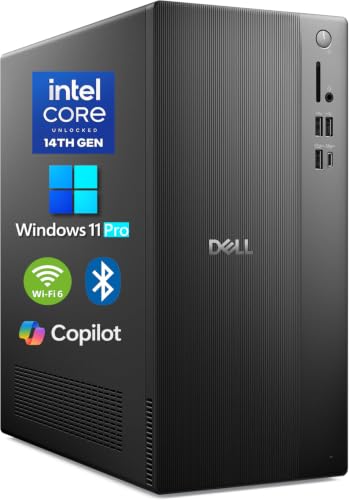
The Dell 2026 Edition Desktop Computers Tower PC is a capable general office desktop, but it is not equipped for demanding local artificial intelligence workloads. Skip this tower if you require on-device model training or 3D rendering, as it lacks a dedicated graphics card.
Check price on Amazon →| Processor | Intel Core i3-14100 (4-Core, 8-Thread, 3.5GHz base, 4.7GHz turbo, 12MB cache) |
|---|---|
| Graphics | Integrated Intel UHD 730 Graphics |
| Memory | 16GB high-speed DDR5 RAM |
| Storage | 1TB PCIe SSD |
| Operating system | Windows 11 Pro 64-bit |
| Display support | Up to 4x FHD displays via DisplayPort 1.4a or dual 4K displays (HDMI 2.1 + DisplayPort 1.4) |
| Wireless connectivity | MediaTek Wi-Fi 6 (802.11ax) with Bluetooth |
| Ports | USB 3.2 Gen 1 Type-C, USB 3.2/2.0 Type-A, HDMI 2.1, DisplayPort 1.4, RJ45 Gigabit Ethernet, media card reader, headset jack |
| Chassis dimensions | 12.76" x 6.06" x 11.53" compact tower chassis |
The Dell 2026 Edition Desktop Computers Tower PC is not a suitable purchase for teams that need a true Dell AI workstation for local machine learning model training, 3D computer-aided design (CAD), or local data science inference. At Layer3Labs, we build and run the gear-radar routine that scans listings like this one, and the pattern we've seen is that retail marketplace categories frequently group standard business desktop towers under workstation labels despite the absence of workstation-grade processors or dedicated graphics processing units (GPUs). Dell configured this tower with a 14th Gen Intel Core i3-14100 central processing unit (CPU), 16GB of DDR5 random-access memory (RAM), and a 1TB Peripheral Component Interconnect Express (PCIe) solid-state drive (SSD). It handles daily administrative tasks reliably. However, local artificial intelligence (AI) engineering requires hardware with dedicated compute capacity that this configuration does not possess.
The manufacturer emphasizes fast processing, DDR5 memory bandwidth, and pre-installed Windows 11 Pro operating system (OS) functionality. Those features serve standard office operations well. Dell engineered the chassis for steady airflow across routine workloads. Even so, running multi-billion-parameter language models or complex visual simulations locally demands specialized silicon. Buyers evaluating this machine must distinguish between cloud-assisted productivity and true workstation-grade local compute.
Who Should Buy the Dell AI Workstation
The Dell 2026 Edition Desktop Computers Tower PC suits organizations needing dependable desktop systems for cloud-based artificial intelligence applications, administrative spreadsheets, and web software. It does not suit teams requiring on-premise local model weights or intensive rendering tasks. Organizations running modern workflows through browser portals, remote servers, or hosted application programming interfaces (APIs) will find adequate responsiveness here. The 14th Gen Intel processor and fast memory execute standard office routines without hesitation.
Buyers requiring local AI inference, CAD assemblies, or deep learning model compilation should skip this unit. Such tasks need specialized silicon. Dedicated compute tasks require enterprise-tier hardware or workstations outfitted with discrete Nvidia RTX GPUs featuring expansive video memory. Operating heavy parameter models on an entry-level CPU leads to severe bottlenecks and thermal throttling. Choose hardware based on real execution requirements rather than marketplace tags.
- Buy this desktop if: your team relies primarily on cloud-hosted software, web-based tools, document management, and dual-display office setups.
- Buy this desktop if: you need Windows 11 Pro management capabilities in a compact physical footprint.
- Skip this desktop if: your workflow involves running quantized large language models locally on device.
- Skip this desktop if: you need dedicated GPU rendering for CAD, mechanical engineering models, or video production suites.
Everyday Office Productivity and Hardware Capabilities
The Intel Core i3-14100 processor delivers dependable single-threaded execution for standard enterprise software. Operating with 4 cores, 8 threads, a 3.5GHz base frequency, a 4.7GHz turbo frequency, and 12MB of cache, this CPU manages daily business operations effectively. Daily office tasks run smoothly. Accounting software, dozens of active browser tabs, and continuous video conferences present no operational friction. Dell paired this chip with 16GB of high-speed DDR5 RAM, which offers noticeable bandwidth advantages over older DDR4 platforms.
Storage responsiveness is another operational strength. The included 1TB PCIe SSD ensures rapid boot sequences, immediate application initialization, and secure local file retention. Transferring archives or accessing local databases occurs without the mechanical lag found in older hard drives. The compact tower measures 12.76 inches by 6.06 inches by 11.53 inches. Dell engineered this chassis for steady airflow, keeping operational volume low during standard workdays.
Dell AI Workstation Hardware vs Heavy Compute Demands
The primary operational boundary of this desktop centers on its graphics subsystem. Dell equipped this configuration with integrated Intel UHD 730 Graphics rather than a discrete GPU. Integrated graphics share system memory with the operating system. They lack the dedicated video RAM required to hold neural network tensor weights during computation. Attempting to run local inference on quantized models using CPU threads alone results in sluggish token generation speeds that impede productivity.
Memory capacity presents a second boundary. While 16GB of DDR5 RAM provides ample room for standard office multitasking, it restricts data science projects that manipulate massive in-memory datasets. Machine learning engineers frequently require 64GB, 128GB, or specialized server platforms. In addition, the compact power supply and chassis dimensions of this tower restrict the installation of full-length, high-wattage graphics accelerators. The physical enclosure is simply not built for power-hungry expansion cards.
Port Options and Multi-Monitor Display Workspace
Dell configured this tower with versatile peripheral connectivity for modern business desks. The machine includes a USB 3.2 Gen 1 Type-C port alongside multiple Universal Serial Bus (USB) 3.2 and USB 2.0 Type-A connections. These ports accommodate external backup drives, specialized security keys, webcams, and standard input devices. An integrated media card reader and headset jack provide accessible front-panel utility for staff handling field photography or voice communications.
Visual display support accommodates complex workstation arrangements. The integrated graphics support up to four Full High Definition (FHD) monitors through DisplayPort (DP) 1.4a routing, or dual 4K displays using High-Definition Multimedia Interface (HDMI) 2.1 paired with DisplayPort 1.4. Multi-monitor setups help analysts track several dashboards simultaneously. Network connections are handled via MediaTek Wi-Fi 6 (802.11ax), Bluetooth, and an Registered Jack 45 (RJ45) Gigabit Ethernet port. Wired gigabit networking ensures consistent throughput when synchronizing large directories with on-premises storage systems.
Comparing the Dell AI Workstation Against Other Shelf Desktops
Analyzing marketplace alternatives reveals sharp architectural distinctions across this shelf. The Alienware Aurora Gaming Desktop configurations feature Intel Core Ultra processors and discrete graphics hardware. For example, one Alienware option pairs an RTX 5070 GPU with an Intel Core Ultra 7 265F. Another model includes an RTX 5080 GPU alongside an Intel Core Ultra 9 285. Those discrete RTX GPUs supply dedicated tensor processing capacity. They also provide distinct video memory for local model weights. That capability contrasts sharply with the integrated Intel UHD 730 Graphics on this Dell tower.
The shelf also includes several renewed desktop units. The renewed Dell Optiplex 7050 Small Form Factor (SFF) provides an Intel i7-7700 with 4 cores, 32GB DDR4 RAM, and a 1TB SSD. Similarly, the renewed DELL Optiplex 7060 SFF includes an 8th Gen Intel i7-8700 with 32GB DDR4 Ram and a 512GB NVMe M.2 SSD. The renewed Dell OptiPlex 7070 SFF steps up to an 8-core Intel i7-9700 with 32GB DDR4 Ram. It also includes a new 1TB NVMe M.2 SSD. Meanwhile, the renewed Dell Optiplex 3050 SFF houses an Intel Quad Core i5-6500 with 16GB DDR4 and a 256GB SSD. System age matters here. While those renewed units provide 32GB of RAM in several listings, this 2026 Edition Dell desktop delivers newer 14th Gen silicon, DDR5 speeds, and Wi-Fi 6 wireless performance.
Factors That Would Change Our Assessment
Two distinct technical factors would alter our assessment of this desktop for computational workloads. First, our verdict would change if Dell offered this exact chassis configuration bundled with a factory-installed, low-profile discrete workstation GPU. Dedicated graphics hardware changes everything. Adding dedicated tensor cores and dedicated video memory would move this system from a standard office PC to a viable entry-level edge inference node. Without dedicated graphics silicon, the system remains strictly tethered to general office compute.
Second, corporate governance and deployment requirements can change the buying decision. If an organization operates an infrastructure architecture where all generative models, CAD rendering engines, and heavy analytical scripts run strictly on centralized private cloud servers, local GPU hardware becomes redundant. Centralized compute alters hardware needs. In an environment enforcing thin-client protocols and strict local endpoint data minimization policies, deploying a standardized Windows 11 Pro machine like this Dell tower represents a practical, secure strategy.
Deployment Steps for Business Workstation Workflows
Deploying this desktop within an office environment begins with configuring the pre-installed Windows 11 Pro operating system. System administrators should immediately initialize BitLocker drive encryption on the 1TB PCIe SSD to protect organizational assets at rest. Security comes first. Join the system to your central identity domain or management directory to enforce unified access control policies across all endpoints.
Next, configure network connections to maximize data transmission reliability. Connect the desktop via its RJ45 Gigabit Ethernet port whenever possible to ensure low-latency access to local file shares and cloud AI platforms. Wired cables offer dependable stability. If operating wirelessly over MediaTek Wi-Fi 6, verify that your corporate wireless access points enforce modern WPA3 enterprise encryption. To proceed with establishing your office infrastructure, determine your software compute dependencies before standardizing on the Dell AI workstation as your team desktop.
Where to buy the Dell 2026 Edition Desktop Computers Tower PC, 16GB DDR5 RAM, 1TB PCIe SSD
The Dell 2026 Edition Desktop Computers Tower PC is a capable general office desktop, but it is not equipped for demanding local artificial intelligence workloads. Skip this tower if you require on-device model training or 3D rendering, as it lacks a dedicated graphics card.
Check price on Amazon →Alternatives worth comparing
If the Dell 2026 Edition Desktop Computers Tower PC, 16GB DDR5 RAM, 1TB PCIe SSD is not the right fit, these are the other ai workstations ranking alongside it right now.
Frequently Asked Questions
- No, this desktop is not equipped to run large local artificial intelligence (AI) models effectively. It relies on integrated Intel UHD 730 Graphics, which share system memory with the operating system instead of using dedicated high-speed video memory. While small, quantized models might execute on CPU threads, token generation will be slow. Workflows requiring on-device inference require a computer with a dedicated graphics processing unit.
- Yes, the 14th Gen Intel Core i3-14100 processor handles general business tasks with ease. It features 4 cores, 8 threads, a base clock of 3.5GHz, and a boost frequency up to 4.7GHz. Office applications, multi-tab web browsing, video conferencing, and administrative workflows run smoothly. It only struggles when subjected to sustained heavy workloads like 3D video rendering or local machine learning training.
- This Dell desktop supports up to four Full High Definition (FHD) monitors or dual 4K displays. The integrated graphics route display signals through its HDMI 2.1 port and DisplayPort 1.4 connection. Users can connect two high-resolution 4K monitors directly or expand to four FHD monitors using DisplayPort multi-stream transport, making it well-suited for data analysis and administrative multi-tasking.
- Yes, this Dell desktop comes pre-loaded with Windows 11 Pro 64-bit. Windows 11 Pro includes BitLocker full-disk encryption, Remote Desktop capabilities, and integration with corporate domain management services. These operating system features make it ready for deployment in managed small and mid-sized business IT environments.
- Installing a full-sized dedicated GPU is generally not supported due to the compact chassis dimensions and power supply limitations. The tower measures 12.76 inches by 6.06 inches by 11.53 inches and is engineered for thermal efficiency with integrated graphics. While some low-profile, bus-powered expansion cards might physically fit, high-end compute cards like Nvidia RTX series require larger enclosures and higher-wattage power supplies.
Deploying desktop hardware for your business workflows?
Layer3Labs helps small and mid-sized businesses evaluate workflow automation and integrate the software systems that run on their office hardware.
Book a free consultation