Dell Optiplex 7010 Review: A Renewed Office Desktop, Not a GPU Workstation
A renewed Core i7 desktop with fast SSD storage and Windows 11 Pro, but no discrete GPU in sight, here's who it actually fits.
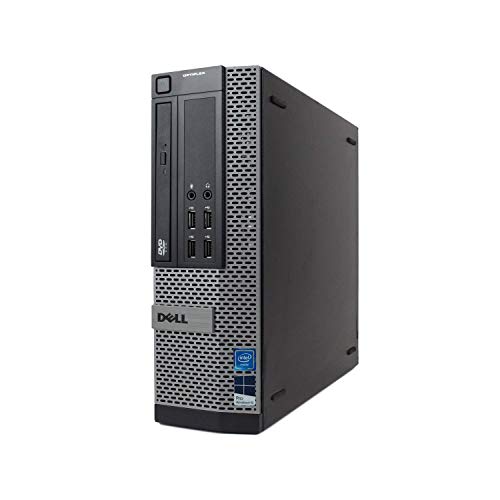
A dependable renewed desktop for everyday office work, backed by Microsoft Authorized Refurbished standards and a 90-day warranty. Its Core i7 processor and 1TB SSD handle typical business tasks well, but the older DDR3 memory and the absence of a listed discrete GPU mean it falls short of what most shoppers expect from an AI workstation.
Check price on Amazon →| Processor | Intel Core i7 (generation not specified), up to 3.8GHz max turbo |
|---|---|
| Graphics | Integrated graphics (no discrete GPU listed) |
| Memory | 16GB DDR3 |
| Storage | 1TB SSD (new) |
| Optical drive | DVDRW |
| Connectivity | WiFi, USB 3.0, 2x DisplayPort |
| Operating system | Windows 11 Pro |
| Condition | Renewed, Microsoft Authorized Refurbished, with digital Certificate of Authenticity |
| Warranty | 90-day warranty and 90-day tech support |
The Dell Optiplex 7010 is a renewed business desktop built around an Intel Core i7 processor, 16GB of DDR3 memory, and a new 1TB SSD. Dell originally designed the Optiplex line for corporate office deployments, not for GPU-heavy AI workloads. That history still shapes what this particular machine can and cannot do.
This review covers what the Optiplex 7010 offers a small business today. It also covers where it falls short of true AI workstation hardware, and how it compares to the other desktops selling alongside it. Every spec below comes from the manufacturer listing.
What the Dell Optiplex 7010 Is, and Who Should Buy It
The Dell Optiplex 7010 is a renewed business desktop built around an Intel Core i7 processor, 16GB of DDR3 memory, and a new 1TB solid-state drive. It runs Windows 11 Pro out of the box, with a USB keyboard, mouse, and WiFi adapter included.
It suits businesses that need a dependable desktop for everyday office work: business software, client files, spreadsheets, inventory tracking, and general web browsing. It also handles lighter personal tasks well, like streaming, schoolwork, and photo storage, if it doubles as a home office machine.
It is a poor fit for GPU-heavy tasks like local AI inference, 3D rendering, or CAD. Shoppers browsing this category for that kind of work should look elsewhere on the shelf.
- Best for: general office desktops, admin stations, and budget-conscious workstation replacements
- Also good for: teams that need a stable Windows 11 Pro machine for everyday CPU-only tasks
- Skip it if: you need GPU acceleration for local AI models, 3D work, or CAD
Performance: What the Core I7 Processor Handles
The Optiplex 7010's Intel Core i7 processor reaches up to 3.8GHz max turbo frequency, which covers everyday business computing without hesitation. The listing does not name a specific generation or model number, so treat it as a general-purpose office chip rather than a benchmarked performance figure.
16GB of DDR3 memory and the 1TB SSD keep the system responsive for multitasking, file storage, and quick boot times. Everyday tasks like email, spreadsheets, and browser tabs should feel snappy on this combination.
Where it runs out of road is any workload that depends on a dedicated graphics processor, since the listing includes no discrete GPU. Video editing, 3D modeling, and local AI inference all fall into that category.
Microsoft Authorized Refurbished: What That Label Means
Microsoft Authorized Refurbished (MAR) status means this Optiplex 7010 was rebuilt to standards Microsoft sets for refurbished computers, not simply resold as-is. MAR providers follow set requirements meant to ensure a like-new, professionally refurbished machine.
Each unit ships with a digitally rendered Certificate of Authenticity for its Windows 11 Pro license, plus a 90-day warranty and 90 days of tech support. The Windows 11 installation itself is described as a fresh, brand-new install free of manufacturer bloatware, so it should boot ready for setup rather than loaded with trial software.
The SSD itself is new rather than reused, which is worth confirming against any other renewed listing you compare it to. For a business buying more than one unit, that combination of certification and support terms matters as much as the raw specs.
Storage, Ports, and What's in the Box
The Optiplex 7010 ships with a new 1TB SSD, 16GB of DDR3 memory, and a built-in DVDRW optical drive. That combination covers an operating system, business applications, and a reasonable library of files without running out of space quickly.
The DVDRW drive is a detail many current desktops have dropped, so it is worth noting for offices that still handle physical discs. Overall storage capacity here is generous next to older Optiplex units that shipped with mechanical hard drives.
For connections, it includes WiFi, USB 3.0, and two DisplayPort outputs for dual-monitor setups. That dual-display support is a real plus for admin roles and data entry positions that lean on side-by-side windows all day.
Dell includes a USB keyboard, USB mouse, and USB WiFi adapter in the box, so it is ready to use as soon as it arrives. There is no need to source separate peripherals before the desktop can go to work.
Where the Optiplex 7010 Falls Short as an AI Workstation
The Optiplex 7010's biggest limitation for AI work is that the listing includes no discrete GPU, only whatever graphics are built into the processor. That rules out running local large language models or image generation at any useful speed.
In our work running consumer-electronics marketing at Amazon, we regularly saw a version of this mistake. Shoppers browsing an 'AI workstation' category assumed any business desktop with 16GB of RAM would qualify, then got surprised when it could not run the local models they had in mind.
DDR3 memory is another factor worth weighing. It is an older standard than the DDR4 and DDR5 used in current business desktops, and the listing does not specify which generation of Core i7 sits inside.
- No discrete GPU listed: relies on integrated graphics, not suited to local AI inference
- DDR3 memory: an older standard than the DDR4/DDR5 used in newer business desktops
- Processor generation unspecified: the listing names only 'Core i7' and its max turbo speed
Dell Optiplex 7010 vs the Alternatives
Against other Optiplex models on this shelf, the 7010 trails on memory type, since its DDR3 memory is older than the DDR4 used in the 7050, 7060, and 3050. Its 1TB SSD and 16GB of RAM still hold up reasonably well for everyday office use, and its storage capacity beats several of those newer models outright.
None of the Optiplex models here include a discrete GPU. Buyers who need genuine AI workstation performance should look at the Alienware Aurora models instead, since they pair modern processors with RTX graphics cards built for that work.
For businesses that only need reliable office computing, the 7010's 90-day warranty and Microsoft Authorized Refurbished certification put it on equal footing with its Optiplex siblings. The deciding factor between them usually comes down to how much RAM and storage headroom the job requires.
Where to buy the Dell Optiplex 7010 Desktop (Renewed)
A dependable renewed desktop for everyday office work, backed by Microsoft Authorized Refurbished standards and a 90-day warranty. Its Core i7 processor and 1TB SSD handle typical business tasks well, but the older DDR3 memory and the absence of a listed discrete GPU mean it falls short of what most shoppers expect from an AI workstation.
Check price on Amazon →Alternatives worth comparing
If the Dell Optiplex 7010 Desktop (Renewed) is not the right fit, these are the other ai workstations ranking alongside it right now.


Frequently Asked Questions
- Not for GPU-based AI work. The listing includes no discrete GPU, so the Optiplex 7010 cannot run local AI models at a useful speed. It works well as a general business desktop instead.
- It ships with 16GB of DDR3 memory, which covers everyday office software, multiple browser tabs, and video calls, though DDR3 is an older standard than the DDR4 found in newer desktops.
- An Intel Core i7 processor with a max turbo frequency of up to 3.8GHz. The listing does not specify the exact generation or model number.
- Yes. It is refurbished by a Microsoft Authorized Refurbisher (MAR), which follows Microsoft's quality standards and includes a digital Certificate of Authenticity for Windows 11 Pro.
- A new 1TB solid-state drive, which is fast enough for the operating system, business applications, and everyday file storage.
- Yes. Renewed units include a 90-day warranty along with 90 days of tech support.
Choosing the right AI workstation for your business?
Layer3 Labs helps small and mid-size businesses evaluate, select, and deploy the right AI-ready hardware, and the workflows that run on it.
Book a free consultation