MSI Codex R2 Review: A Gaming Desktop Doubling as an AI Workstation
A budget gaming desktop with enough graphics memory to also run AI models locally in a small office.
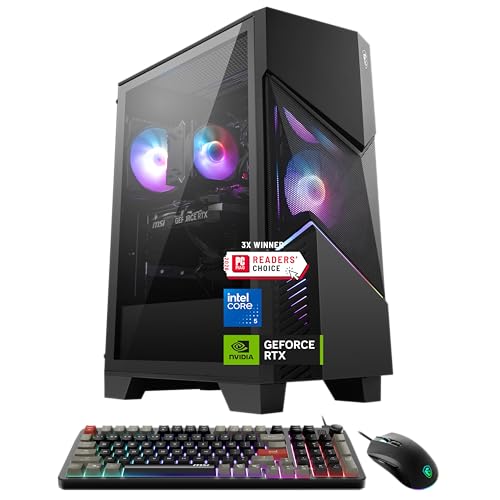
A gaming-first desktop whose RTX 5070 graphics card and 12GB of video memory make it a credible budget AI workstation, if a team can live with Windows 11 Home and cooling built for long gaming sessions.
Check price on Amazon →| Graphics card | NVIDIA GeForce RTX 5070, 12GB video memory |
|---|---|
| Processor | Intel Core i5-14400F |
| Memory | 32GB DDR5 RAM |
| Storage | 1TB NVMe solid-state drive (SSD) |
| Cooling | RGB CPU air cooler with four-fan airflow system |
| Wireless | Wi-Fi 6E |
| Operating system | Windows 11 Home |
| Software | MSI Center control dashboard |
The MSI Codex R2 is a gaming desktop that also works as a budget option for running artificial intelligence (AI) models locally in a small office. In the implementations we run for clients, the failure mode we hit most often is you buying enterprise workstation-class hardware before confirming your models even need it. MSI builds the Codex R2 around an NVIDIA GeForce RTX 5070 graphics card with 12GB of video memory and a six-core Intel Core i5-14400F processor. That pairing is meant for 1440p and 4K gaming rather than office work. The same graphics card carries enough dedicated video memory to run a range of open-source language models on the desktop itself. That's why it shows up on this list, even though nobody at MSI designed it for a business.
This review covers what the Codex R2 does well, where treating a gaming PC as a workstation runs into trouble, and how it compares to the renewed business desktops on this list. Every claim below comes from MSI's own listing for this configuration, model D14NVP5-613US.
Who Should Buy the MSI Codex R2
MSI builds the Codex R2 as a prebuilt gaming desktop rather than a business machine, and the listing for this model says so directly. It pairs an NVIDIA GeForce RTX 5070 graphics card with an Intel Core i5-14400F processor, 32GB of DDR5 memory, and a 1TB NVMe SSD. The RTX 5070 is a graphics processing unit (GPU) that handles the heavy math behind both game rendering and AI inference. NVMe is the fast connection standard modern solid-state drives use.
That mix targets a first PC for a gamer wanting 1440p or 4K play with ray tracing and DLSS 4 Multi-Frame Generation. DLSS 4 Multi-Frame Generation is MSI's technology for generating extra video frames to smooth out gameplay. None of that changes what the hardware can do once you point it at spreadsheet work, video calls, or a locally run AI model instead of a game.
If you're considering the Codex R2, you're really buying the RTX 5070 and its 12GB of dedicated video memory (VRAM) at a price gaming hardware makes possible. MSI didn't design this machine for a business audience; it just happens to work for one.
- Best for: a single AI-curious employee or founder who wants to run open-source language models locally instead of paying for cloud GPU time
- Also good for: a design or marketing seat that occasionally renders video or 3D work and can use the same graphics card for both jobs
- Skip it if: your team needs Windows 11 Pro features like domain join or centralized device management, since this configuration ships with Windows 11 Home
The RTX 5070 for Gaming vs Local AI Work
The RTX 5070 is the reason a gaming desktop ends up on an AI workstation list at all. It ships with 12GB of dedicated video memory, and that memory pool limits which AI models run locally far more than the processor does.
A graphics card with 12GB of VRAM can load and run a range of mid-sized open-source language models entirely on the desktop, with no prompt ever leaving the building. That matters if you're handling client data you'd rather not upload to an outside AI service. It also turns inference into a fixed hardware cost instead of a bill that grows with use.
The tradeoff is worth stating plainly. MSI tuned the RTX 5070 and the Codex R2 platform for gaming, so DLSS 4 Multi-Frame Generation does nothing for AI inference. A workstation card at the same price often ships with more VRAM or drivers certified for AI software instead. If you're running one or two models occasionally, the RTX 5070's gaming-first design is not a real problem. If you're training models or running several at once, 12GB of VRAM becomes your ceiling fast.
The Core i5-14400F and 32GB of DDR5 RAM
The Intel Core i5-14400F is a ten-core processor, six performance cores and four efficiency cores, built for a desktop socket rather than a laptop. MSI pairs it with 32GB of DDR5 system memory, headroom enough to keep the RTX 5070 fed with data instead of waiting on the processor between frames or AI inference requests.
The F in the chip's name means it ships with no integrated graphics, normal for a gaming build since the RTX 5070 handles every graphics task. It also means the Codex R2 has no fallback display output if the graphics card ever fails. If you rely on this machine daily, keep that single point of failure in mind.
32GB of DDR5 RAM covers the multitasking your seat needs. A browser with dozens of tabs, a spreadsheet, a video call, and a local AI model can all run in the background at once without the system stalling.
Cooling Built for Marathon Gaming Sessions
MSI cools the Codex R2 with a dedicated RGB CPU air cooler and a four-fan airflow system. The listing states this keeps temperatures consistent from the first hour of use through the fifth. That consistency matters for AI inference the same way it matters for gaming. A model generating a long response keeps the processor and graphics card under sustained load, much like a marathon gaming session does.
The tradeoff is noise and looks. Four fans tuned for marathon gaming run louder under load than a quiet office desktop. The RGB lighting is a gaming aesthetic you might turn off through MSI Center, the dashboard MSI includes for managing fan curves, performance profiles, and lighting in one place.
Wi-Fi 6E and What Windows 11 Home Leaves Out
The Codex R2 includes Wi-Fi 6E, the newest Wi-Fi standard, which adds the 6GHz band on top of the older 2.4GHz and 5GHz bands. That extra band carries less other traffic in most offices, which lowers latency, a real benefit whether the machine is running a game or a real-time voice call.
Windows 11 Home ships on this configuration, and that detail is most likely to catch you off guard. Windows 11 Home skips domain join, Group Policy management, BitLocker drive encryption, and Remote Desktop hosting, all standard on Windows 11 Pro and common fleet requirements. A single desk running this machine on its own is fine on Home. If you're standardizing several units, you'll need to upgrade each one to Windows 11 Pro separately.
Standard Parts Mean Room to Upgrade Later
MSI builds the Codex R2 on standard, off-the-shelf desktop components rather than proprietary parts. The listing states that upgrading storage, RAM, or the graphics card later is a straightforward next step. That matters more to you as a business buyer than to a home gamer, since it means a 12GB RTX 5070 bought today doesn't lock your growing AI workload into the same VRAM ceiling forever.
If you outgrow local inference on the RTX 5070, you can swap in a card with more VRAM later, add a second NVMe drive for a larger model library, or push RAM past 32GB. None of that requires replacing the machine. That upgrade path is the strongest argument for treating a gaming desktop as a starter AI workstation, rather than a dead end.
Where the Codex R2 Falls Short as a Business Machine
The Codex R2's weaknesses trace to its gaming-first design, rather than a flaw in the hardware. None rule it out for your business, but each is worth planning around before it becomes your team's standard machine.
Our answer would change if your AI workload outgrows 12GB of VRAM, or your fleet rollout needs Windows 11 Pro out of the box. Either is a real reason to look at a purpose-built workstation instead.
- Windows 11 Home ships instead of Pro, so domain join, BitLocker, and centralized IT management all require a separate upgrade
- 12GB of VRAM on the RTX 5070 caps how large an AI model can run locally, and a heavier workload will hit that ceiling
- Four-fan cooling built for marathon gaming sessions runs louder under sustained load than a quiet office desktop
- RGB lighting and gaming branding are cosmetic choices a business may want to turn off through MSI Center
- The listing names no business-support tier beyond MSI's standard consumer coverage
MSI Codex R2 vs the Business Desktops on This List
Every other desktop ranked ahead of the Codex R2 in AI Workstations is a renewed Dell Optiplex, and that split tells the real story. The Dell Optiplex 7050 SFF Desktop, ranked #1, runs an Intel Core i7-7700 with 32GB of DDR4 RAM and Windows 11 Pro, built from the start for a business fleet. But it relies on the processor's integrated graphics with no discrete GPU, so it cannot run a local AI model of any real size.
That same tradeoff repeats across the Dell Optiplex 3060, the Optiplex 7060 SFF, and the Optiplex 3050 SFF on this list. Each is a renewed, Windows 11 Pro business desktop with a Dell service history behind it, and none carries a graphics card capable of local AI inference. They're the safer standardize-on choice if your office only needs everyday productivity software and centralized IT management.
The deciding question is what you need the machine to do. If you want an IT-managed fleet running office software, pick an Optiplex model instead. If you want to run AI models locally on a budget, and you're comfortable managing Windows 11 Home yourself, the Codex R2 is your machine.
Where to buy the MSI Codex R2 Gaming Desktop
A gaming-first desktop whose RTX 5070 graphics card and 12GB of video memory make it a credible budget AI workstation, if a team can live with Windows 11 Home and cooling built for long gaming sessions.
Check price on Amazon →Alternatives worth comparing
If the MSI Codex R2 Gaming Desktop is not the right fit, these are the other ai workstations ranking alongside it right now.


Frequently Asked Questions
- Yes, if you're running AI models on a budget. Its NVIDIA GeForce RTX 5070 graphics card carries 12GB of dedicated video memory, enough to run a range of mid-sized open-source language models locally, though MSI built the whole platform for gaming first.
- It is a gaming PC. MSI markets the Codex R2 for 1440p and 4K gaming with ray tracing and DLSS 4 Multi-Frame Generation, and the RTX 5070 graphics card inside it also happens to carry enough video memory to handle local AI inference for a small office.
- No, this configuration ships with Windows 11 Home. That means no domain join, BitLocker drive encryption, or centralized device management out of the box. If your fleet needs those features, you'd have to add them with a separate Windows 11 Pro upgrade.
- 12GB of dedicated video memory, according to MSI's listing. That ceiling limits which AI models run locally far more than the Intel Core i5-14400F processor does.
- Yes. MSI builds it on standard, off-the-shelf components, and the listing states that storage, RAM, and the graphics card can all be upgraded later without replacing the whole machine.
- An Intel Core i5-14400F, a ten-core desktop processor with six performance cores and four efficiency cores. The F in its name means no integrated graphics, so it depends entirely on the RTX 5070 for every graphics task.
- It can be. MSI cools it with a four-fan airflow system built for marathon gaming sessions, and that same cooling runs louder under sustained AI or gaming load than a quiet office desktop is designed for.
Weighing a budget AI workstation for your team?
Layer3 Labs helps small and mid-size businesses choose and deploy the AI hardware that actually fits their workload, from a single desktop to a full local inference setup.
Book a free consultation