Best AI Note-Taker Devices for Meetings in 2026
Hardware note-takers capture in-person meetings a laptop app cannot — and turn them into transcripts and summaries. Here are the ones worth wearing.
The best AI note-taker device is a small recorder or wearable that captures a conversation and turns it into a transcript and summary automatically. Unlike a meeting-app bot, a hardware note-taker works for the meetings that actually lack notes: in-person conversations, hallway decisions, site visits, and phone calls.
This guide ranks the AI note-taker devices and AI voice recorders worth buying in 2026 — wearables you clip on, card recorders for calls, and smart pens for people who still write by hand. We focus on what matters for business use: transcription accuracy, how summaries are generated, battery and storage, and — critically — where the audio and transcripts are processed, because that decides whether the device is safe for confidential meetings.
The Best AI Note Taker Devices, Ranked

A pill-sized recorder you wear as a pin, clip, or wristband that captures conversations and uses AI to produce transcripts, summaries, and mind-maps. It is the cleanest "always with you" option for capturing in-person meetings without opening a laptop.
View on Amazon →- Wearable (pin/clip/wristband)
- AI transcription + summaries via app
- Long standby battery
- Speaker labeling
- Discreet and always available
- Good summary templates
- Captures in-person meetings apps miss
- Summaries need a subscription tier
- Cloud processing — check your privacy needs

A credit-card-thin recorder that magnetically attaches to the back of a phone and can capture both in-person audio and phone calls. If your notes gap is sales or client calls, the Note is purpose-built for it.
View on Amazon →- MagSafe-style phone attachment
- Records calls + in-person audio
- ChatGPT-based transcription/summaries
- Card form factor
- Captures phone calls cleanly
- Slim, travels in a wallet
- Strong summary quality
- Subscription for full AI features
- Call recording laws vary by region
A wearable pendant designed to capture your day continuously and surface searchable notes and summaries. It leans furthest into "record everything," which is powerful for heavy-meeting roles but demands a clear consent and privacy policy. Note: Meta acquired Limitless in late 2025 and paused Pendant sales to new customers, so treat remaining listings as existing stock and check current availability and support before buying.
View on Amazon →- All-day wearable capture
- Searchable transcripts + summaries
- Consent-aware design
- Companion app
- Effortless continuous capture
- Strong search across conversations
- Privacy-forward positioning
- Always-on raises consent questions
- Availability limited since the Meta acquisition — new sales paused
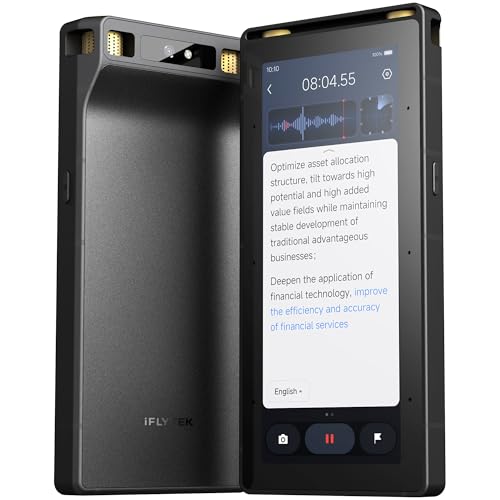
iFLYTEK builds dedicated AI recorders known for strong speech-to-text and multilingual transcription, including real-time translation on some models. For long, multi-speaker meetings where transcript accuracy is the priority, a dedicated recorder beats a wearable.
View on Amazon →- Dedicated AI voice recorder
- High-accuracy multi-speaker transcription
- Real-time translation on some models
- On-device screen + storage
- Excellent transcription accuracy
- Strong multilingual support
- Standalone — no phone needed
- Bulkier than a wearable
- App/ecosystem is less Western-polished

Established digital voice recorders from Sony and Philips capture reliable, high-quality audio you then run through the AI transcription tool of your choice. If you want durable hardware and full control over where transcripts are processed, this is the pragmatic pick.
View on Amazon →- High-quality stereo recording
- Long battery + expandable storage
- Bring-your-own transcription/AI
- Simple, durable hardware
- Rock-solid audio capture
- You control the transcription pipeline
- No subscription lock-in
- No built-in AI summaries
- Extra step to transcribe
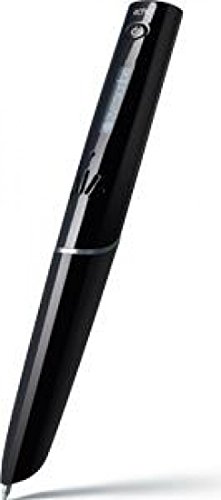
A smartpen records audio while you write and syncs the two, so tapping a word in your notes jumps to what was said at that moment. For people who think best on paper, it bridges handwriting and AI transcription better than any wearable.
View on Amazon →- Records audio synced to handwriting
- Notes + audio to the companion app
- Works with special notebooks
- Transcription via app
- Keeps the paper workflow
- Audio-to-ink sync is genuinely useful
- No meeting bot needed
- Requires special paper/notebooks
- Transcription less automated than wearables
Bee is a low-cost wristband/pendant that listens throughout the day and turns conversations into searchable notes, reminders, and to-dos. Amazon acquired Bee in 2025, positioning it as an always-with-you personal companion rather than a meeting-specific tool — it picks up ad hoc work conversations the same way it picks up everyday ones, so it fits teams that want one device for both.
View on Amazon →- Wristband or clip form factor
- Continuous listening with on-demand summaries
- Amazon-owned since 2025
- Companion app for search across notes
- Lower cost of entry than most wearables in this list
- Doubles as a personal + work capture device
- Simple setup, no special notebooks or docking
- Less meeting-structured than Plaud or Limitless
- Cloud processing — check privacy needs before wearing it into confidential meetings
[Apple](https://support.apple.com/en-us/148354) added Audio Intelligence to Apple Watch Series 12 and Ultra 4 for wrist-based conversation capture. Siri Recap generates high-level summaries throughout the day that export directly to apps like Notes or Journal. It does not produce a verbatim transcript.
View on Amazon →- Smartwatch (Apple Watch Series 12 or Ultra 4)
- High-level summaries and 15-second text snippets
- 7-day auto-delete for unsaved summaries
- Paired iPhone 16 or later (except iPhone 16e)
- Requires no secondary device to carry if you wear a compatible Apple Watch
- Exports summaries directly into Apple Notes, Journal, and other apps
- Opt-in, with scheduling controls based on time or location
- Generates high-level summaries with no option for a verbatim transcript
- Unsaved summaries delete after seven days
- Ships in beta later this year, starting in English and initially unavailable in the EU
AI note-taker devices at a glance
| Device | Best for | Form factor | AI summaries |
|---|---|---|---|
| Plaud NotePin | Wearable capture | Pin / clip / band | Yes (app) |
| Plaud Note | Phone calls | Phone-back card | Yes (app) |
| Limitless Pendant | Always-on | Pendant | Yes (app) |
| iFLYTEK VOITER | Accuracy / languages | Handheld recorder | Transcribe + translate |
| Sony / Philips recorder | Clean audio | Handheld recorder | Bring your own |
| Livescribe Symphony | Handwriting | Smartpen | Via app |
| Bee | Budget wearable | Wristband / pendant | Yes (app) |
| Apple Watch S12 / Ultra 4 | No extra hardware | Smartwatch | Summaries only (beta) |
How to Choose an AI Note-taker Device
Pick by where your notes actually go missing. A wearable is best for in-person and walking meetings; a card recorder is best for phone and desk calls; a dedicated recorder is best for long, multi-speaker sessions where transcript accuracy is everything; a smartpen is best if you take notes by hand.
- Capture scenario — In-person vs phone vs long conference vs handwritten. Match the form factor to the meeting you keep failing to document.
- Where audio is processed — Most wearables send audio to the cloud for AI summaries. For confidential or regulated conversations, prefer on-device transcription or a recorder whose pipeline you control.
- Summary quality vs raw transcript — Wearables shine at summaries; dedicated recorders shine at accurate raw transcripts. Decide which you actually need.
- Consent and law — Recording conversations, especially phone calls, is regulated and varies by region. Set a consent practice before you deploy any of these.
Device vs Meeting-app Note-taker
A hardware note-taker and a meeting-app bot solve different problems. App bots (the kind that join a Zoom call) are great for scheduled online meetings and usually cheaper. A hardware device earns its place by capturing everything the bot cannot: in-person meetings, phone calls, site walks, and hallway decisions.
Many teams run both — an app note-taker for online calls and a wearable for in-person work. If most of your undocumented decisions happen face to face, the device is the higher-leverage buy.
Can a Tablet with Microsoft 365 Copilot Replace a Dedicated Note-Taker?
A tablet running Microsoft 365 Copilot can produce a meeting transcript and recap, but it only covers meetings held inside Microsoft Teams — it is not a substitute for a device that captures any conversation in the room.
Microsoft 365 Copilot generates its meeting recap and notes during a Teams call, so it needs the meeting to actually be a Teams call running on that tablet. It does not passively record an in-person conversation, a phone call, or a meeting on another platform the way a wearable or handheld recorder does.
If your meetings mostly run inside Teams, a Copilot-licensed tablet and Microsoft 365 subscription genuinely cover transcripts and meeting minutes with no extra hardware. If the meetings you fail to document are in-person, phone calls, or site visits, none of that Copilot capability helps — pair the tablet with a wearable or card recorder from the list above.
- Works well for: scheduled Microsoft Teams meetings, generating a recap and action items automatically.
- Does not help with: in-person meetings, phone calls, or any call outside Teams.
- Licensing: requires a Microsoft 365 plan with Copilot included or added as an add-on — confirm your tenant's current licensing before assuming it is bundled.
Frequently Asked Questions
- Yes, for meetings held inside Microsoft Teams — Microsoft 365 Copilot can generate a transcript, recap, and action items automatically on any tablet running Teams with a Copilot-enabled 365 license. It cannot capture in-person conversations, phone calls, or meetings outside Teams; for those, use a dedicated AI note-taker device like the ones ranked above.
- For most people, the Plaud NotePin is the best all-round AI note-taker device — a discreet wearable that transcribes and summarizes in-person meetings automatically. If your gap is phone calls, the Plaud Note is purpose-built for it; if you need the highest transcription accuracy across languages, a dedicated iFLYTEK recorder is stronger.
- It depends on where the audio is processed. Most wearable note-takers send recordings to the cloud to generate summaries, which may not suit confidential or regulated conversations. For privileged meetings, prefer a device that transcribes on-device, or a plain recorder whose transcription pipeline you control, and always set a clear consent practice.
- Yes — that is their main advantage over meeting-app bots. A wearable or handheld recorder captures the room directly, so in-person meetings, phone calls, and site visits get transcribed and summarized just like an online call. That is exactly the set of meetings that usually ends up with no notes.
- Recording laws vary by region and are stricter for phone calls than in-person conversations — some places require all parties to consent. Before deploying any recording device across a team, confirm the rules for your locations and adopt a standard consent practice, such as announcing recording at the start of each meeting.
- Yes — the market moves fast. Bee, a low-cost wristband/pendant Amazon acquired in 2025, is worth a look if you want one device for both personal and work capture rather than a meeting-specific tool, and it undercuts most of the wearables above on price. We keep this list to devices we can stand behind for business use; if there is a specific device you think belongs here, tell us and we will evaluate it for the next update.
Want AI meeting notes without the privacy risk?
Layer3 Labs helps businesses capture and summarize meetings with the right hardware and a workflow that keeps sensitive conversations in your control — including on-device and private-AI options for regulated teams.
Book a free consultation