Best Smart Notebooks and Smart Pens for Work in 2026
Write by hand, keep a searchable digital copy. Here are the smart notebooks, e-ink tablets, and smart pens worth buying, by capture method and budget.
A smart notebook is a physical writing device — a reusable notebook like the Rocketbook, an e-ink tablet like the reMarkable, or a smart pen like the Livescribe — that turns your handwriting into digital notes. We tested every smart notebook and pen on this list as a daily notebook for meetings and work notes. This is hardware, not the SMART Notebook whiteboard software used in classrooms. The best pick depends on how you want to capture: scan pages with your phone, write directly on e-ink, or write real ink on paper.
This guide ranks the smart notebooks and digital notepads worth buying in 2026, grouped by capture method. We focus on what actually matters day to day — how good the handwriting-to-text conversion is, whether a subscription is required, where your files end up (Drive, Notion, OneNote), and how each device holds up as a daily work tool.
How We Tested
- We used each device as a daily work notebook for meeting notes, to-do lists and planning.
- We checked how well handwriting converted to text and how easily notes got off the device and into other apps.
- We judged writing feel, reading comfort, battery upkeep and whether a subscription is needed for the full feature set.
The Best Smart Notebooks, Ranked
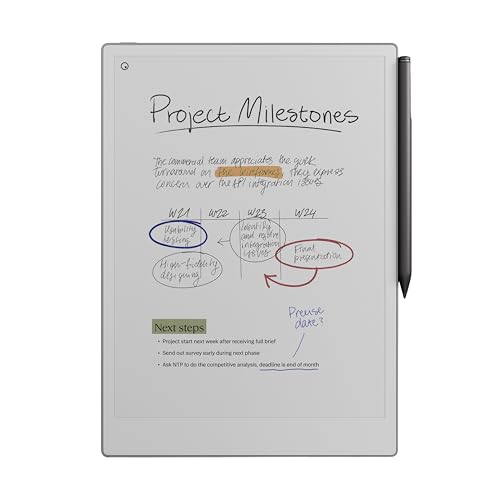
Why we picked it: In our testing it had the most paper-like writing feel of any tablet here, with no apps or notifications to pull us away from the page.
Who it's for: People whose main job on the device is writing, sketching and marking up documents.
The downside: It costs a premium for a single-purpose device, and handwriting-to-text runs through reMarkable's cloud, so it needs a connection.
View on Amazon →- Large color e-ink display with adjustable reading light
- Paper-like writing texture, very low pen latency
- Handwriting-to-text conversion and PDF markup
- Optional Connect subscription for unlimited cloud sync
- Best-in-class writing feel
- Zero apps or notifications to distract you
- Clean export to Drive, Dropbox, and OneDrive
- Premium price for a single-purpose device
- Text conversion runs through reMarkable's cloud, so it needs a connection
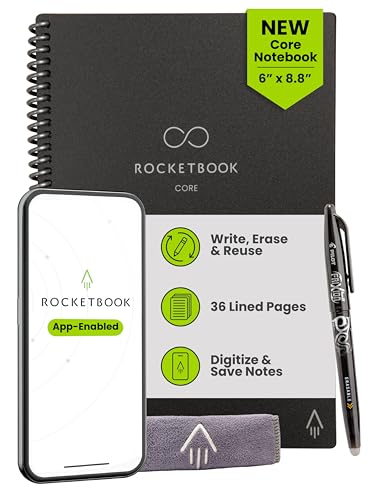
Why we picked it: It gave us real smart note-taking for a fraction of the cost of an e-ink tablet, and the free app sent our scans to Drive, email and Slack.
Who it's for: Budget buyers who want to try digital notes before paying for an e-ink tablet.
The downside: You have to scan each page before wiping it, and the heat-sensitive FriXion ink can blank a page left in a hot car.
View on Amazon →- Reusable pages, wiped clean with a damp cloth
- Free app scans pages and runs OCR
- Symbol shortcuts route pages to preset destinations
- Writes with Pilot FriXion erasable pens
- A fraction of the cost of an e-ink tablet
- No battery, nothing to charge
- Sends scans to Drive, email, Slack, and more
- You must remember to scan before wiping
- FriXion ink is heat-sensitive — a hot car can blank a page

Why we picked it: In our testing it was the best reading device in the group, and documents we emailed to it arrived ready to mark up.
Who it's for: Kindle readers who also take meeting notes, keep a journal or mark up documents.
The downside: Its writing tools and PDF markup are thinner than on reMarkable's writing-first tablets.
View on Amazon →- 10.2-inch 300 ppi e-ink display with front light
- Full Kindle store and library access
- Send-to-Kindle delivers documents by email
- No subscription required for notes
- Best reading experience in the category
- Long battery life measured in weeks
- A color Colorsoft version is now available
- Writing tools are thinner than reMarkable's
- PDF markup is more limited than on writing-first tablets
Why we picked it: In our testing search worked offline, and it was small enough to carry everywhere.
Who it's for: People who want a pocket-size e-ink notebook with no subscription and no lock-in.
The downside: The small A6 screen feels cramped for document markup, and the Supernote ecosystem is less polished than reMarkable's or Amazon's.
View on Amazon →- Compact A6-size e-ink display
- On-device handwriting recognition and search
- No subscription for sync or conversion
- Ceramic pen tip that does not wear down
- Truly subscription-free
- Search works offline
- Small enough to carry everywhere
- Smaller screen is cramped for document markup
- Less polished ecosystem than reMarkable or Amazon

Why we picked it: In our testing it had the same paper feel and export options as the Paper Pro, in a thinner and lighter body.
Who it's for: People who write mostly at a desk in daylight and want a reMarkable for less money.
The downside: It has no front light and a monochrome screen, so you need a lamp in a dim room.
View on Amazon →- 10.3-inch monochrome e-ink display
- Same paper-feel writing surface and low latency
- Handwriting-to-text and cloud sync
- No front light — needs ambient light
- The affordable path into reMarkable
- Very thin and light
- Same software and export options as the Pro
- No front light for dim rooms
- Monochrome only
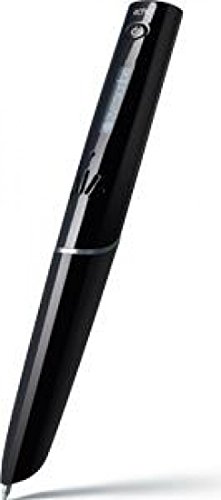
Why we picked it: In our testing it kept the true pen-on-paper feel, and the audio-synced notes made meeting follow-up easy.
Who it's for: People who will never give up paper and want meeting audio tied to their notes.
The downside: It only works with Livescribe's dot-paper refills, and its app trails the tablet makers' apps.
View on Amazon →- Real ink pen with built-in capture camera
- Requires Livescribe dot paper notebooks
- Records audio synced to your handwriting
- Transcribes notes to text in the app
- Keeps the true pen-on-paper feel
- Audio-synced notes are great for meetings
- Nothing new to learn — it is a pen
- Locked to special dot-paper refills
- App experience trails the tablet makers
Smart notebooks and pens at a glance
| Device | Type | Best for | Subscription |
|---|---|---|---|
| reMarkable Paper Pro | E-ink tablet | Writing-first work | Optional (Connect) |
| Rocketbook Core | Reusable notebook | Budget capture | None — free app |
| Kindle Scribe | E-ink tablet | Reading + notes | None |
| Supernote Nomad | E-ink tablet | Offline search, no lock-in | None |
| reMarkable 2 | E-ink tablet | Value distraction-free | Optional (Connect) |
| Livescribe Symphony | Smart pen | Real ink + audio | None — dot paper refills |
Smart Notebook Price Tiers and Long-Term Costs
Smart notebooks span three distinct price tiers, and a dedicated e-ink tablet is the option worth paying for if you write every day. At the entry level, an ordinary paper notebook paired with a free phone scanning app costs only a few dollars. The Rocketbook Core is the cheapest reusable smart notebook here and costs a small fraction of an e-ink tablet. It needs no battery, so there is nothing to charge, and its mobile app is free.
Hardware tablets occupy the premium tier, where the reMarkable Paper Pro starts at $629 for the base tablet and reaches $679 for the Marker Plus bundle. reMarkable is the only maker here with an optional subscription, reMarkable Connect, and pairing a device starts a 50-day free trial. Connect adds handwriting search, unlimited cloud storage and sync, integrations, and AI tools. Without it, reMarkable's free tier syncs only a limited number of documents. The Kindle Scribe, Supernote, and Livescribe need no subscription for core features, and our Kindle Scribe vs reMarkable comparison sets those two tablets side by side. The Kindle Scribe, Supernote, and Livescribe product cards above each link to Amazon search results that show current prices. An e-ink tablet used daily for two years works out to pennies per session. To compare e-ink tablets with other capture hardware, see the best AI note-taker devices.
How to Choose a Smart Notebook
Start with the capture method, not the brand. There are exactly three ways these devices digitize handwriting, and each suits a different habit: scan-with-app reusable notebooks, write-on-screen e-ink tablets, and camera-equipped smart pens on real paper.
- Capture method — Reusable notebooks (Rocketbook) are cheap but need a phone scan per page. E-ink tablets (reMarkable, Scribe, Supernote) capture instantly but cost far more. Smart pens (Livescribe) keep real paper but lock you to dot-paper refills.
- OCR quality — Handwriting-to-text is the whole point for many buyers. Supernote converts on the device; reMarkable converts in its cloud; Rocketbook transcribes only when you set up "destinations" in its app first — many owners never configure this and miss the feature entirely.
- Subscriptions — reMarkable's Connect plan gates unlimited cloud sync behind a monthly fee. Rocketbook, Kindle Scribe, and Supernote need no subscription. Factor recurring cost into any comparison.
- Where files land — Check the device pushes to the tools you already use: Google Drive, OneNote, Notion, Dropbox, or email. A perfect note trapped in a vendor app is a dead note.
- Battery — E-ink tablets run one to two weeks per charge. A Rocketbook needs no battery at all. Smart pens need charging like earbuds.
Are Smart Notebooks Worth It?
A smart notebook is worth it if you take handwritten notes most days and lose time retyping or hunting for them. The math is cost per use: a device used daily for two years costs pennies per session and pays for itself in retyping time alone.
It is not worth it if you take notes a few times a month, or if you would be equally happy typing. A paper notebook costs a few dollars, and phone cameras plus free OCR apps cover occasional capture. The premium buys searchability, backup, and one system instead of a drawer of half-used pads — value that only shows up with daily use.
Frequently Asked Questions
- Yes — for daily handwritten note-takers. If you write by hand most working days, a smart notebook pays for itself in search, backup, and time not spent retyping. If you write occasionally, a paper notebook plus a free scanning app covers you, and even a budget Rocketbook is a better test purchase than a premium e-ink tablet.
- The reMarkable Paper Pro is the best smart notebook for work if writing is the main job — meetings, thinking, and document markup with zero distractions. The Kindle Scribe wins if you read as much as you write. The Rocketbook Core is the right first step if you want to trial the habit for the price of a nice paper notebook.
- Mostly no. The Rocketbook app is free, and Kindle Scribe, Supernote, and Livescribe need no subscription for core features. reMarkable is the exception: the device works without one, but its Connect subscription gates unlimited cloud sync and some cloud features — the free tier syncs only a limited number of documents.
- Buy the Rocketbook if budget leads: it costs a fraction of a reMarkable and proves whether you will actually digitize notes. Buy the reMarkable if you write daily and want instant capture — no scanning step, better organization, and handwriting-to-text built in. Many people start with a Rocketbook and upgrade once the habit sticks.
Digitizing how your team captures notes?
Layer3 Labs helps small and mid-size businesses build note-capture workflows that work — smart notebooks, AI note-takers, and the automations that route everything into Drive, Notion, or your CRM. We map it to your tools, team, and budget.
Book a free consultation