Rocketbook Core Letter Review: The Full-Size Reusable Notebook
A full letter-size reusable notebook that scans to Google Drive, Dropbox, or OneNote — here's where it earns its place on a desk, and where it doesn't.
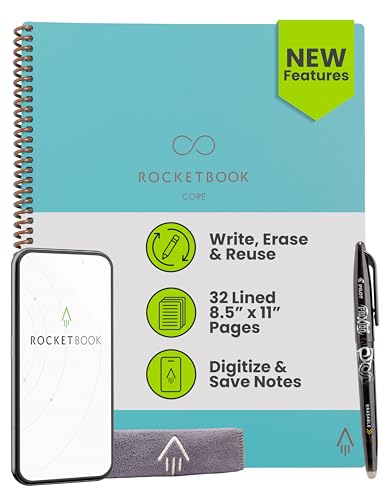
The right Rocketbook for the desk. The full 8.5 x 11 page gives you room to actually think, and the scan-and-wipe workflow saves the paper spend of a normal legal pad — if you're willing to depend on the app.
Check price on Amazon →| Size | Letter — 8.5 x 11 inches |
|---|---|
| Page style | College-ruled, with Smart Titles and Smart Tags |
| Binding | Spiral, scratch-resistant cover |
| Pen required | Pilot FriXion (one included) |
| App | Rocketbook app (iOS and Android) |
| Cloud destinations | Google Drive, Dropbox, OneNote, and others |
| Reusability | Wipe clean with a damp cloth and reuse |
The Rocketbook Core Letter is a full-size reusable notebook that pairs pen-and-paper writing with a scan-to-cloud app, and its point is that you can use it forever without buying a refill. Write with the included Pilot FriXion pen, scan the page into Google Drive, Dropbox, or OneNote, then wipe the page with a damp cloth and start again.
This review covers what the letter-size Core does well, where it struggles, and how it compares to the executive-size version and the other smart notebooks selling alongside it. Every spec below comes from the manufacturer listing.
What the Rocketbook Core Letter Is — and Who Should Buy It
The Rocketbook Core Letter is a spiral-bound notebook that looks and writes like normal paper but is designed to be erased and reused. You write with a FriXion pen, capture the page through Rocketbook's phone app, and wipe the ink away with water.
It suits people who take a lot of handwritten notes at a desk — meeting notes, brainstorming, journaling, planning — and want those notes searchable in the cloud without buying a new notebook every month. It is a poor fit for anyone who prefers a plain paper notebook, or who does not want a phone-app step in their workflow.
- Best for: knowledge workers who take handwritten meeting or planning notes at a desk
- Also good for: students who study by longhand and want digital backups of their notes
- Skip it if: you never want an app step between your notebook and your files
The Reusable Workflow: Write, Scan, Wipe, Repeat
The Core's main promise is the loop. Write in FriXion ink, open the Rocketbook app on your phone, and the app auto-detects the page, straightens the image, and sends it to whichever cloud service you've set as the destination. When the page is full, a damp cloth returns it to blank.
The Letter size — 8.5 x 11 inches — is the biggest reason to pick this variant over the Executive. You get the same room as a legal pad or a printer sheet, which matters for diagrams, wide tables, meeting notes with multiple columns, and long-form thinking.
App and Cloud Integration
The Rocketbook app is the piece doing the real work. Each page has icons at the bottom that map to a cloud destination, and you check the icon for wherever you want that page sent — Google Drive, Dropbox, OneNote, or email — so a meeting note can auto-land in a client folder without any renaming.
This version adds Smart Titles and Smart Tags, so a handwritten filename or hashtag on the page becomes the file name and tag in the cloud. That is the difference between a folder full of Scan-01.jpg files and a searchable archive.
Materials, Binding, and Ink Behavior
The Core is spiral-bound with a scratch-resistant cover, and Rocketbook describes the pen-to-paper feel as improved over earlier versions. The paper is a synthetic sheet rather than tree pulp — that is what lets the FriXion ink wipe off with water instead of soaking in.
FriXion ink needs about 15 seconds to set before you close the notebook, or you'll get transfer between pages. Wipe pages promptly after scanning — ink left for weeks can be harder to fully remove. These are known FriXion behaviors, not defects.
Where the Rocketbook Core Letter Falls Short
The Core's limits are the normal limits of the reusable-notebook category, plus one that comes specifically from the letter size.
- You must use FriXion pens — regular ballpoint or gel ink will not erase
- Dot-grid fans will miss the pattern; this Core is college-ruled only
- Letter size is not pocketable — it wants a bag or a desk, not a jacket
- The value proposition depends on one vendor's app staying supported
Rocketbook Core Letter vs the Alternatives
Against the other smart notebooks in this category, the Core Letter is the practical desk option. The Executive-size Core is the same product in a smaller, more portable body — pick that one if you take notes standing up or on the move.
Compared to an e-ink device like a Kindle Scribe or reMarkable, the Core costs a fraction as much and needs no charging, but you don't get a screen, real handwriting recognition, or on-device editing. It is a paper workflow with cloud output, not a tablet.
Where to buy the Rocketbook Core Reusable Smart Notebook (Letter)
The right Rocketbook for the desk. The full 8.5 x 11 page gives you room to actually think, and the scan-and-wipe workflow saves the paper spend of a normal legal pad — if you're willing to depend on the app.
Check price on Amazon →Alternatives worth comparing
If the Rocketbook Core Reusable Smart Notebook (Letter) is not the right fit, these are the other smart notebooks ranking alongside it right now.
Frequently Asked Questions
- For someone who takes a lot of handwritten notes at a desk and wants them in the cloud, yes. The full 8.5 x 11 page gives you legal-pad room, and the scan-and-wipe workflow replaces the paper you'd otherwise keep buying.
- Yes. The Core only works with Pilot FriXion pens, because FriXion ink is what lets the page wipe clean with water. One FriXion pen is included in the box.
- Through the Rocketbook app. Each page has icons at the bottom that you assign to destinations — Google Drive, Dropbox, OneNote, email — and when the app scans the page, it sends the file to whichever icons you've marked.
- Wipe it with a damp cloth. Rocketbook recommends erasing pages within a reasonable window after writing — ink left for weeks can be harder to fully remove.
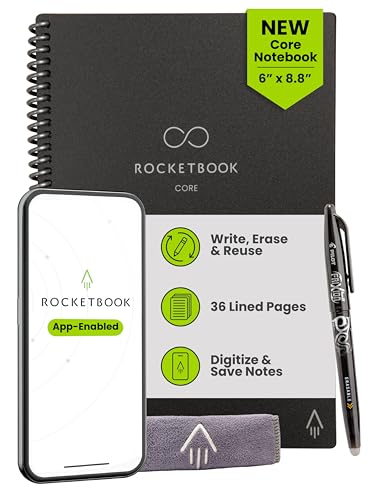
- Size. The Letter is 8.5 x 11 inches for desk use; the Executive is 6 x 8.8 inches for portability. Pen, paper, app, and cloud workflow are identical.
Turning meeting notes into a real knowledge base?
Layer3 Labs helps small and mid-size businesses design note-capture and knowledge workflows — from handwritten pages to searchable, AI-ready archives.
Book a free consultation