Kindle Scribe vs reMarkable in 2026: Which E-Ink Tablet Wins?
Both put a pen on e-ink paper. One is a Kindle that writes; the other is a notebook that refuses to do anything else. Here is how to pick.
The short answer: buy the Kindle Scribe if you read more than you write and live in the Amazon ecosystem; buy a reMarkable if writing, document markup, and distraction-free focus are the job. We tested every e-ink tablet on this list as both a work notebook and an e-reader. The Scribe is a first-class e-reader with capable notes. The reMarkable is a dedicated writing instrument with better pen feel and deeper markup — and no bookstore at all.
This comparison ranks the current contenders — the Kindle Scribe, the reMarkable Paper Pro, and the reMarkable 2 — plus two alternates if neither ecosystem fits. We compare what buyers actually feel day to day: writing latency, reading, file import and export, handwriting-to-text, subscriptions, and battery.
How We Tested
- We used each device as a daily work notebook for meeting notes, to-do lists and planning.
- We checked how well handwriting converted to text and how easily notes got off the device and into other apps.
- We judged writing feel, reading comfort, battery upkeep and whether a subscription is needed for the full feature set.
The Best E-ink Work Tablets, Ranked

Why we picked it: In our testing it was the best reader here, and battery life ran for weeks between charges.
Who it's for: Reading-first users in the Amazon ecosystem who add a few notes to each session.
The downside: Its writing tools are simpler than reMarkable's, and markup on store-bought books is more limited than on your own documents.
View on Amazon →- 10.2-inch 300 ppi e-ink display with warm front light
- Full Kindle store, library, and Audible support
- Send-to-Kindle: email documents straight to the device
- No subscription required
- Unmatched reading ecosystem
- Front light for reading anywhere
- Weeks of battery life
- Writing tools are simpler than reMarkable's
- Markup on store-bought books is more constrained than on your own documents
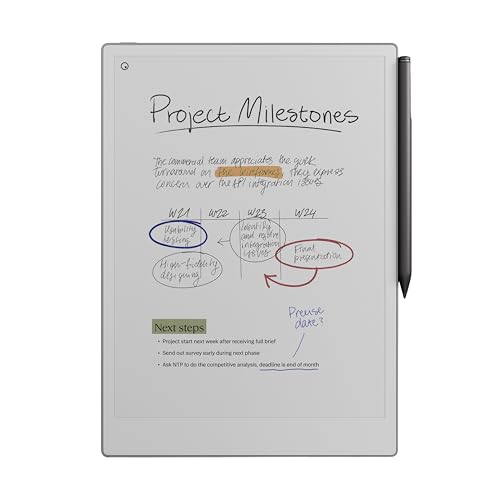
Why we picked it: In our testing it had the best writing feel on e-ink, and nothing on the device interrupted a writing session.
Who it's for: Writing-first users who mark up PDFs and want nothing on the screen that can interrupt them.
The downside: It costs a premium and has no bookstore, so you bring every document yourself.
View on Amazon →- Large color e-ink display with adjustable reading light
- Class-leading paper feel and pen latency
- Deep PDF markup and handwriting-to-text
- Optional Connect subscription for unlimited sync
- Best writing experience on e-ink
- Nothing on it can interrupt you
- Exports to Drive, Dropbox, and OneDrive
- Premium price
- No bookstore — you bring every document yourself

Why we picked it: In our testing it exported and synced exactly like the Paper Pro, and its thin, light body was easy to carry.
Who it's for: Writers who work at a desk in lit rooms and want the value path into reMarkable.
The downside: It has no front light and a monochrome screen, so it is unusable in a dark room without a lamp.
View on Amazon →- 10.3-inch monochrome e-ink display
- Same writing surface and software as the Pro
- Handwriting-to-text and cloud sync
- No front light
- The value path into reMarkable
- Very thin and light
- Identical export and sync options
- Unusable in a dark room without a lamp
- Monochrome only
Why we picked it: In our testing search worked offline, and nothing locked our notes into one app or service.
Who it's for: Writers who want reMarkable-style focus with zero lock-in.
The downside: Supernote is a smaller brand with a rougher ecosystem, and the Manta has no reading store.
View on Amazon →- A5-size e-ink display
- On-device handwriting recognition and search
- No subscription for any feature
- Ceramic pen tip with no replacement nibs
- Zero lock-in
- Offline search
- Loyal, well-supported user community
- Smaller brand with a rougher ecosystem
- No reading store either

Why we picked it: In our testing its PDF apps gave us strong markup tools, and one device covered every reading app we tried.
Who it's for: Power users who want every reading and notes app on a single e-ink device.
The downside: Android on e-ink needs tinkering, and the open app store removes the distraction-free benefit of the dedicated tablets.
View on Amazon →- E-ink tablet running Android with app store access
- Reads Kindle, Kobo, and library apps side by side
- Stylus notes plus full PDF apps
- Front light included
- One device, every ecosystem
- Strong PDF tooling via apps
- Regular hardware refreshes
- Android on e-ink needs tinkering
- The distraction-free benefit disappears
Kindle Scribe vs reMarkable head to head
| Criterion | Kindle Scribe | reMarkable |
|---|---|---|
| Writing feel and latency | Good — smooth, slight glassiness | Best in class — textured, near-instant |
| Reading ecosystem | Full Kindle store + Audible | None — bring your own documents |
| File import, export, PDF markup | Send-to-Kindle email; simpler markup | Drive/Dropbox/OneDrive; deep PDF markup |
| Handwriting-to-text | Yes, on shared or exported notes | Yes, converts and emails from the device |
| Subscription | None required | Optional Connect for unlimited sync |
| Battery | Weeks per charge | One to two weeks per charge |
| Price band | Premium, usually the cheaper of the two | Premium to very premium (Paper Pro) |
When to Choose the Kindle Scribe
Choose the Scribe when reading leads. If your e-ink hours are books, articles, and Audible with notes on the side, no rival touches the Kindle ecosystem. Your library, highlights, and progress sync everywhere the Kindle app runs.
- You already own a Kindle library or subscribe to Kindle Unlimited.
- You want one device for books, journaling, and light document review.
- You read at night — the warm front light matters more than people expect.
- You want zero subscriptions attached to your notes.
When to Choose the ReMarkable
Choose a reMarkable when writing leads. Meeting notes, thinking on paper, and marking up contracts or reports all day is what it was built for, and the pen feel is the best on e-ink. The absence of a store, browser, and notifications is deliberate — it is a focus device.
- Your day involves heavy PDF and document markup.
- You want handwritten notes converted to text and emailed without leaving the device.
- Distraction-free is a requirement, not a preference.
- Pick the Paper Pro for color and the reading light; pick the reMarkable 2 to save money at a desk.
Subscriptions and Lock-in: Read This Before Buying
The two devices lock you in differently. reMarkable sells an optional Connect subscription: the device works without it, but the free tier syncs only a limited number of documents to the cloud, and features like unlimited sync and handwriting search sit behind the fee. USB transfer to a computer stays free and unlimited.
The Scribe has no subscription, but its gravity is the Kindle store — books you buy live in Amazon's format. Its quiet superpower is Send-to-Kindle: every Scribe gets an email address, so you can forward a PDF or Word file from your inbox and it appears on the device. reMarkable counters with direct Google Drive, Dropbox, and OneDrive integration and custom PDF templates, which suits recurring forms like weekly planners or inspection sheets.
Frequently Asked Questions
- The reMarkable is better for writing; the Kindle Scribe is better for reading. The reMarkable Paper Pro has the superior pen feel, deeper PDF markup, and a distraction-free design. The Scribe has the entire Kindle ecosystem, a front light, and no subscription. Decide by which activity fills more of your hours.
- Yes — if you write by hand daily and want your notes searchable, backed up, and free of distractions. It is a premium single-purpose device, so the price only makes sense with regular use. If you write a few times a week or mostly read, the Kindle Scribe or a budget option like the Rocketbook is the smarter spend.
- No. The device works fully without one — writing, organizing, USB export, and text conversion all function. The optional Connect subscription adds unlimited cloud sync and extras like handwriting search; the free tier caps how many documents sync to the cloud. Heavy multi-device users usually end up wanting it.
- Yes, for most note-takers. The Scribe handles journals, meeting notes, and to-do lists well, and you can email documents to it for markup. Where it falls short of a dedicated writing tablet is heavy PDF annotation and organizing hundreds of notebooks — that is reMarkable territory. As a paper-notebook replacement plus e-reader, it is excellent.
Rolling out note-taking devices to your team?
Layer3 Labs helps small and mid-size businesses choose and deploy note-capture gear — e-ink tablets, smart notebooks, and AI note-takers — and connect them to Drive, Notion, or your CRM so nothing gets lost. We map it to your workflows and budget.
Book a free consultation