Best AI Security Cameras for Business in 2026
AI person and vehicle detection turns a security camera from a motion-spam machine into a real alert system. Here are the best for offices, storefronts, and warehouses.
The best AI security camera for most businesses is a PoE camera with on-device AI detection and local storage — the Reolink RLC-800 series is the standout — because it classifies people, vehicles, and packages without a monthly cloud fee. We tested every security camera on this list as business coverage for an office, storefront or warehouse. AI here means the camera tells you a person entered the loading dock, instead of alerting on every headlight, branch, and stray cat.
This guide ranks the AI security cameras and automated security camera systems worth buying for a business in 2026, from a single storefront camera to a multi-camera warehouse build. We compare where the AI runs (on the camera vs in the cloud), where footage lives (local NVR vs subscription), and how each connects (PoE, Wi-Fi, or battery) — because those three choices drive the total cost far more than the sticker price.
How We Tested
- We used each camera to cover the spots a small business watches, such as entrances, registers, stockrooms and parking areas.
- We checked how well the AI told people and vehicles apart from general motion, and how many false alerts reached us.
- We judged install effort, where footage is stored, and which features need a monthly subscription.
The Best AI Business Security Cameras, Ranked

Why we picked it: In our testing one PoE cable per camera handled power and data, and neither the AI nor local storage asked for a monthly fee.
Who it's for: Small businesses that want to own their camera system outright with no monthly fees.
The downside: You need Ethernet runs or a PoE switch, and the Reolink app works but lacks enterprise polish.
View on Amazon →- 4K PoE with on-device person/vehicle/animal detection
- Optical zoom + color night vision with spotlights
- Local storage: NVR, microSD, or FTP — no required cloud plan
- Vandal-resistant, outdoor-rated housing
- No monthly fees for AI or storage
- Single-cable PoE power and data
- Wide range of matching cameras and NVRs
- Needs Ethernet runs (or a PoE switch)
- Management app is functional, not enterprise-polished

Why we picked it: In our testing it recorded around the clock instead of saving clips, and the footage stayed on-site.
Who it's for: A storefront or small warehouse that wants complete coverage on day one.
The downside: The install is bulkier than single smart cameras, and the Lorex software looks dated next to cloud-native rivals.
View on Amazon →- NVR kits with 4–16 PoE cameras, 4K recording
- Person and vehicle smart detection
- 24/7 continuous recording to local NVR storage
- No subscription required for core features
- Everything in one purchase, sized to the building
- Continuous recording, not just clips
- Footage stays on-site
- Bulkier install than single smart cameras
- Software is dated next to cloud-native rivals
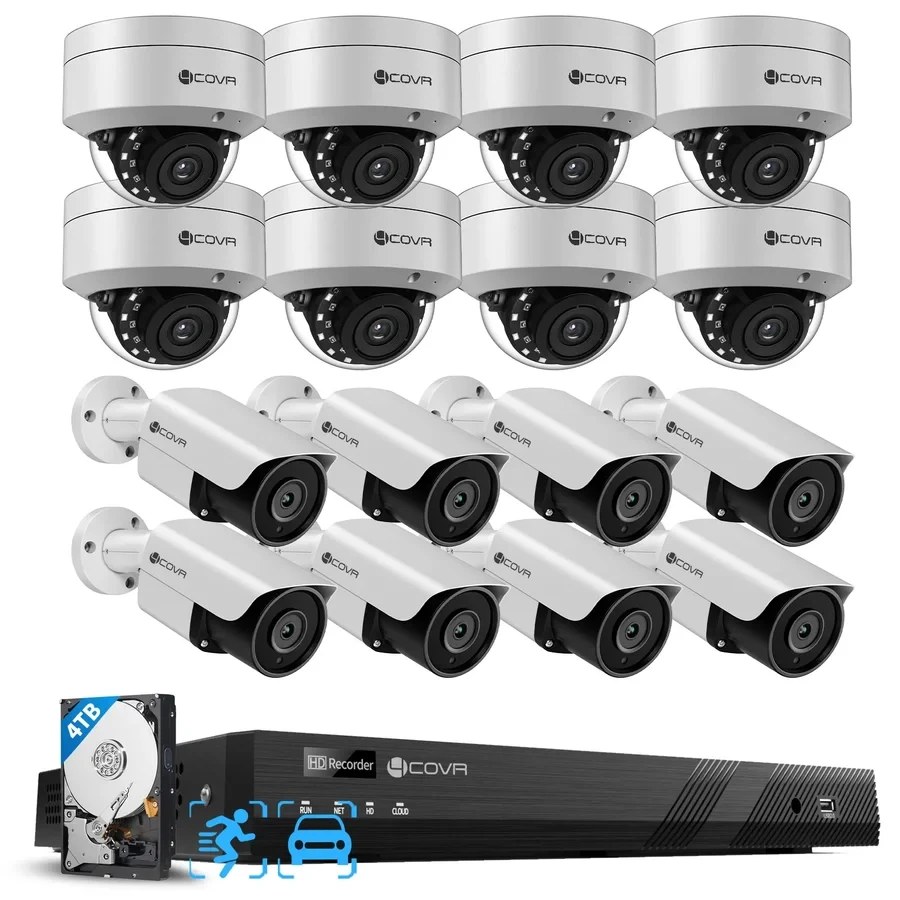
Why we picked it: In our testing its AI detection told people and vehicles apart from general motion, and continuous local recording kept the footage on-site.
Who it's for: Large properties that need broad coverage from many cameras on one system.
The downside: Every camera location needs an Ethernet run, so installation takes more work than individual Wi-Fi cameras.
View 16 Camera Security Systems →- 16-channel PoE NVR paired with 16 4K security cameras
- Person and vehicle AI detection processed locally
- 24/7 continuous recording
- 4TB local storage included with expandable storage support
- No required monthly subscription for local recording and core system features
- PoE connectivity delivers power and data through a single Ethernet cable
- ONVIF supported for compatible third-party cameras
- Designed for large properties requiring broad multi-camera coverage
- 16 cameras and a 16-channel NVR provide a complete high-capacity setup
- Continuous local recording keeps footage on-site
- PoE reduces each camera connection to a single Ethernet cable
- AI detection helps distinguish people and vehicles from general motion
- Requires Ethernet cabling to each camera location
- Installation is more involved than individual Wi-Fi cameras
- The system is better suited to multi-camera properties than simple one- or two-camera installations

Why we picked it: In our testing UniFi Protect felt like enterprise software with no monthly fees, and the footage stayed on a console we controlled.
Who it's for: Growing businesses that already run UniFi networking or plan to.
The downside: The cameras require a UniFi console, which adds a real up-front platform cost and is overkill for a one-camera storefront.
View on Amazon →- G5 camera family: turret, bullet, dome, PTZ
- AI detections managed in self-hosted UniFi Protect
- PoE throughout; footage stored on your console
- Excellent multi-site and multi-user management
- Enterprise-feeling software with no monthly fees
- Scales cleanly across rooms and sites
- You own the data end to end
- Requires a UniFi console — real up-front platform cost
- Overkill for a one-camera storefront

Why we picked it: It installed where we couldn't run cables, and in our testing the solar panel kept battery top-ups rare.
Who it's for: Sites with no Ethernet access, such as a rented storefront exterior or a lot without conduit.
The downside: It records only events rather than round-the-clock footage, and it relies on Wi-Fi, which is less dependable than PoE.
View on Amazon →- Wire-free with solar-assisted battery
- On-device AI detection, local encrypted storage
- HomeBase hub expands storage and links cameras
- Dual-lens pan-and-tilt coverage on the S340
- Installs where cables cannot go
- No monthly fees
- Solar panel minimizes battery maintenance
- Battery cameras record events, not 24/7
- Wi-Fi dependence is a real reliability tradeoff

Why we picked it: In our testing it was the easiest setup here, and its false-alert filtering was strong.
Who it's for: A small storefront that wants alarms, cameras and monitoring all from Ring and is fine paying a subscription.
The downside: Ring's best features need an ongoing subscription, and footage lives in the cloud instead of on-site.
View on Amazon →- Radar-assisted 3D motion detection with bird's-eye view
- Cloud video history and rich app experience
- Ties into Ring alarm + optional professional monitoring
- Wired, battery, and plug-in mounting options
- Easiest setup of anything here
- Alarms, cameras, and monitoring in one ecosystem
- Strong false-alert filtering
- Key features sit behind an ongoing subscription
- Footage lives in the cloud, not on-site

Why we picked it: It gave us 2.5K video at a very low cost per camera, and microSD recording worked without a paid plan.
Who it's for: Businesses on a tight budget that want an extra camera on a stockroom, register or back door.
The downside: The best AI features need the paid plan, and consumer-grade reliability rules it out for critical coverage.
View on Amazon →- 2.5K video with color night vision
- MicroSD local recording plus optional cloud plan
- Indoor/outdoor rated for sheltered spots
- Wi-Fi with simple app setup
- Extremely low cost per camera
- Local microSD recording works without a plan
- Fine as a supplemental camera
- Best AI features require the paid plan
- Consumer-grade reliability — not for critical coverage
AI business security cameras at a glance
| Camera | Best for | AI detection | Storage |
|---|---|---|---|
| Reolink RLC-800 series | Overall / office | On-device person/vehicle | Local NVR or microSD |
| Lorex 4K NVR kit | Multi-camera building | Person/vehicle on system | Local NVR, 24/7 |
| 4COVR 16-camera PoE kit | Configurable multi-camera | Person/vehicle on NVR | Local NVR, 4TB, 24/7 |
| UniFi Protect G5 | Self-hosted, multi-site | On-console smart detect | Self-hosted console |
| Eufy SoloCam S340 | Wire-free exterior | On-device detection | Local + hub, event-based |
| Ring Stick Up Cam Pro | Cloud + monitoring | Radar-assisted, cloud AI | Cloud subscription |
| Wyze Cam v4 | Budget interior | Basic; better with plan | MicroSD or cloud plan |
How to Choose an AI Security Camera for Your Business
Three decisions drive everything: where the AI runs, where the footage lives, and how the camera gets power and data. Get those right and the brand choice mostly follows.
- Detection quality — Person, vehicle, and package classification is the feature that makes cameras usable. It cuts false alerts by an order of magnitude, so staff stop ignoring notifications. Prefer on-device AI: it works without a subscription and keeps working if the internet drops.
- Storage architecture — A local NVR means no monthly fees, footage stays in-house, and recording survives an internet outage. Cloud storage means easier off-site access and survives camera theft. Many businesses land on local-first with selective cloud backup.
- PoE vs Wi-Fi vs battery — PoE is the business-grade answer: one cable carries power and data, and it does not drop like Wi-Fi. Use Wi-Fi or battery only where cable runs are truly impossible.
- Night vision — Storefronts and lots need color night vision or spotlights, not just grainy infrared. Check real low-light samples for the model, not the marketing shots.
- Multi-camera management — If you will run more than two or three cameras, pick a platform (Reolink NVR, Lorex, UniFi, Ring) rather than a pile of standalone apps.
Privacy, Retention, and Compliance for Business Cameras
Cameras at a business carry obligations that home cameras do not. Video of entrances, registers, and stockrooms is broadly acceptable; cameras in bathrooms, changing areas, and break rooms are off-limits everywhere. Several states also require you to notify employees that surveillance is in place — posted signage plus a line in the employee handbook is the standard, low-friction way to cover it.
Audio is the trap most owners miss. Many US states require all parties to consent before a conversation is recorded, which makes camera audio legally riskier than video. The practical move: disable microphones on business cameras unless you have specific guidance saying otherwise. Set a written retention policy too — 30 to 90 days is a common range — and limit who can pull footage. Deleting on schedule is not just storage hygiene; keeping video forever expands what you can be compelled to produce. This is practical guidance, not legal advice — check your state's rules or ask counsel before recording audio anywhere.
Frequently Asked Questions
- For most small businesses, a Reolink 4K PoE camera (RLC-800 series) is the best buy: on-device AI person and vehicle detection, local storage, and no monthly fees. If you need whole-building coverage at once, a Lorex 4K NVR kit is the fastest complete system, and if cables are impossible, the wire-free Eufy SoloCam S340 is the strongest no-subscription option.
- Not necessarily — it depends on where the AI runs and where footage is stored. Cameras with on-device AI and local NVR or microSD storage (Reolink, Lorex, 4COVR, UniFi, Eufy) work fully without a subscription. Cloud-first systems like Ring keep video history and their best AI features behind a monthly plan. If avoiding fees matters, choose on-device AI with local storage.
- It classifies what triggered motion — person, vehicle, package, or animal — instead of alerting on any pixel change. That is the difference between three meaningful alerts a day and three hundred junk ones, and it lets you set rules like "alert only when a person is in the loading zone after hours." Better systems add smart search, so you can find "person, back door, Tuesday night" without scrubbing hours of footage.
- Usually, yes. Wi-Fi and battery cameras (Eufy, Ring, Wyze) are screwdriver-level jobs anyone can do. PoE systems are still DIY-friendly if you can run Ethernet cable — each camera needs one cable back to the NVR or a PoE switch — but ceiling and exterior runs take time and a drill. A common split: install the cameras yourself and hire a low-voltage contractor for the cable runs, which is the cheap part of a professional install.
Putting AI eyes on your business?
Layer3 Labs helps small and mid-size businesses choose and deploy AI security camera systems — detection, storage, and alerting matched to your building, budget, and state rules — so the footage is there when it matters.
Book a free consultation