GEEKOM Air12 Mini PC Review: The Budget WFH Desktop
A small, cheap Intel mini PC for email, browser apps, and video calls — here's exactly what the Air12 can do, and where its budget chip runs out of road.

A genuine budget office desktop. The Air12 is built for light WFH and front-desk work, and it earns its keep there — as long as you match the modest Pentium chip to modest tasks.
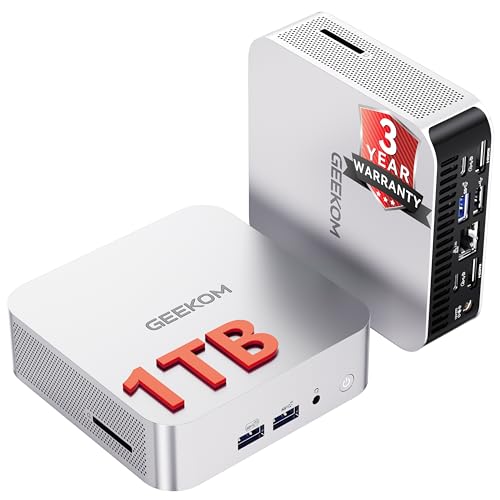
Check price on Amazon →| Processor | Intel Pentium 7505 (dual-core) |
|---|---|
| Graphics | Intel UHD Graphics (48 EU, integrated) |
| Memory | 8GB DDR4, dual-channel, upgradable to 64GB |
| Storage | 256GB NVMe SSD, upgradable to 2TB |
| Displays | Up to 3x 4K (HDMI 2.0, Mini DisplayPort 1.4, USB-C) |
| Connectivity | Wi-Fi 6, Bluetooth, 5x USB, SD card reader |
| Cooling | IceBlast 3.0 dual copper heat pipe |
| Operating system | Windows 11 Pro |
| Warranty | 3-year limited |
The GEEKOM Air12 is an ultra-compact Intel mini PC built for work-from-home setups, reception desks, and light office tasks, and its job is to run the basics well at the lowest sensible price. For a business kitting out a home worker or a front desk, it covers email, browser-based apps, spreadsheets, and video calls without paying for power those tasks never use.
This review covers what the Air12 handles comfortably, where its budget processor gives up, and how it stacks up against the other mini PCs selling next to it. Every spec below comes from the manufacturer listing.
What the GEEKOM Air12 Is — and Who Should Buy It
The GEEKOM Air12 is a budget small-form-factor desktop that fits in a hand and hides behind a monitor. It runs a full copy of Windows 11 Pro on an Intel Pentium 7505, so it behaves like a normal office PC rather than a locked-down thin client, just with a light-duty processor at its core.
It suits businesses equipping remote workers, students, or a front desk with a machine for everyday tasks: email, web apps, documents, spreadsheets, and video meetings. It is the wrong tool for heavy multitasking, creative work, gaming, or running local AI models, all of which want far more processor and graphics than a Pentium-class chip provides.
- Best for: work-from-home desktops, reception and front-desk machines, and student setups
- Also good for: digital signage, kiosks, and a light home-server or soft-router box
- Skip it if: you juggle heavy multitasking, edit media, or need any real local AI power
Performance: What the Intel Pentium 7505 Handles
The Intel Pentium 7505 is a dual-core mobile processor aimed at light, everyday computing. It runs an office suite, a stack of browser tabs, and a Teams or Zoom call cleanly, and its Intel UHD Graphics include AV1 hardware decoding for smooth 4K streaming, so video playback and screen sharing hold up well.
Its ceiling arrives sooner than a Ryzen or Core machine's. GEEKOM lists 48 graphics execution units — double the count on N100-class chips — but two CPU cores still limit how much you can pile on at once. Heavy multitasking, large data files, photo and video editing, and 3D work are outside its comfort zone.
Upgrade Room That Keeps a Budget Box Useful
The Air12's most reassuring feature is that it is not sealed shut. It ships with 8GB of DDR4 in a true dual-channel, dual-slot layout that accepts up to 64GB, and a 256GB NVMe SSD you can grow to 2TB.
That flexibility matters most on a cheap machine. The 8GB it comes with is tight for modern Windows once a browser and a couple of apps are open, so the ability to add memory later — rather than replace the whole unit — is what stretches the Air12's useful life and keeps its real cost down.
- Dual-channel memory, not the single-channel setup that bottlenecks many budget rivals
- 8GB is the practical weak point out of the box — plan on a RAM upgrade for heavier use
- Storage grows to 2TB, plus a full-size SD card reader for quick photo transfers
Ports, Displays, and Desk Fit
The Air12 covers the connections a work-from-home desk actually needs. It offers HDMI 2.0, Mini DisplayPort 1.4, and a full-function USB-C for a triple 4K display setup, plus five USB ports, Wi-Fi 6 with a high-gain antenna, and Bluetooth.
At 4.6 by 4.4 by 1.35 inches it mounts behind a display and disappears on a desk, and GEEKOM's IceBlast 3.0 dual-heat-pipe cooling keeps it quiet during long sessions. It ships with Windows 11 Pro and is also compatible with Linux, Ubuntu, and FydeOS, and GEEKOM backs it with a three-year limited warranty — longer than the one-year coverage common at this price.
Where the GEEKOM Air12 Falls Short
The Air12's limits are the honest limits of a budget dual-core mini PC. The Pentium 7505 and integrated graphics are sized for light work, so anything demanding will feel slow, and the 8GB of starting memory is snug for today's Windows.
- Dual-core Pentium — fine for light office work, not for heavy multitasking or creative apps
- 8GB DDR4 out of the box; expect to upgrade RAM sooner than on pricier models
- Integrated Intel UHD graphics are not built for gaming, 3D, or meaningful local AI
- GEEKOM is a value brand — support and resale value trail Lenovo, Dell, or HP
GEEKOM Air12 vs the Alternatives
Against the other best-selling mini PCs, the Air12 is the light-duty, low-cost option. It undercuts GEEKOM's own Ryzen models like the A5 and A6, but with a slower chip and less headroom for anything demanding.
If your team's tasks are genuinely basic, that trade is the point — you pay for what you use. If anyone will multitask hard, edit media, or touch local AI, one of the Ryzen machines below is the smarter buy. The full comparison set follows.
Where to buy the GEEKOM Air12 Mini PC for Business & WFH
A genuine budget office desktop. The Air12 is built for light WFH and front-desk work, and it earns its keep there — as long as you match the modest Pentium chip to modest tasks.
Check price on Amazon →Alternatives worth comparing
If the GEEKOM Air12 Mini PC for Business & WFH is not the right fit, these are the other mini pcs ranking alongside it right now.


Frequently Asked Questions
- Yes, for light work-from-home tasks. The Air12 runs Windows 11 Pro, drives up to three 4K monitors, and handles email, browser apps, documents, and video calls comfortably. It is not built for heavy multitasking or creative work.
- Only the smallest models, and slowly. The Air12 relies on integrated Intel UHD graphics, which are not designed for AI inference. For on-device AI, choose a mini PC with stronger integrated graphics, a dedicated GPU, or a Ryzen AI chip with an NPU.
- Up to 64GB. It ships with 8GB of DDR4 in a dual-slot, dual-channel layout, both slots user-accessible, so you can add memory yourself. Because 8GB is tight for modern Windows, a RAM upgrade is worth planning for.
- Yes. The Air12 ships with Windows 11 Pro pre-installed, which supports business features like domain join, device management, and BitLocker encryption. It is also compatible with Linux, Ubuntu, and FydeOS.
- A three-year limited warranty, with a 90-day return policy. That coverage is longer than the one-year warranty most budget mini PCs offer, which is useful reassurance on an inexpensive business machine.
Rolling out WFH desktops for your team?
Layer3 Labs helps small and mid-size businesses choose, standardize, and deploy the right AI-ready hardware, and the workflows that run on it.
Book a free consultation