GMKtec N95 Mini PC Review: A Budget Office Desktop
An Intel N95 mini PC built for light office work — here's where it fits in a small business, and where it doesn't.
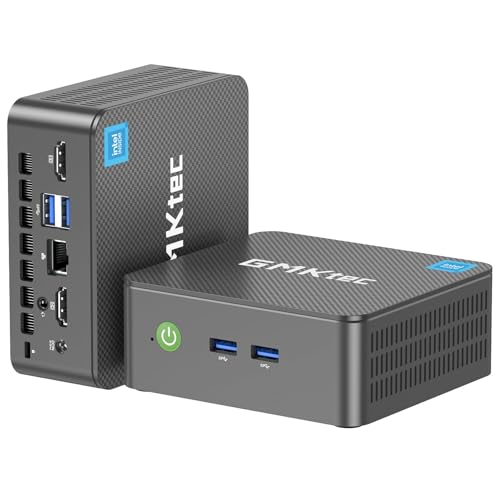
A budget-friendly mini PC for basic office tasks. The Intel N95 and 8GB of RAM handle everyday browsing and productivity work fine, but the modest specs and lack of RAM upgrade room make it a poor fit for anything more demanding.
Check price on Amazon →| Processor | Intel N95 (4-core/4-thread, up to 3.4GHz burst, 6MB cache) |
|---|---|
| Memory | 8GB DDR4 |
| Storage | 256GB M.2 2242 SSD |
| Display Outputs | Dual HDMI 2.0, 4K@60Hz |
| Connectivity | Gigabit Ethernet, WiFi 5, Bluetooth 5.0 |
| Ports | USB 3.2 (up to 10Gbps), 3.5mm audio jack |
| Remote Management | Wake On LAN, PXE Boot, RTC Wake, Auto Power On |
The GMKtec Nucbox G3S is a compact desktop built around Intel's N95 processor, a budget chip aimed at routine office tasks and light entertainment. Its standout feature is server-friendly extras like Wake On LAN and PXE Boot, which make it useful for IT teams managing multiple desktops remotely. For a business buying several identical low-cost desktops, those remote management tools can save real time.
This review covers what the G3S does well, where it struggles, and how it compares to the other mini PCs selling alongside it right now. We looked closely at the processor, memory, storage, and display capabilities the manufacturer lists, since those determine whether a budget desktop like this fits your team's daily needs. Every spec below comes from the manufacturer listing.
What the GMKtec Nucbox G3S Is — and Who Should Buy It
The GMKtec Nucbox G3S is an entry-level mini PC built around Intel's N95 processor. It's designed for routine office tasks rather than heavy multitasking or creative work, and its small footprint fits easily on a crowded desk or behind a monitor.
It suits small businesses that need affordable desktops for email, spreadsheets, point-of-sale terminals, or digital signage. Its remote wake and boot features also make it a fit for IT teams managing several machines at once, since it can be provisioned and powered on without anyone standing at the desk. That combination of low cost and remote manageability is what makes it worth a look for multi-desk rollouts.
- Best for: basic office desktops, kiosks, and digital signage
- Also good for: small server or always-on tasks thanks to remote wake support
- Skip it if: you run multiple demanding applications at once or need more than 8GB of RAM
Performance: What the Intel N95 Handles
The Intel N95 is a 4-core, 4-thread processor with a 6MB cache, bursting up to 3.4GHz. GMKtec positions it as a meaningful step up from older Intel chips like the N100, N5105, N5100, and N5095 in everyday tasks, which matters if you're replacing aging office desktops built on those older chips.
8GB of DDR4 memory is enough for single-tasking or light multitasking, such as a browser with several tabs alongside an office app. The 256GB SSD covers the operating system and everyday files, though it leaves limited room for large local datasets or a growing document archive. Treat this as a machine for one main task at a time rather than a heavy multitasking workhorse.
The Standout Feature: Remote Management for IT Teams
The G3S supports Wake On LAN, PXE Boot, RTC Wake, and Auto Power On, features aimed at IT administrators rather than typical home users. That means a business can remotely wake, boot, or schedule power for these machines across an office or building, which is handy for overnight updates or provisioning new desktops without a site visit.
Dual 4K@60Hz HDMI output rounds out the package, letting two displays run at full resolution for dashboards, signage, or a simple dual-monitor desk.
Where the GMKtec Nucbox G3S Falls Short
8GB of RAM is on the lean side for 2026 business use, especially with modern browsers and office suites running multiple background processes. There's no mention of user-upgradeable memory in the listing, so what ships in the box is likely what you're stuck with.
256GB of storage is also modest, and the SSD is a smaller M.2 2242 form factor, which can limit future upgrade options compared to standard-size drives.
- 8GB of RAM is limiting for heavier multitasking
- 256GB of storage fills up quickly with larger files or apps
- WiFi 5 instead of newer WiFi 6/6E standards
GMKtec Nucbox G3S vs the Alternatives
Against KAMRUI's AK1PLUS, which also uses an Intel Celeron-class chip, the G3S is a comparable budget option, though the AK1PLUS ships with more RAM at 16GB.
Compared to GEEKOM's A5 and Air12, or GMKtec's own Ryzen-based M6 Ultra, the N95-based G3S is the most budget-focused pick in this lineup. If your team needs more multitasking headroom, those options are worth the step up, even at a higher cost.
Ports, Wireless, and Warranty
The G3S includes USB 3.2 ports rated up to 10Gbps, a 3.5mm audio jack, Gigabit Ethernet, WiFi 5, and Bluetooth 5.0. That covers standard peripherals and a wired network connection, though it lacks the newer WiFi 6 or 6E standards found on higher-tier mini PCs.
GMKtec backs the G3S with a 1-year limited warranty covering design and workmanship defects, supported by the company's after-sales team.
Where to buy the GMKtec Nucbox G3S Mini PC
A budget-friendly mini PC for basic office tasks. The Intel N95 and 8GB of RAM handle everyday browsing and productivity work fine, but the modest specs and lack of RAM upgrade room make it a poor fit for anything more demanding.
Check price on Amazon →Alternatives worth comparing
If the GMKtec Nucbox G3S Mini PC is not the right fit, these are the other mini pcs ranking alongside it right now.



Frequently Asked Questions
- Yes, for light office tasks like email, spreadsheets, and basic browsing. The Intel N95 processor and 8GB of RAM keep costs down but aren't built for heavier multitasking, so it's best suited to simple, single-purpose desks.
- It ships with 8GB of DDR4 RAM. The listing doesn't mention user-upgradeable memory, so 8GB is likely the practical ceiling for this machine over its lifespan.
- Yes, it has dual HDMI 2.0 ports that support 4K@60Hz on both displays at once. That's enough for a standard dual-monitor office setup or a signage display pair.
- It can work well for that purpose. Support for Wake On LAN, PXE Boot, RTC Wake, and Auto Power On makes it easy for IT teams to manage remotely without visiting the machine in person, which suits kiosks and signage.
- Skip it if you need more than 8GB of RAM or plan to run several demanding applications at once. Teams with heavier workloads, or plans to run local AI tools, should look at a higher-tier mini PC instead.
Rolling out mini PCs for your business?
Layer3 Labs helps small and mid-size businesses choose, standardize, and deploy the right AI-ready hardware, and the workflows that run on it.
Book a free consultation