KAMRUI Pinova P2 Mini PC Review: A Budget Business Desktop
A compact AMD Ryzen 4300U mini PC with triple 4K display support — here's where it fits in a small business, and where it falls short.
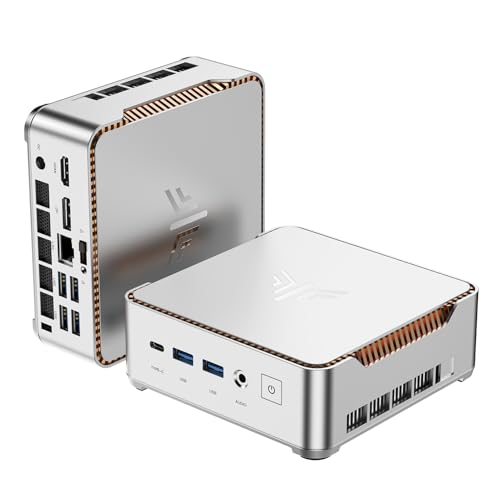
A capable budget mini PC for everyday office work. The AMD Ryzen 4300U handles multitasking well, and triple 4K display support is rare at this rank, but storage expansion requires buying your own drives.
Check price on Amazon →| Processor | AMD Ryzen 4300U (4-core/8-thread, up to 3.7GHz) |
|---|---|
| Graphics | AMD Radeon Vega 5 (integrated) |
| Memory | 16GB LPDDR4 |
| Storage | 512GB M.2 SSD (expandable to 4TB across two slots) |
| Display Outputs | HDMI 2.0, DisplayPort 1.4, USB-C — triple 4K@60Hz |
| Connectivity | Gigabit LAN, WiFi, Bluetooth, USB 3.2 Gen2 Type-C (10Gbps) |
| Dimensions | 5.05 x 5.05 x 1.73 inches, VESA mountable |
The KAMRUI Pinova P2 is a compact AMD Ryzen 4300U mini PC built for office desktops, browser-heavy multitasking, and multi-monitor setups. Its standout feature is triple 4K@60Hz display output, a capability many rivals in this class don't offer. For a small business setting up desks that need more than one screen, that's a meaningful advantage. The chassis is small enough to hide behind a monitor or mount to a wall, which matters when desk space is tight.
This review covers what the P2 does well, where it struggles, and how it compares to the other mini PCs selling alongside it right now. We looked closely at the processor, memory, storage, and display capabilities the manufacturer lists, since those are what decide whether a desktop like this fits your team's daily workflow. Every spec below comes from the manufacturer listing.
What the KAMRUI Pinova P2 Is — and Who Should Buy It
The KAMRUI Pinova P2 is a small-form-factor desktop built around AMD's Ryzen 4300U processor. It's sized to disappear behind a monitor or mount to a VESA bracket, freeing up desk space in tight offices. That compact footprint also makes it easy to relocate or swap out as a team grows.
It suits businesses that need affordable desktops for everyday tasks like email, spreadsheets, video calls, and multi-window browsing. The true 4-core design keeps it responsive under multitasking loads that trip up cheaper chips. For a reception desk, a shared workstation, or a manager's office, it covers the basics without excess cost.
- Best for: office desktops running everyday productivity software
- Also good for: multi-monitor workstations, digital signage, and home offices
- Skip it if: you need discrete graphics for serious editing or gaming
Performance: What the Ryzen 4300U Handles
The Ryzen 4300U is a true 4-core, 8-thread processor built on AMD's 7nm Zen 2 architecture, clocking up to 3.7GHz. That's a genuine quad-core design, unlike some competing chips that pair fewer real cores with efficiency cores that throttle under sustained load. In real-world use, that translates to steadier performance when several apps compete for CPU time.
16GB of LPDDR4 memory gives the P2 enough headroom for multiple browser tabs, office suites, and background apps running at once. The 512GB SSD handles fast boot times and app launches, and the two internal storage slots let you add more capacity later. Together, the processor and memory pairing is enough for a full workday of office tasks without noticeable slowdown.
The Standout Feature: Triple 4K Display Support
Triple 4K@60Hz output is the P2's biggest differentiator. The combination of HDMI 2.0, DisplayPort 1.4, and a USB-C port that also carries DisplayPort signal lets you run three 4K monitors at once without an external dock. That's a setup normally reserved for pricier desktops or laptops paired with a docking station.
That matters for finance, design-adjacent, or ops roles where more screen space directly speeds up work. Most mini PCs at this rank cap out at dual displays, so triple-monitor support is a genuine edge. It also lets IT teams standardize on one small box instead of pairing a laptop with an external dock just to get a third screen.
Where the KAMRUI Pinova P2 Falls Short
The P2 ships with only 512GB of storage, and expanding beyond that means buying and installing your own M.2 drives. KAMRUI doesn't include the extra storage in the box, so budget for that separately if your team handles large files.
LPDDR4 memory is soldered rather than user-upgradeable, so 16GB is the ceiling for the life of the machine. That's fine for office work, but it rules out heavier local AI workloads down the road. Teams planning to run local AI models should look at a mini PC with socketed, upgradeable memory instead.
- No included storage expansion — you supply your own M.2 drives
- Memory is fixed at 16GB, not user-upgradeable
- Integrated graphics only — not built for gaming or GPU-heavy work
KAMRUI Pinova P2 vs the Alternatives
Against KAMRUI's own AK1PLUS and Pinova P1, the P2's true 4-core Ryzen chip and triple 4K support are clear upgrades over Celeron-class or lower-tier AMD options. If you're standardizing on KAMRUI hardware, the P2 is the stronger all-around pick of the three.
Compared to GEEKOM's A5 and Air12, the P2 undercuts them on rank but can't match GEEKOM's dual-slot upgradeable RAM. If long-term upgrade room matters more than triple-display support, GEEKOM is worth a look instead. Against GMKtec's entry-level N95 option, the P2's true quad-core chip and stronger graphics make it the better all-around performer.
Connectivity, Cooling, and Support
Beyond its display outputs, the P2 includes a USB 3.2 Gen2 Type-C port rated for 10Gbps transfers, plus two USB 3.2 Gen2 Type-A ports for peripherals and external drives. Gigabit LAN, WiFi, and Bluetooth round out the connectivity for typical office networking.
KAMRUI also reworked the case shape to improve heat dissipation, and the fan stays quiet at light load and reasonably quiet under sustained use. The company backs the P2 with lifetime technical support and a 12-month service window, which is useful if you're deploying several units across an office.
Where to buy the KAMRUI Pinova P2 Mini PC
A capable budget mini PC for everyday office work. The AMD Ryzen 4300U handles multitasking well, and triple 4K display support is rare at this rank, but storage expansion requires buying your own drives.
Check price on Amazon →Alternatives worth comparing
If the KAMRUI Pinova P2 Mini PC is not the right fit, these are the other mini pcs ranking alongside it right now.



Frequently Asked Questions
- Yes, the KAMRUI Pinova P2 is a solid choice for everyday office desktops. Its true 4-core Ryzen 4300U processor and 16GB of memory handle multitasking, video calls, and productivity software without slowing down. Its compact size also makes it easy to fit into small offices or shared workstations.
- Yes, it supports triple 4K@60Hz output through HDMI 2.0, DisplayPort 1.4, and USB-C simultaneously. That makes it a strong pick for multi-monitor desks without needing an external dock, which is unusual at this rank.
- Yes, the P2 has two internal M.2 slots that support up to 4TB combined. The extra drives aren't included, so you'll need to buy and install them yourself, but the option is there as your team's storage needs grow.
- For office work, yes. 16GB of LPDDR4 handles typical business software and multitasking well, though the memory is soldered and can't be upgraded later, so plan around that limit if your workload grows.
- Skip it if you need discrete graphics for gaming or video editing, or if you expect to need more than 16GB of RAM down the road. The integrated graphics and fixed memory limit its ceiling for heavier workloads like local AI inference.
Rolling out mini PCs for your business?
Layer3 Labs helps small and mid-size businesses choose, standardize, and deploy the right AI-ready hardware, and the workflows that run on it.
Book a free consultation