KAMRUI Pinova P2 Mini PC Review: Ryzen 4300U, 8GB RAM
A compact AMD desktop that drives three 4K monitors at once. Here's what its 8GB memory configuration actually covers, and where it runs out.
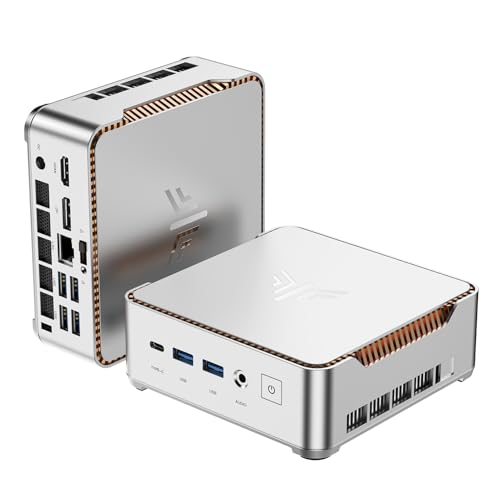
A capable single-user office desktop with real triple-4K display support, held back mainly by an 8GB memory ceiling that cannot be upgraded later.
Check price on Amazon →| Processor | AMD Ryzen 4300U (7nm Zen 2, 4-Core/8-Thread, up to 3.7GHz) |
|---|---|
| Graphics | AMD Radeon Vega 5 (integrated) |
| Memory | 8GB LPDDR4 RAM |
| Storage | 512GB M.2 SSD (dual M.2 2280 slots, expandable to 4TB combined, second drive not included) |
| Display outputs | Triple 4K@60Hz via HDMI 2.0, DisplayPort 1.4, and USB-C |
| USB ports | 2x USB 3.2 Gen2 Type-A (10Gbps), 1x USB 3.2 Gen2 Type-C (10Gbps, DisplayPort Alt Mode) |
| Connectivity | Gigabit LAN, WiFi, Bluetooth |
| Dimensions | 5.05 x 5.05 x 1.73 inches, VESA mountable |
| Support | Lifetime technical support, 12-month satisfaction service |
The KAMRUI Pinova P2 is a compact AMD Ryzen 4300U mini PC built for office desks that need three 4K displays without the footprint of a tower. In the workflow-automation rollouts we run for small business clients, a machine like this usually becomes the first shared desktop a growing team standardizes on before anyone talks about a dedicated server.
This review covers the 8GB RAM, 512GB SSD configuration of the Pinova P2, its performance, its display and connectivity setup, and where its specs run out. It also compares this configuration against the other mini PCs selling nearby, including KAMRUI's own 16GB version of the same Pinova P2 chassis. Every claim below comes from the manufacturer's own listing for this specific configuration.
What the KAMRUI Pinova P2 Mini PC Is, and Who Should Buy It
The KAMRUI Pinova P2 pairs a 7nm AMD Ryzen 4300U processor with 8GB of LPDDR4 memory and a 512GB M.2 SSD, in a silver chassis measuring 5.05 by 5.05 by 1.73 inches. It ships ready to run Triple 4K@60Hz displays off HDMI 2.0, DisplayPort 1.4, and USB-C at the same time, which is unusual at this size.
It fits single-user office desks, reception stations, small conference rooms, and home offices that run standard business software: browsers, spreadsheets, video calls, and multi-monitor productivity work. Its VESA mount lets it disappear behind a monitor entirely, which matters in an open office where desk space is limited.
It is not built for gaming, video editing, or local AI inference, since it relies on the processor's integrated graphics with no room for a discrete GPU or a dedicated AI chip. If you're evaluating this machine for anything beyond office productivity, look elsewhere.
- Best for: single-user office desks, reception stations, and multi-monitor productivity setups
- Also good for: home offices and small conference rooms that need three 4K displays from one small box
- Skip it if: you need discrete-GPU power, heavy multitasking beyond 8GB, or local AI inference
Performance: What the AMD Ryzen 4300U Handles
The AMD Ryzen 4300U is a true 4-core, 8-thread processor built on AMD's 7nm Zen 2 architecture, running up to 3.7GHz. KAMRUI's listing states it runs 40% faster than the Intel Core i3-10110U and 25% faster than the Intel N95 in multi-core tasks. Both of those competing chips either pack fewer real cores or throttle harder under sustained load.
That edge shows up mostly in multitasking rather than in any single task. A 4-core, 8-thread chip running at a full 28W handles several browser tabs, a spreadsheet, and a video call together without the stutter a 2-core or efficiency-core-only chip shows under the same load.
8GB of LPDDR4 memory is the real ceiling on how far that multitasking goes. It covers a browser, an office suite, and a video call running together, but stacking on a dozen tabs, a spreadsheet, and background software will slow the system down before the processor itself becomes the bottleneck.
Graphics and the Triple 4K Display Setup
The Pinova P2 runs on AMD's integrated Radeon Vega 5 graphics. KAMRUI's listing describes it as 2.5 times stronger than the Intel UHD graphics built into the N95 and i3-10110U chips it competes against. That extra graphics headroom lets the P2 drive three separate 4K displays at 60Hz at once, through HDMI 2.0, DisplayPort 1.4, and a USB-C port with DisplayPort Alt Mode.
Three 4K monitors from one small box is a real advantage if your work spreads across multiple screens, and the listing also points to home-theater and light photo or video use. It is still integrated graphics. It is not a substitute for a discrete GPU on anything demanding.
The two USB 3.2 Gen2 Type-A ports add 10Gbps transfer speed on top of the display setup, useful for external drives or fast file transfers between the desktop and a portable SSD.
8GB RAM and 512GB Storage: What This Configuration Gets You
This review covers the 8GB RAM, 512GB SSD configuration of the Pinova P2. That distinction matters because KAMRUI sells the same Pinova P2 chassis with 16GB of RAM too, and you can easily mix the two up when comparing prices or reviews.
The 512GB M.2 SSD gives enough room for Windows, a full office suite, and a real library of files without hitting a storage ceiling right away. Two internal M.2 2280 slots, one SATA/NVMe PCIe 3.0 and one SATA-only, can combine for up to 4TB of total storage. The second drive isn't included, though, so you'll need to buy it separately.
8GB of LPDDR4 memory is the part to weigh carefully. LPDDR4 memory in a chassis this compact is typically soldered directly to the board rather than socketed, so unlike the storage, you can't add more later if your needs outgrow it.
Ports, Wireless, and the Physical Design
Wireless connectivity is built in, with WiFi and Bluetooth included alongside a Gigabit LAN port for a wired connection, so no USB dongle is needed to get the Pinova P2 online or paired with a wireless keyboard and mouse.
KAMRUI built the chassis around a compact, quiet form factor: a silver case measuring 5.05 by 5.05 by 1.73 inches, small enough to travel in a bag. It also includes a VESA mount for attaching it directly to a monitor or a wall. The listing describes a cooling redesign meant to keep the fan quiet under load, aimed at open offices where a tower's fan noise is a real distraction.
KAMRUI backs the Pinova P2 with lifetime technical support and a 12-month satisfaction service window, according to the listing, a shorter commitment than the multi-year warranties some larger PC brands offer on comparable desktops.
Where the KAMRUI Pinova P2 Falls Short
The Pinova P2's limitations trace directly to this specific configuration. They are not a flaw in KAMRUI's design. None of them are surprising for a mini PC at this size and this memory tier, but you should weigh them before this becomes the standard desktop for your entire team.
- 8GB of LPDDR4 RAM is soldered and not user-upgradable, so if your needs grow into heavier multitasking, you have nowhere to go without replacing the whole machine
- The second M.2 storage slot is empty out of the box, so reaching the advertised 4TB combined capacity means buying and installing an extra drive
- Integrated graphics only, so gaming, 3D work, and local AI inference are all out of reach without a discrete GPU
- 12 months of satisfaction service is shorter than the multi-year warranties larger PC brands sell on comparable business desktops
- No listed RAM speed or SSD read and write speeds, so if you're comparing raw performance against other mini PCs, you'll have to take the multitasking experience on faith
KAMRUI Pinova P2 Mini PC vs the Alternatives
Against the other mini PCs selling in this category, this 8GB configuration of the Pinova P2 competes mainly on triple-4K display support and a genuine 4-core desktop-class chip at a compact size. The most direct comparison is KAMRUI's own 16GB RAM, 512GB SSD version of the same Pinova P2 chassis, which doubles the memory on the identical Ryzen 4300U processor and display setup for a buyer who already knows 8GB will not be enough.
The Apple Mac mini, sold with Apple's own chip and macOS, sits in a different category entirely. It suits you if you've already standardized on Apple hardware, rather than if you're shopping for a Windows-compatible desktop on a tight per-seat budget.
The deciding question is really how much multitasking your desk needs. If your office role mostly runs a browser and an office suite, you'll fit comfortably inside 8GB. A role that also runs a CRM or heavier multitasking needs the 16GB Pinova P2 instead.
Where to buy the KAMRUI Pinova P2 Mini PC (8GB RAM, 512GB SSD)
A capable single-user office desktop with real triple-4K display support, held back mainly by an 8GB memory ceiling that cannot be upgraded later.
Check price on Amazon →Alternatives worth comparing
If the KAMRUI Pinova P2 Mini PC (8GB RAM, 512GB SSD) is not the right fit, these are the other mini pcs ranking alongside it right now.


Frequently Asked Questions
- Yes, for single-user office desks running standard software. It handles browsers, spreadsheets, and video calls smoothly on the Ryzen 4300U, and its compact VESA-mountable case frees up desk space a tower would take, though 8GB of RAM limits how much you can run at once.
- This configuration ships with 8GB of LPDDR4 memory, and it is not user-upgradable, because LPDDR4 memory in a chassis this compact is typically soldered to the board rather than socketed. If you expect to need more, look at KAMRUI's 16GB version of the same Pinova P2 instead.
- Yes. It supports Triple 4K@60Hz displays through HDMI 2.0, DisplayPort 1.4, and a USB-C port with DisplayPort Alt Mode, powered by the integrated AMD Radeon Vega 5 graphics.
- Yes, up to a combined 4TB. The Pinova P2 has two internal M.2 2280 slots, one that supports SATA or NVMe PCIe 3.0 drives and one SATA-only slot, though the second drive isn't included, so you'll need to purchase and install it separately.
- Not realistically. It relies on the Ryzen 4300U's integrated Radeon Vega 5 graphics, which has no dedicated AI acceleration hardware. If you need on-device AI work, look for a mini PC with a discrete GPU or a modern AI-focused chip instead.
- Both use the identical Ryzen 4300U processor, the same triple 4K display support, and the same chassis. The only difference KAMRUI lists is memory: this configuration ships with 8GB of LPDDR4 RAM, while the 16GB version doubles that if you expect to run more at once.
- It includes built-in WiFi and Bluetooth, a Gigabit LAN port for a wired connection, two USB 3.2 Gen2 Type-A ports at 10Gbps, and a USB 3.2 Gen2 Type-C port that also carries DisplayPort video output.
Rolling out office mini PCs across your team?
Layer3 Labs helps small and mid-size businesses choose and standardize the desktop hardware, from compact mini PCs to full workstations, and the workflows that run on it.
Book a free consultation