Lenovo ThinkCentre M710q Review: A Budget Business Mini PC
A renewed, business-grade tiny desktop for well under new-mini-PC money — genuinely fine for basic office roles, with a few catches worth knowing.
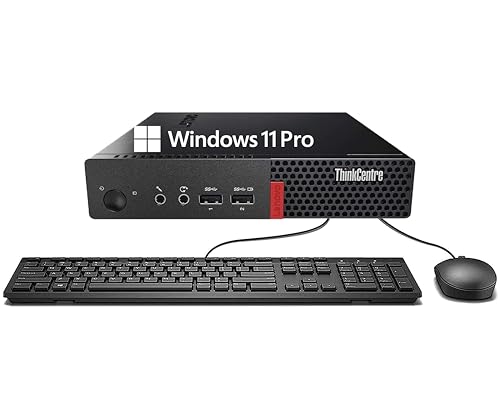
A renewed business-grade tiny desktop for far less than a new mini PC. Genuinely fine for basic office roles, but held back by a 2016-era Intel chip and no real upgrade story.
Check price on Amazon →| Processor | Intel Core i3-6100T (6th Gen, dual-core) |
|---|---|
| Memory | 8GB DDR4 |
| Storage | 256GB SSD |
| Ports | USB Type-A, DisplayPort, RJ-45 Ethernet, headphone/mic combo |
| Wireless | Wi-Fi + Bluetooth |
| Operating system | Windows 11 Pro |
| Condition | Renewed (refurbished) |
| Included | Keyboard and mouse |
The Lenovo ThinkCentre M710q is a renewed enterprise tiny desktop aimed at basic office work on a tight budget. It pairs a genuine business-grade build with a low, refurbished price, and a processor that was already old when the unit was refreshed.
This review explains what the M710q is good for, why its Renewed status is the most important thing to understand, and how it compares to the newer mini PCs selling next to it.
What the ThinkCentre M710q Is — and Who It's For
The ThinkCentre M710q is a tiny form-factor desktop from Lenovo's business line, sold here as a Renewed (refurbished) unit with Windows 11 Pro, a keyboard, and a mouse. It is designed for organizations that buy in volume and value reliability over raw speed.
It fits basic roles well: reception desks, back-office data entry, kiosks, and any seat where the work is email, web apps, and documents. It is not meant for creative work, heavy multitasking, or anything AI-related.
- Best for: basic office seats, reception and kiosk machines, and budget fleet rollouts
- Skip it if: users run heavy apps, need multiple 4K screens, or want on-device AI
Performance: Fine for the Basics, Not Much More
The M710q's 6th-generation Intel Core i3-6100T is a dual-core chip from 2016, and it performs like one. It manages web browsing, email, office documents, and single-app work smoothly, but it slows under heavy multitasking or media work.
With 8GB of RAM and a 256GB SSD, it boots fast and feels responsive for light tasks. The ceiling is low, though: this is a machine for doing one or two things at a time, not a power user's desk.
Why 'Renewed' Is the Whole Story
The single most important fact about this listing is that it is Renewed — professionally refurbished, not new. That is how a business-grade Lenovo lands at a budget price, and for basic roles it is often a smart trade.
It also sets expectations. Cosmetic wear is normal, internal components have prior use, and warranty coverage is shorter and different from a new unit's. For a fleet of light-duty seats, renewed ThinkCentres can stretch a hardware budget a long way.
Ports and Manageability
The M710q covers standard office connections: USB Type-A, DisplayPort, wired Ethernet, and a headphone/microphone jack, plus Wi-Fi and Bluetooth. It ships with Windows 11 Pro, so it can join a domain and be managed centrally.
That manageability is a real edge for IT teams, because Pro-tier Windows supports business tools like BitLocker and remote management that Home editions lack. The ThinkCentre build quality is also a known quantity, which is part of what you pay for with an enterprise brand.
Where the M710q Falls Short
The M710q's weaknesses all trace back to its age and its renewed condition. It is a capable basic machine, but it has little headroom and few modern conveniences.
- A 2016-era dual-core CPU — fine for basics, slow for heavy multitasking
- 8GB of RAM and older ports (no USB-C) with little modern upgrade appeal
- Renewed condition means shorter warranty and cosmetic wear
- Cannot run local AI models or drive demanding multi-4K creative work
Lenovo M710q vs the Alternatives
Against newer mini PCs, the M710q trades performance for price and pedigree. A GEEKOM A5 gives you a far newer AMD chip, more memory, and real upgrade room for more money; the KAMRUI models compete mainly on price.
Choose the M710q when budget and Lenovo's business-grade reliability matter more than speed. The full comparison is below.
Where to buy the Lenovo ThinkCentre M710q Tiny Desktop
A renewed business-grade tiny desktop for far less than a new mini PC. Genuinely fine for basic office roles, but held back by a 2016-era Intel chip and no real upgrade story.
Check price on Amazon →Alternatives worth comparing
If the Lenovo ThinkCentre M710q Tiny Desktop is not the right fit, these are the other mini pcs ranking alongside it right now.



Frequently Asked Questions
- For basic office work on a budget, yes. A renewed M710q delivers Lenovo's business-grade build and Windows 11 Pro at a fraction of a new mini PC's price, which is a smart trade for light-duty seats, as long as you accept an older processor.
- Yes, this listing ships with Windows 11 Pro pre-installed. Note that Microsoft's official Windows 11 hardware list excludes 6th-gen Intel chips, so future feature updates may be limited even though the system runs today.
- For basic office roles, yes. Its 6th-gen Core i3 handles email, web apps, and documents smoothly, but it struggles with heavy multitasking, media editing, or many demanding apps at once.
- No. Its 2016-era integrated graphics and dual-core CPU are not suited to local AI inference. For on-device AI, choose a mini PC with a dedicated GPU or a modern Ryzen AI chip.
Refreshing your office fleet?
Layer3 Labs helps small and mid-size businesses choose the right desktops, standardize them, and put the AI workflows that matter on top.
Book a free consultation