Mac Mini vs Windows Mini PC: Which Belongs on a Business Desk?
One question settles this before any specification does: whether your line-of-business software runs on macOS.
If any software your business depends on runs only on Windows, buy a Windows mini PC. If none does, buy a Mac mini. At Layer3Labs, we deploy desktops that run automated workflows for small teams, and the decisions we’ve been part of hinge on that one question far more often than on a specification.
On a desk, the two machines look interchangeable. A Mac mini M6 measures 2.0 by 5.0 by 5.0 inches, weighs about a pound and a half, and starts at $899. Windows mini PCs from GEEKOM, Beelink, ASUS, and Minisforum come in the same footprint but span a much wider price range.
The differences emerge after the purchase: what runs on them, what can be repaired, and how they’re managed once more than one person is involved. Those three things decide the buy far more than any benchmark does.
Mac mini M6 vs. Windows Mini PC: Side-by-Side
| Dimension | Mac mini M6 | Windows Mini PC |
|---|---|---|
| Operating system | macOS only | Windows 11, and Linux if you want it |
| Windows-only software | Needs a virtual machine and a Windows licence | Runs directly |
| Memory after purchase | Soldered to the chip package, fixed at order | Usually SO-DIMM slots you can upgrade |
| Storage after purchase | Fixed internally, external drives only | Usually M.2 slots, often two |
| Fleet management | Apple Business Manager plus an MDM service | Microsoft Intune, or existing Windows tooling |
| Warranty and support | Apple support, with AppleCare as an option | Varies widely by brand, from strong to minimal |
| Entry price | $899 | Roughly $200 to $1,000 depending on brand and specification |
| Resale value | Holds value well | Falls quickly |
| Noise and power | Near silent, low draw | Usually quiet, though fans are audible under load |
| External displays | Up to three | Commonly two to four, by model |
| Best for | Offices already on macOS, and teams that keep machines four years or more | Windows-only software, tight budgets, and fleets that get upgraded in place |
Are you one of these vendors? Update your listing
The Software Question Comes First
List the software your business cannot operate without, then check each one for a macOS version. If a single item on that list is Windows-only, the argument is over and the Windows mini PC wins, whatever the specifications say.
The usual offenders are not the famous applications. Office suites, accounting platforms, and design tools mostly run on both. What traps people is the industry-specific software: practice-management systems, dental and veterinary imaging, older inventory packages, shop-floor controllers, and anything that came bundled with a piece of hardware.
Check the peripherals with the same care. A label printer, a signature pad, a card reader, or a scanner that ships a Windows-only driver is the same problem as Windows-only software, and it usually surfaces after the machines arrive rather than before.
- Line-of-business software: check every item, not the well-known ones.
- Peripherals: printers, scanners, signature pads, card readers, and dongles all carry drivers.
- Anything with a hardware key or a serial-port connection is a Windows answer more often than not.
Running Windows on a Mac Mini Costs More Than a Licence
A Mac mini can run Windows in a virtual machine, and that path adds three things to your bill rather than one. Parallels Desktop describes itself as the only solution authorized by Microsoft to run Windows 11 on Apple silicon, and its Business and Enterprise editions are the ones a company buys.
The version matters as much as the price. What runs on Apple silicon is the Arm version of Windows 11 Pro or Enterprise, so ordinary x86 applications run through emulation rather than natively. Most behave, and the ones that do not tend to be exactly the older, specialised programs a small business is stuck with.
Then there is support. When something breaks in that stack, you are working out whether the problem sits with the application vendor, with Parallels, with Microsoft, or with the Mac, and none of those four will own it for you. For one occasional application that is a fair trade. For the system your team lives in all day it is not.
What Happens in Year Three
Memory and storage are fixed on a Mac mini and usually replaceable on a Windows mini PC. Apple builds unified memory into the chip package, so a 16GB machine stays a 16GB machine for its whole life, and the internal drive is not something a business swaps either.
Most Windows mini PCs take standard SO-DIMM memory modules and M.2 solid-state drives, often two of the latter. A machine that has run short of memory after three years takes an upgrade that costs a fraction of a new computer and half an hour of somebody's time.
That flexibility cuts both ways in practice. A fleet that gets upgraded in place stays useful longer and gets messier to manage, because no two machines end up with the same specification. A fleet of Macs stays uniform and gets replaced rather than repaired. Which of those you prefer says more about how your business runs than about either machine.
- Mac mini: buy the memory you need at the order page, because there is no second chance.
- Windows mini PC: buy less now and add memory later, at the cost of fleet consistency.
- Both: storage is easy to extend externally over USB or Thunderbolt.
Managing More Than One of Them
Each platform has a management path, and the cost of running both at once is the part businesses underestimate. Macs go into Apple Business Manager and then to a mobile device management (MDM) service, which pushes settings, installs software, and holds the FileVault recovery key.
Windows machines go to Microsoft Intune, or to whatever directory and policy tooling the business already uses. If your office is already running Windows machines and Windows tooling, adding one Mac means a second console, a second patching process, and a second set of steps for whoever answers the support question.
The reverse holds too. An office already standardized on Apple hardware, with an MDM in place and someone who knows it, adds real work by introducing one Windows box. Neither platform is harder in the abstract. The second one you adopt is always the expensive one.
What Three Years Costs
Compare the configured price and the exit, not the sticker. A Windows mini PC can start under $300 and a Mac mini starts at $899, and by the time both are specified with the memory a working desk needs, the gap narrows without closing.
Two lines move the total after that. Resale value on a Mac mini stays high enough that the machine is worth selling at the end, while a three-year-old budget mini PC is usually worth keeping as a spare rather than listing. Warranty is the other line. Apple support is consistent, while cover across the mini PC brands runs from good to almost nothing. Our roundup of the best AI mini PCs for business says which brands back their machines.
Running costs favour both machines and separate neither. Each draws little power and sits quietly on a desk, so a machine left on all year is not a line anyone notices on the bill.
Where the Mac Mini Wins Outright
Three situations favour the Mac mini regardless of price. The first is an office already running iPhones, iPads, and Macs, where shared accounts, message handoff, and a single management console are already in place and the Mac mini simply joins them.
The second is longevity. Businesses that keep desktops four or five years get more of those years out of a Mac mini, provided the memory was ordered generously on day one. The machine that ages badly is the one bought at the base configuration, on either platform.
The third is quiet. A Mac mini in an occupied room is effectively silent, which matters for a reception desk, a therapy room, a recording setup, or any office where a fan spinning up is a distraction. Windows mini PCs are quiet too, and under sustained load most of them are audible.
Who Should Buy Which
Buy the Windows mini PC if any critical software or peripheral is Windows-only, if the budget is tight, if you plan to upgrade memory in place, or if the business already runs Windows management tooling. Those four cases cover most small offices we see, and none of them is a compromise.
Buy the Mac mini if the office already runs on Apple hardware, if the machines will be kept four years or more, if silence matters in the room, or if a private AI model is going to live on one of the desks. Unified memory gives that last job a shape a Windows mini PC handles differently, and we work through it separately in best AI mini PCs for business.
Anyone genuinely undecided should run the software list first and let it decide. If the list comes back clean, price the Mac mini against a well-supported Windows mini PC at the same memory tier, and pick on how long you intend to keep the machine.
What to Buy
Here are the machines this page is about, with our full review of each and a link to the current listing. We have written up every one of them in depth, so the table is a shortcut rather than the whole argument: read the review before you order, because the platform your office standardizes on is a decision you live with for years.
| Machine | Best for | Our review | Buy |
|---|---|---|---|
| Apple Mac mini (M6, 2026) | The macOS side. Pick it when nothing your business runs is Windows-only. | Read the review | Check price on Amazon |
| GEEKOM A8 Mini PC | The Windows side. A fast Ryzen box that runs Windows-only software directly and takes more memory later. | Read the review | Check price on Amazon |
| GEEKOM 2026 Business Bulk Choice Mini PC A7 | The fleet option, for buying several identical machines for a team at once. | Read the review | Check price on Amazon |

The macOS side. Pick it when nothing your business runs is Windows-only.
View on Amazon →
The Windows side. A fast Ryzen box that runs Windows-only software directly and takes more memory later.
View on Amazon →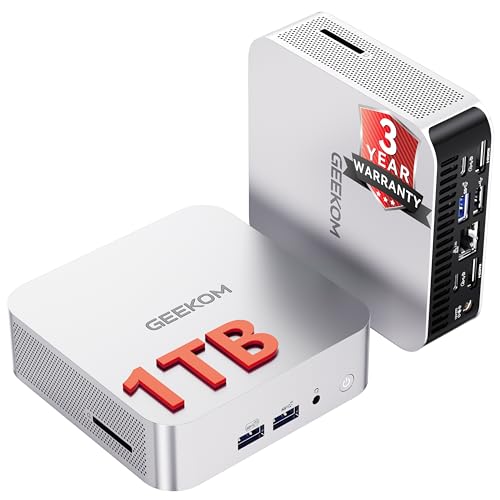
The fleet option, for buying several identical machines for a team at once.
View on Amazon →The Verdict
Your software list decides this, not the hardware. One Windows-only application or one Windows-only driver makes a Windows mini PC the right buy, and no amount of virtualization makes that a comfortable arrangement for software a team uses all day.
With a clean software list, the Mac mini is the better machine for an office that keeps hardware a long time, already runs Apple gear, or wants a silent desk. The Windows mini PC is the better machine for a tight budget, an upgradeable fleet, or a business whose management tooling is already Microsoft.
What would change this answer is the emulation layer. If Arm versions of Windows reach the point where specialised x86 software and its drivers run without incident, the software list stops being decisive and the comparison becomes an ordinary one about price and upgradeability. That is not where things stand today, so write down the software your business cannot operate without, and let that list pick the platform.
Researched from primary Apple documentation and public regulator sources. Pricing and availability are accurate as of Sep 9, 2026 and can change — confirm current terms with each vendor before you buy.
Frequently Asked Questions
- Neither is better in general, and the software you run decides it. A Mac mini is quieter, holds resale value, and lasts longer in an Apple office. A Windows mini PC runs Windows-only software directly, costs less to start, and can usually take more memory later. Check your line-of-business applications before comparing anything else.
- A small-form-factor Windows machine from GEEKOM, Beelink, ASUS, or Minisforum sits in the same footprint and price territory. The practical difference is that most of them accept SO-DIMM memory and M.2 drives after purchase, where the Mac mini does not. Our best AI mini PCs for business roundup ranks the current options.
- Through a virtual machine, yes, with limits worth knowing. Parallels Desktop describes itself as the only solution authorized by Microsoft to run Windows 11 on Apple silicon, and what runs is the Arm version of Windows 11 Pro or Enterprise, so x86 applications go through emulation. Add a Windows licence, a Parallels subscription, and a support path with four vendors in it before treating this as a solved problem.
- Memory and storage cannot be changed after purchase, and macOS will not run Windows-only software directly. A 16GB machine bought today is a 16GB machine in four years, which is why the order page is the only place that decision gets made. Everything else about it suits a business desk well.
- Usually the Windows mini PC on purchase price, and the gap narrows once both are specified with real memory. A Mac mini holds resale value at the end and comes with consistent support, while mini PC warranties vary sharply by brand. If a Windows licence and a virtualization subscription enter the Mac side of the comparison, the Windows machine wins clearly.
- Yes, and it costs more to manage than either alone. Each platform needs its own management console, patching process, and support knowledge, so mixing them adds work that scales with the number of machines. Pick one platform for the fleet and treat exceptions as exceptions.
Pick the platform on the software your team runs
At Layer3Labs, we specify and deploy the desktops behind automated workflows for small teams. Send us the list of software your business depends on, and we will tell you which platform it points to.
Book a Consultation