CMTECK Conference USB Microphone Review: A Budget Pickup Mic
A cheap 360-degree USB conference microphone with a mute button — but no speaker, so you pair it with your own audio out. Here is exactly where it fits.
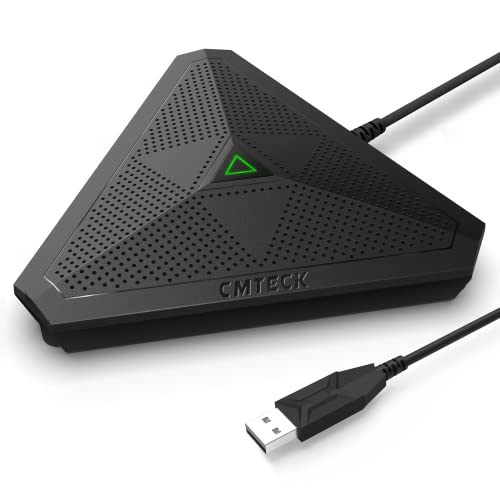
A genuinely inexpensive omnidirectional conference microphone with a handy mute button. Just know what it is: a pickup mic with no speaker, best paired with headphones or separate speakers, not a standalone speakerphone.
Check price on Amazon →| Microphone | Omnidirectional, 360-degree pickup, up to 3m / 10ft |
|---|---|
| Speaker | None — microphone only (no built-in speaker) |
| Connection | USB wired, plug and play, 1.8m / 6ft cable |
| Compatibility | Windows and macOS (not Raspberry Pi or Android) |
| Controls | Mute button with status LED (green connected, flashing green live, red muted) |
| Processing | CMTECK CCS2.0 smart chip — noise blocking and echo cancellation |
| Warranty | 24-month warranty, 30-day return |
The CMTECK conference USB microphone is a budget pickup mic, not a full speakerphone — it captures voices in a 360-degree pattern and plugs into a computer over USB, but it has no built-in speaker at all. That single fact decides whether it fits your meetings, so this review leads with it rather than burying it.
This review covers what the CMTECK does well, the hard limits set by its microphone-only design, and how it compares to the true speakerphones selling alongside it. Every spec below comes from the manufacturer listing.
What the CMTECK Microphone Is — and Who Should Buy It
The CMTECK is a standalone USB conference microphone, meaning it does one job: it captures the voices in a room and sends them to your computer. It is not a speakerphone, because a speakerphone also plays the far end's audio out loud, and this device has no speaker of any kind.
It suits a specific setup: one person or a small huddle at a desk, using headphones or the computer's own speakers to hear the call, who just want a better microphone than a laptop's built-in mic. For that person it is an inexpensive upgrade. It is the wrong tool if you want one box that both listens and talks for a room.
- Best for: a solo desk user or small huddle who already has headphones or desktop speakers
- Also good for: podcasting, interviews, and recording where you monitor with headphones
- Skip it if: you need one device that both picks up and plays audio for a meeting room
Mic Pickup: 360-Degree Coverage for a Small Space
The CMTECK uses an omnidirectional capsule that picks up sound from every direction within about 3 meters, or 10 feet. That is enough to catch a couple of people seated around a desk, and CMTECK says it captures far more clearly than a typical built-in computer microphone.
A built-in CCS2.0 smart chip handles noise blocking and echo cancellation, so keyboard clicks and steady background hum are reduced before your voice reaches the call. Coverage is modest by design — this is a personal and small-huddle mic, not a boardroom array that reaches across a long table.
The Mute Button and Status Light
The most useful everyday feature is the physical mute button, with a color-coded LED that tells you your state at a glance. Green means connected, a flashing green means the mic is live, and red means you are muted.
That instant visual confirmation matters on real calls, where software mute buttons are easy to lose track of. A tap on the hardware and a glance at the light is faster and more reliable than hunting for the mute control in a meeting app.
- One-touch hardware mute and unmute, independent of your meeting software
- LED status: green connected, flashing green live, red muted
- Pocket-sized and portable, with a 6-foot USB cable
Connectivity: Simple USB, with a Couple of Catches
The CMTECK connects over a single USB cable and is plug and play, so there are no drivers to install. It works with Windows and macOS and slots into meeting apps as a standard USB microphone.
Two limits are worth noting before you buy. CMTECK states it is not compatible with Raspberry Pi or Android, so it is a computer accessory, not a mobile or single-board one. And because it is USB-only with no Bluetooth, it stays tethered to the machine it plugs into.
Where the CMTECK Falls Short
The defining limit is not a flaw so much as the product category: with no speaker, the CMTECK cannot run a meeting on its own. Everyone in the room either shares the computer's speakers or the call is a headphones-on affair, which does not scale past one or two people.
- No built-in speaker — you must supply headphones or separate speakers for audio out
- About 10 feet of pickup, so it is a personal and small-huddle mic, not a boardroom device
- USB only, no Bluetooth, and not compatible with Android or Raspberry Pi
CMTECK vs the Alternatives
Against the true speakerphones on this shelf, the CMTECK plays a different game. The EMEET, Anker, and Yealink units below are complete speakerphones with both microphones and speakers built in, so any of them can run a room call by itself, which the CMTECK cannot.
The trade is price and purpose. If all you need is a better microphone for a desk where you already wear headphones, the CMTECK is the cheapest way there. If you need one device to both hear and be heard around a table, choose one of the speakerphones in the comparison set below.
Where to buy the CMTECK Conference USB Microphone with Mute Button
A genuinely inexpensive omnidirectional conference microphone with a handy mute button. Just know what it is: a pickup mic with no speaker, best paired with headphones or separate speakers, not a standalone speakerphone.
Check price on Amazon →Alternatives worth comparing
If the CMTECK Conference USB Microphone with Mute Button is not the right fit, these are the other conference speakerphones ranking alongside it right now.


Frequently Asked Questions
- It is just a microphone. CMTECK states clearly that this device has no built-in speaker and is designed solely to capture audio. To hear the other side of a call, you pair it with headphones or separate computer speakers — it cannot play audio on its own like a true speakerphone.
- No. There is no speaker of any kind. It is a pickup microphone only, so it handles the 'talk' side of a call but not the 'listen' side. You supply your own audio output through headphones or desktop speakers.
- Up to about 3 meters, or 10 feet, in a 360-degree pattern. That is enough for one person or a small huddle around a desk, but it is not built to cover a large conference table where speakers sit far from the mic.
- It is plug and play over USB with Windows and macOS, and needs no drivers. CMTECK notes it is not compatible with Raspberry Pi or Android, so treat it as a desktop and laptop accessory rather than a mobile device.
- Yes. It has a physical mute button with a status LED — green when connected, flashing green when live, and red when muted — so you can confirm your state at a glance without checking your meeting software.
Setting up conference audio across your team?
Layer3 Labs helps small and mid-size businesses choose, standardize, and deploy the right meeting hardware, and the workflows that run on it.
Book a free consultation