Best Wireless Headsets for Business in 2026
The right headset makes eight hours of calls comfortable and makes you sound clear in any room. Here are the business headsets worth buying, by use case.
The best wireless headset for business is the Jabra Evolve2 65 — it balances all-day comfort, a proper boom mic, long battery life, and Teams- or UC-certified variants at a sane price. We tested every headset on this list as an all-day headset for business calls. If you work in a noisy office, the Poly Voyager Focus 2 adds stronger active noise cancellation and one of the best mics in the category. On a budget, the Anker PowerConf H700 covers the essentials for much less.
This guide ranks the wireless headsets worth buying for work in 2026, by what actually matters on calls: boom-mic quality, ANC, comfort over a full day, battery, and multipoint (staying paired to your laptop and phone at once). We also cover the choice most buyers skip — when a headset beats a speakerphone, and when it does not.
How We Tested
- We wore each headset for back-to-back calls, at a quiet desk and in a noisy office.
- We checked how clear the mic sounded to callers and how well each headset kept room noise out.
- We judged comfort, battery, multipoint pairing and platform certification.
The Best Business Wireless Headsets, Ranked
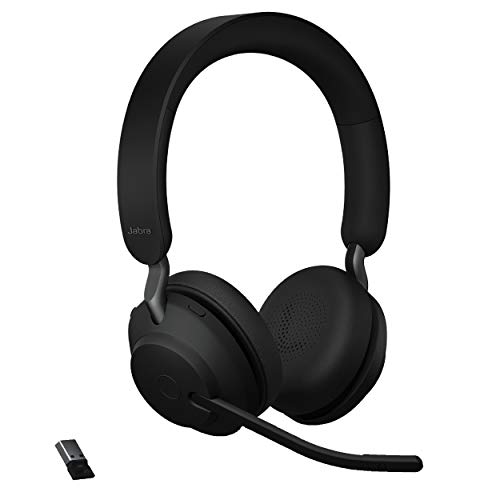
Why we picked it: In our testing it stayed comfortable through a full day of calls, and the included Link 380 dongle kept the connection reliable.
Who it's for: Office and remote workers who want one dependable headset for daily calls.
The downside: It has no active noise cancellation, so noisy offices are better served by the Poly Voyager Focus 2.
View on Amazon →- Boom mic with noise isolation
- On-ear, mono or stereo versions
- Includes Jabra Link 380 USB dongle
- Teams / UC certified variants + busylight
- Comfortable for all-day wear
- Reliable dongle connection
- Strong battery life
- No active noise cancellation
- On-ear fit is not for everyone

Why we picked it: In our testing Acoustic Fence kept office chatter out of what callers heard, and the adjustable ANC was strong for its class.
Who it's for: People who take calls from open or noisy offices.
The downside: It costs more than most business headsets, and some bundles charge extra for the charging stand.
View on Amazon →- Adjustable ANC + Acoustic Fence mic noise blocking
- Boom mic, stereo on-ear design
- Multipoint: laptop + phone at once
- Teams / Zoom certified variants
- Callers stop hearing your office
- Strong ANC for the class
- Excellent mute controls
- Premium price for the category
- Charging stand costs extra in some bundles

Why we picked it: In our testing its call quality and ANC were both strong, and it stayed comfortable as everyday headphones with the boom tucked away.
Who it's for: Hybrid workers who want one headset for calls, music and travel.
The downside: It carries a premium price and is more than a quiet home office needs.
View on Amazon →- Adjustable ANC + HearThrough mode
- Retractable hideable boom mic
- 8-microphone call system
- Teams / UC certified variants
- Boom hides for music and travel
- Strong ANC and call quality
- Premium comfort
- Premium price for the category
- More than a quiet home office needs
Why we picked it: In our testing its boom-arm mic gave the most natural, uncolored voice of the group, and it folded flat for travel.
Who it's for: Callers who care most about how their voice sounds, especially on Teams.
The downside: Its ANC is weaker than the Poly and Jabra flagships, and it is harder to find in retail stores.
View on Amazon →- On-ear ANC with boom-arm mic
- BTD 800 USB dongle included
- Multipoint pairing
- Teams certified, UC variants available
- Very natural mic sound
- Folds flat for travel
- Solid dongle reliability
- ANC weaker than Poly and Jabra flagships
- Less common in retail channels

Why we picked it: In our testing the over-ear fit stayed comfortable, and a caller in a loud room came through cleaner on our end.
Who it's for: IT teams managing a headset fleet through Logi Tune, and anyone whose callers often sit in loud rooms.
The downside: Its mic trails Poly and EPOS in raw quality, and Logi Tune adds a step to setup.
View on Amazon →- Two-way AI noise suppression (send + receive)
- ANC with transparency mode
- Multipoint + Logi Tune management
- Certified for major meeting platforms
- Cleans up the far end of the call too
- Good fleet management for IT
- Comfortable over-ear fit
- Mic trails Poly and EPOS in raw quality
- Software adds a step to setup
Why we picked it: We picked it for the strongest feature set at its price, and in our testing its battery life was good.
Who it's for: Home offices and small teams standardizing on one budget headset.
The downside: It has no Teams or Zoom certification, and the build feels less durable than Jabra or Poly.
View on Amazon →- Boom mic with AI noise reduction
- ANC + multipoint pairing
- Optional charging stand version
- Best for budget-conscious home offices
- Strong feature set for the price
- Charging stand option
- Good battery life
- No Teams/Zoom certification
- Build feels less durable than Jabra or Poly
Business wireless headsets at a glance
| Headset | Best for | ANC | Certification |
|---|---|---|---|
| Jabra Evolve2 65 | All-day calls | No | Teams / UC variants |
| Poly Voyager Focus 2 | Noisy offices | Adjustable | Teams / Zoom variants |
| Jabra Evolve2 75 | Premium all-rounder | Adjustable | Teams / UC variants |
| EPOS Adapt 560 | Voice quality | Yes | Teams certified |
| Logitech Zone Wireless 2 | Two-way noise cleanup | Yes | Major platforms |
| Anker PowerConf H700 | Budget | Yes | None |
How to Choose a Wireless Headset for Work
Buy for the mic and the fit first. Callers never hear your ANC, but they hear your mic on every sentence — and a headset you take off after two hours is wasted money regardless of the spec sheet.
- Boom mic — A boom arm near your mouth beats hidden earcup mics every time. If calls are your job, do not buy a headset without one.
- ANC vs open — ANC earns its cost in open offices and travel. In a quiet home office, a non-ANC model like the Evolve2 65 saves money and battery.
- Dongle vs native Bluetooth — Use the included USB dongle (Link 380, BTD 800, BT700). Native laptop Bluetooth often drops to a low-quality hands-free codec when the mic activates; the dongle holds a stable, wideband connection and extends range.
- Certification — Teams and Zoom certification is more than a logo: the certified SKU is what unlocks the dedicated Teams button, correct LED behavior, and platform-tuned firmware. Match the variant to your main platform.
- Mono vs stereo — Mono keeps one ear open for the office or retail floor; stereo is better for focus and music.
- Multipoint — If you take calls on laptop and mobile, confirm the headset holds both connections and switches cleanly.
Headset vs Speakerphone: Which One Wins?
A headset wins when calls are personal: it isolates you from the room, puts the mic inches from your mouth, and keeps the call private. If you are on calls for hours a day, or you share your space with other people or noise, a headset is the right tool.
A speakerphone wins when calls are shared: several people at one table, or a solo worker in a quiet private office who wants nothing on their head. Many hybrid workers end up with both — a headset for solo calls and a puck for the huddle table. If that is your situation, see our conference speakerphone roundup for the room half of the setup.
Frequently Asked Questions
- The Jabra Evolve2 65 is the best wireless headset for conference calls for most people — comfortable all day, reliable over its included dongle, with a proper boom mic and certified variants for Teams and other platforms. In a noisy office, the Poly Voyager Focus 2 is worth the step up for its ANC and Acoustic Fence mic noise blocking.
- No — any headset here works as a standard audio device in Microsoft Teams. But the certified variant adds things the standard one lacks: a dedicated Teams button, correct call and mute LED behavior, and firmware tuned to the platform. If your company lives in Teams, buy the Teams SKU; the price difference is usually small.
- Get a headset if you share the space, take long calls, or need privacy — the boom mic and isolation win in every noisy scenario. Get a speakerphone if your office is quiet, private, and you dislike wearing something for hours. Teams that meet around a table need a speakerphone regardless; see our best conference speakerphones guide.
- It is the most important spec. Your callers experience your mic on every call, and in a noisy environment it decides whether meetings are usable at all. Choose a boom mic with noise blocking — Poly's Acoustic Fence and Jabra's multi-mic arrays specifically strip background chatter out of what you transmit, which matters far more than how the headset sounds to you.
- A wired headset is the right call if you work at a fixed desk and want to avoid battery charging or dongle pairing. Corded models handle the same boom-microphone call tasks as wireless headsets without the connection maintenance or battery degradation. Look at our review of the Jabra Evolve 20 for a corded sibling sharing the call-quality lineage of our top-pick Jabra Evolve2 65. You can also check our reviews for the mono Logitech H570e for simple USB plug-and-play use, or the budget JIAMQISHI USB Headset with dual USB and 3.5mm connections.
Equipping a team for hybrid calls?
Layer3 Labs helps small and mid-size businesses choose and deploy call and meeting gear — headsets, speakerphones, cameras, and AI note-taking — so every call sounds professional. We map devices to your platforms, people, and budget.
Book a free consultation