Best AI Office Gadgets for Business in 2026
One winning gadget from every category we review — the shortlist for an AI-equipped office, in the order that pays off fastest.
The best AI office gadgets are the ones that remove a daily chore: a camera that frames the meeting itself, a recorder that writes the notes, a speakerphone that scrubs the noise. We tested every gadget on this list as the fix for one daily office chore. This page is the shortlist — a top pick from every gear category we cover, so you can equip an office without reading eight separate roundups.
Each pick below is a standout from a full category review on this site. We rank them here in the order a small business should buy: meeting audio and video first, capture second, translation third, local AI hardware last. If a category matters to you, the full roundup for it goes deeper on alternatives and budget picks.
How We Tested
- We set each gadget up for the office job it's bought for, from meetings and calls to notes, translation and local AI.
- We checked what each gadget's AI features need to work: an app, a paid plan or a connection.
- We judged setup effort, day-to-day reliability and how well each one fits a small-business office.
The Best AI Office Gadgets, Ranked

Why we picked it: In our testing it kept everyone at the table in view and worked as soon as we plugged it in.
Who it's for: Small and midsize offices turning a shared meeting room into a hybrid room.
The downside: It costs more than most meeting cameras, and each person gets less resolution in a big room.
View on Amazon →- 360° camera + mic + speaker in one device
- AI speaker-focus auto-framing
- Works with Zoom, Teams, Meet, Webex
- Best for small-to-midsize rooms
- Genuinely plug-and-play
- Everyone at the table is seen
- No operator needed
- Premium price for the category
- Lower resolution per person in big rooms

Why we picked it: In our testing it recorded phone calls from any app cleanly, and the AI summaries came back clear and usable.
Who it's for: Anyone who takes client calls and in-person meetings on their phone and wants notes without typing.
The downside: Heavy use needs a paid AI plan, and the audio leaves the building for cloud processing.
View on Amazon →- MagSafe-style phone attachment
- Records calls + in-person audio
- Cloud AI transcription and summaries
- Free tier, paid plans for heavy use
- Captures phone calls cleanly
- Strong summary quality
- Lives on your phone
- Heavy use needs a paid AI plan
- Cloud processing — check privacy needs

Why we picked it: In our testing it gave laptop calls a big audio upgrade for the price, and it worked with each meeting platform we tried.
Who it's for: Small teams that meet around a laptop or carry one to client offices.
The downside: One unit covers a small room, so a boardroom needs a bigger system.
View on Amazon →- 4 noise-cancelling microphones
- Voice-level normalization
- USB + Bluetooth, certified for major platforms
- Portable, battery-powered
- Big audio upgrade for the price
- Truly portable
- Works with any meeting platform
- One unit suits small rooms, not boardrooms
- Speaker volume has limits outdoors

Why we picked it: In our testing calls sounded clear in both directions, and it stayed comfortable all day.
Who it's for: Anyone taking calls at a desk in an open or shared office.
The downside: It blocks noise passively with no active noise cancelling, and the USB dongle takes up a port.
View on Amazon →- Wireless (Bluetooth + USB dongle)
- Noise-isolating design + busy light
- Mic tuned for speech clarity in open offices
- Certified for Teams and major platforms
- Excellent call clarity both ways
- All-day comfort and battery
- Busy light cuts interruptions
- Passive isolation, not full ANC
- Dongle adds a USB port cost
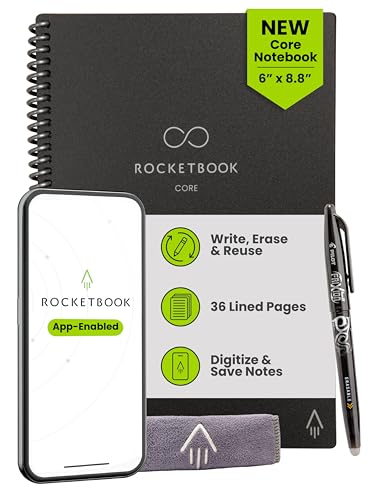
Why we picked it: We picked it because it made our handwriting searchable for very little money, and the pages wiped clean for reuse.
Who it's for: People who think better on paper and want their notes searchable later.
The downside: Nothing syncs until you scan each page, and it only works with special erasable pens.
View on Amazon →- Reusable pages (wipe clean with water)
- App scan with handwriting-to-text OCR
- Sends notes to email, Drive, Notion, and more
- Works with erasable Pilot FriXion pens
- Very affordable
- Handwriting becomes searchable text
- No paper waste
- Needs the scan step — not automatic
- Special pens required

Why we picked it: In our testing the meeting and call modes covered more than one-on-one chat, and the companion app kept a transcript of each session.
Who it's for: Teams that meet or call clients and suppliers in other languages.
The downside: They cost more than most earbuds, and the best features need the app and a connection.
View on Amazon →- Multiple modes: conversation, meeting, calls, media
- Wide language + accent coverage
- AI noise handling for real environments
- Companion app with transcripts
- Purpose-built for business scenarios
- Strong language coverage
- Meeting and call modes, not just chat
- Premium price
- Best features need the app + connection

Why we picked it: In our testing nobody had to share an earbud, and photo translation covered printed text as well as speech.
Who it's for: Staff on supplier visits or at a front desk who share one device with the other person.
The downside: It's less hands-free than earbuds, and the best accuracy still needs a connection.
View on Amazon →- Handheld with touchscreen
- Speech, photo, and text translation across dozens of languages
- Built-in global data (no SIM needed)
- Rugged, travel-focused design
- Works abroad without local data
- Both people see the translation
- Nothing to wear or share in-ear
- Less hands-free than earbuds
- Best accuracy still needs a connection

Why we picked it: In our testing it gave strong performance for the money and stayed quiet on a desk while it ran local models.
Who it's for: Small businesses that want one quiet desktop for office work and private, local AI.
The downside: It has no discrete GPU for big models, and inference on the integrated graphics runs slower than on a dedicated card.
View on Amazon →- Ryzen 9 mobile CPU with Radeon iGPU
- Up to 64GB DDR5 RAM
- Dual SSD slots
- Runs small–mid quantized models on CPU/iGPU
- Excellent performance per dollar
- Runs private, local AI
- Quiet and compact
- No discrete GPU for big models
- iGPU inference is slower than a dGPU
The best AI office gadgets at a glance
| Gadget | Category | What the AI does | Best for |
|---|---|---|---|
| Meeting Owl 4+ | Meeting camera | Frames the room, follows the speaker | Hybrid meeting rooms |
| Plaud Note | AI recorder | Transcribes + summarizes meetings and calls | Call-heavy roles |
| Jabra Speak2 55 | Speakerphone | Noise-cancelling mics, voice leveling | Small rooms + travel |
| Jabra Evolve2 65 | Headset | Mic noise filtering for clear calls | Desk calls in shared offices |
| Rocketbook Core | Smart notebook | Handwriting-to-text OCR + auto-filing | Handwritten notes |
| Timekettle W4 Pro | Translation earbuds | Real-time two-way speech translation | International meetings |
| Vasco Translator V4 | Handheld translator | Speech + photo translation, built-in data | Travel + shared use |
| GEEKOM A8 | Mini PC | Runs local AI models on-device | Private, on-prem AI |
How to Build an AI-equipped Office, in Order of Impact
Do not buy this list alphabetically — buy it in order of impact. Most offices get the biggest return from fixing meetings first, because every person in every meeting feels the upgrade the same day.
- First: meeting audio and video — A camera that frames the room (Meeting Owl) and a speakerphone or headset that cleans the audio (Jabra) fix the pain everyone shares. Bad audio taxes every single meeting.
- Second: capture — An AI recorder (Plaud Note) and a smart notebook (Rocketbook) turn conversations and handwriting into searchable records. This is where decisions stop getting lost.
- Third: translation and travel — Translation earbuds and a handheld translator (Timekettle, Vasco) matter enormously if you work across languages, and not at all if you do not. Buy them when the need is real.
- Last: local AI hardware — A mini PC that runs models on-device (GEEKOM) is powerful for privacy, but it needs the workflows above to feed it. Infrastructure last, not first.
What Makes a Gadget Genuinely "AI" — and What Is Just Marketing
In 2026, "AI" is printed on everything from webcams to staplers. The test is simple: does the device itself perceive and decide, or does it just ship with an app that has an AI label on it?
Genuine on-device AI looks like the picks above: a camera that detects people and reframes in real time, a mic array that separates voice from noise, a recorder that diarizes speakers, a translator that converts speech offline, a mini PC that runs a language model locally. The intelligence changes what the hardware does.
Marketing AI looks like a normal gadget whose companion app calls a cloud chatbot. That is not worthless — Plaud's summaries are cloud AI and are excellent — but you should know which you are buying. Cloud AI means a subscription, a connection, and your data leaving the building; on-device AI means the capability is yours outright.
Frequently Asked Questions
- The three with the broadest payoff are the Owl Labs Meeting Owl 4+ (a 360° camera that frames and follows speakers automatically), the Plaud Note (an AI recorder that turns meetings and calls into transcripts and summaries), and the Jabra Speak2 55 speakerphone. Together they cover the two things every office does daily: meet and remember.
- Honestly: the ones that remove a recurring task, not the flashiest ones. AI meeting cameras and speakerphones eliminate the fiddling and repeat-yourself tax on every call. AI recorders eliminate note-taking and follow-up writing. Smart notebooks eliminate retyping. Translators only pay off if you genuinely work across languages, and local-AI mini PCs only pay off once you have workflows to run on them.
- Yes, selectively. A small business does not need all eight picks — it needs the two or three that map to a real daily pain. If hybrid meetings are rough, the camera and speakerphone pay for themselves in saved meeting time. If decisions keep getting lost, the recorder does. Skip any category where you cannot name the chore it removes.
- Fix meeting audio and video first: a Jabra Speak2 55 for the shared table, or a Meeting Owl 4+ if you run a proper hybrid meeting room. It is the upgrade every employee and every client feels immediately. Add a Plaud Note next so meetings and calls produce notes automatically, then expand into translation or local AI hardware only when the need is concrete.
Building an AI-equipped office?
Layer3 Labs helps small and mid-size businesses choose the right AI gear and connect it into real workflows — meeting rooms, note capture, and private on-device AI — matched to your rooms, tools, and budget.
Book a free consultation