GMKtec G5S Mini PC Review: Basic Office Tasks Only
A budget Intel Celeron mini PC built for browsing and office apps. It is not built for AI work of any kind.

The GMKtec G5S is a low-cost mini PC for the lightest office tasks. Its Celeron N5095 chip and soldered 8GB of memory rule out AI work of any kind. They also limit how much real multitasking it can handle. Buy it for a single, light role, not as an all-purpose desktop.
Check price on Amazon →| Processor | Intel Celeron N5095 (4-core, 4-thread, up to 2.9GHz burst) |
|---|---|
| Graphics | Intel UHD Graphics (integrated) |
| Memory | 8GB LPDDR4 2400MT/s, onboard and not upgradeable |
| Storage | 128GB M.2 2242 SATA SSD (1x PCIe Gen3 x2 NVMe/SATA slot for expansion, up to 8TB) |
| Displays | Dual display via 2x HDMI 2.0, up to 4K at 60Hz |
| Connectivity | Wi-Fi 6, Bluetooth 5.2, Gigabit Ethernet, USB-A 3.2 Gen1 ports |
| Power | USB-C 12V/3A input, 36W adapter included, up to 10W peak power draw |
| Dimensions & weight | 2.83 x 2.83 x 1.75 in, about 0.45 lbs (7.27 oz) |
| Warranty | 1-year limited warranty (GMKtec) |
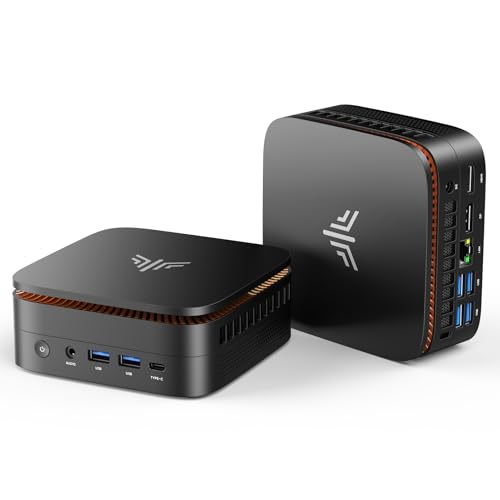
The GMKtec G5S is a palm-sized mini PC. It is built around Intel's entry-level Celeron N5095 processor.
It targets the lightest computing jobs. Think web browsing, email, video calls, and basic office documents, not heavy workloads.
This review covers what the G5S can do and what it cannot. Every claim comes from GMKtec's own product listing, not from a lab test.
It also compares the G5S to the other mini PCs selling in the same lineup. That way you can see where it fits, and where a different machine makes more sense for your team.
What the GMKtec G5S Is Built For
The G5S is a compact desktop, about the size of a deck of cards. It runs on the Intel Celeron N5095. That chip has four cores and four threads, with a burst speed up to 2.9GHz.
GMKtec markets the G5S for office work, online classes, video meetings, and media streaming. The listing also mentions POS systems and digital signage. Those are light, steady workloads, not demanding ones.
This makes the G5S a tool for one job at a time. It is not built to juggle many heavy programs at once. GMKtec does not position it that way either.
Among mini PCs aimed at growing businesses, the G5S sits at the entry level. It is meant for the simplest desks in the building, not the ones running the business.
The video-meeting use case is worth a second look. A webcam call with a shared screen is a light load for most modern chips, including this one.
- Best for: reception desks, kiosks, digital signage, and single-purpose browsing stations
- Also good for: students and light home-office use where budget matters most
- Skip it if: you need any form of AI, video editing, or heavy multitasking
Performance: What the Celeron N5095 Can Actually Do
The Celeron N5095 is Intel's entry tier. It is built for efficiency, not speed. Four cores and four threads handle one task stream well, but slow down fast under multiple demanding programs.
Everyday jobs are fine. Loading a webpage, typing in a document, or joining a video call will not tax this chip. Opening a dozen browser tabs and a spreadsheet at the same time will.
Intel UHD Graphics is built into the chip. It plays back video smoothly and handles basic desktop graphics. It has no dedicated AI hardware and no meaningful 3D power.
The mini PC category now includes machines built for local AI work, with dedicated GPUs or NPUs on board. The G5S is not one of them, and it never claims to be.
For a business weighing AI-ready hardware against a basic office desktop, the line is simple to draw. The G5S belongs in the second group, not the first. Buy it for kiosks, browsing, and light documents, and buy a different machine entirely for any AI project.
That split matters when assigning desks or roles. Give the G5S to seats that browse, type, and take calls. Save a stronger machine for any seat that edits, renders, or crunches data.
Memory and Storage: The Biggest Limitation
The G5S ships with 8GB of LPDDR4 memory, running at 2400MT/s. That memory is soldered to the board. It cannot be upgraded later, so what you buy is what you get for the life of the machine.
8GB is enough for a browser, an email client, and one office document open at a time. Push past that, with more tabs or more apps, and the machine will start to feel slow.
Storage is a 128GB M.2 2242 SATA SSD. That covers an operating system, a browser, and a handful of office apps. It leaves little room once files start to pile up.
GMKtec includes one PCIe Gen3 x2 NVMe and SATA SSD slot for adding storage later. Buyers can expand it up to 8TB. That slot helps offset the small starting drive, at least for storage, if not for memory.
Buyers coming from a modern laptop with 16GB of memory or more should expect a step down here. That tradeoff comes with choosing an entry-level machine built around a Celeron chip.
Ports, Displays, and Connectivity
Two HDMI 2.0 ports support dual displays, at up to 4K and 60Hz. That is useful for a simple two-screen setup, like email on one side and a spreadsheet on the other.
Networking covers Wi-Fi 6, Bluetooth 5.2, and Gigabit Ethernet. The wired connection is worth using in an office, since it is more stable than Wi-Fi for daily work.
Rounding out the ports are USB-A 3.2 Gen1 connectors and a 3.5mm combo audio jack. There is also SD card support up to 256GB, plus a security lock slot for shared or public spaces.
That security lock slot matters more than it might seem. Kiosks and front desks are public-facing spots. A small, easy-to-grab device needs to be physically secured to a desk or wall in places like that.
Size, Power Draw, and Noise
At 2.83 by 2.83 by 1.75 inches, and about 0.45 pounds, the G5S is small. It is easy to mount behind a monitor with its VESA holes, or tuck into a bag for travel.
It draws power through USB-C, using the included 36W adapter. GMKtec rates peak power draw at just 10W, which is low next to a typical desktop tower.
Cooling comes from a single copper heat pipe and one fan. That keeps the unit quiet, which suits reception areas, shared offices, and libraries. GMKtec backs the G5S with a 1-year limited warranty.
For a business fitting out several front desks, the low power draw and small footprint add up. A row of 10W devices pulls far less electricity than a row of full-size desktop towers. It also takes up far less desk space.
Where the GMKtec G5S Falls Short
The G5S's limits trace straight back to its entry-level chip. There is no discrete graphics chip, no NPU, and no path to AI work, however small the model.
GMKtec's own listing does not mention an operating system as included. Buyers should confirm that detail with the seller before ordering. It changes what setup looks like on day one.
The 8GB memory ceiling is the sharpest cut. It is soldered in place, so there is no upgrade path if your workload grows. Buyers should treat 8GB as a hard limit, not a starting point.
That memory ceiling matters most for AI. Most local AI tools need far more than 8GB just to load a small model. Processing has not even started at that point. The G5S was never designed to clear that bar.
- 8GB of memory, soldered and not upgradeable
- 128GB starting SSD is tight for anything beyond basic apps
- Celeron N5095 slows down once you open many browser tabs or programs at once
- GMKtec's listing does not specify an included operating system
GMKtec G5S vs the Other Mini PCs in Its Lineup
Against its closest rival, the KAMRUI AK1PLUS, the G5S loses on paper. The AK1PLUS uses the same Celeron N5095 chip. It pairs that chip with 16GB of memory and a 256GB SSD, double the G5S in both categories.
The Ryzen-based options in this lineup step up further. The KAMRUI Pinova P1 and the Getorli models use newer AMD chips. Those chips outperform the N5095 on every kind of task, especially multitasking.
None of these alternatives change the bigger picture. Every mini PC in this lineup, including the G5S, is built for office and browsing tasks. None of them include the graphics hardware that local AI work needs.
The real question is not which mini PC in this lineup is fastest. It is whether a mini PC is the right category at all for what your business needs to run. For office desks and kiosks, any of these will do. For AI work, none of them will.
Buyers standardizing across many desks should also weigh consistency. Mixing Celeron and Ryzen units across a fleet makes support harder. Picking one chip family and sticking with it simplifies troubleshooting later.
Where to buy the GMKtec G5S Mini PC (Intel Celeron N5095)
The GMKtec G5S is a low-cost mini PC for the lightest office tasks. Its Celeron N5095 chip and soldered 8GB of memory rule out AI work of any kind. They also limit how much real multitasking it can handle. Buy it for a single, light role, not as an all-purpose desktop.
Check price on Amazon →Alternatives worth comparing
If the GMKtec G5S Mini PC (Intel Celeron N5095) is not the right fit, these are the other mini pcs ranking alongside it right now.


Frequently Asked Questions
- It works for the lightest business roles. Think reception desks, kiosks, digital signage, and single-task browsing stations. For general office work with several open programs at once, the 8GB of memory becomes a bottleneck fast. Plan for the G5S to run one job well, not many jobs at once. Assign it accordingly when you set up desks.
- No. The Celeron N5095 has no dedicated AI hardware. It also lacks the memory bandwidth for local inference, even with small models. Businesses that need on-device AI should look at a mini PC with a discrete GPU or an NPU instead. An entry-level Celeron chip like this one is not built for that job.
- No. The 8GB of LPDDR4 memory is soldered to the board. Whatever amount the unit ships with is permanent. Buy based on that ceiling, not on future upgrade plans, since there is no way to add memory later.
- It ships with a 128GB M.2 2242 SATA SSD. That is a small starting drive by modern standards. GMKtec does include one additional PCIe Gen3 x2 NVMe and SATA SSD slot. Buyers can use that slot to add up to 8TB more storage once the built-in drive fills up.
- Thin-client and kiosk-style roles fit it best. Front desks, digital signage, POS terminals, and basic web browsing are all a good match. Treat it as a light-duty desktop, not a general workhorse. It is not an AI-capable machine, and it will do its job well within that narrower role.
Choosing hardware for your team's AI workflows?
Layer3 Labs helps small and mid-size businesses pick the right mini PCs and AI-ready hardware for the work they actually do, instead of the lowest sticker on the shelf.
Book a free consultation