KAMRUI Pinova P1 Mini PC Review: More Storage Than the Business Model
The same Ryzen R2544 hardware as KAMRUI's Business-branded Pinova P1, now in a 512GB configuration with triple 4K output.
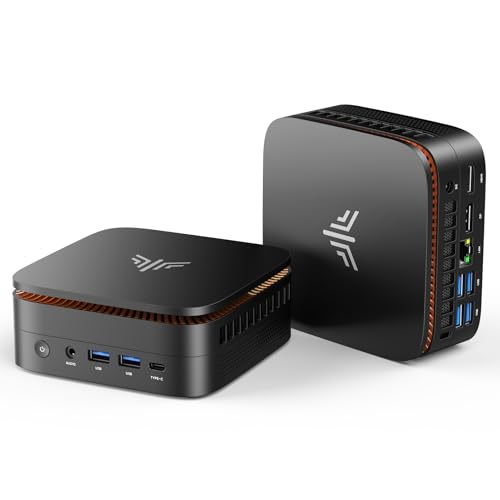
A budget Ryzen mini PC that doubles the storage of its own Business-branded twin, though its listing leaves several connectivity details for buyers to confirm on Amazon.
Check price on Amazon →| Processor | AMD Ryzen Embedded R2544 (quad-core) |
|---|---|
| Memory | 16GB DDR4 |
| Storage | 512GB SSD, with a second M.2 slot for expansion |
| Dimensions | 5.1 x 5.1 x 2 inches (smaller than a hardcover book) |
| Displays | Triple 4K output |
| Mounting | VESA mounting bracket included |
| Chassis | High-conductivity aluminum body, fan-optimized airflow |
| Upgradability | Tool-free RAM and second-SSD upgrades |
The KAMRUI Pinova P1 is a budget AMD Ryzen mini PC. It is built for everyday office computing, remote work, and multi-monitor desks. It fits businesses that want a compact desktop with room for dozens of tabs and three screens.
This review covers what the plain Pinova P1 does well. It also covers where the listing leaves gaps, and how it compares to KAMRUI's Business-branded version. Every claim below comes from the manufacturer's listing, not hands-on testing.
The plain Pinova P1 and the Business-branded Pinova P1 share the same core hardware. This review treats them as related but separate SKUs. Only specs stated on each product's own listing are used for comparison.
What the KAMRUI Pinova P1 Is — and Who Should Buy It
The KAMRUI Pinova P1 is a budget AMD Ryzen mini PC. It targets everyday office computing and multi-monitor desks. It pairs a quad-core Ryzen Embedded R2544 with 16GB of DDR4 RAM.
KAMRUI says that combination runs more than 20 browser tabs at once. It suits small businesses, home offices, and multi-monitor desks. It is not built for 3D work, gaming, or local AI.
Typical roles include a receptionist's desk, a small accounting office, or a classroom computer lab. Any spot that needs steady multitasking and extra screen space is a good fit. Heavy creative work is the clearest exception.
- Best for: everyday office multitasking, remote work, and triple-monitor desks
- Also good for: reception desks, classrooms, and signage that mount behind a screen
- Skip it if: you need discrete-GPU power for gaming, video rendering, or local AI inference
Performance: What the Ryzen R2544 and 16GB of RAM Handle
The Ryzen Embedded R2544 is a quad-core chip. It targets steady office work, not heavy computing. KAMRUI's listing says it runs 20-plus browser tabs at once, alongside other office software.
That fits spreadsheets, email, video calls, and browser-based apps running together. It should also handle office suites and light document editing. The listing names no operating system or specific graphics chip, so confirm those details on Amazon first.
A typical day might mix a browser with 15 tabs, a spreadsheet, and a video call. The Pinova P1's 16GB of RAM is built for exactly that mix. It is not built for editing large video files or running virtual machines.
The Standout Feature: Triple 4K Outputs
Triple 4K output is the Pinova P1's best business feature. Connecting three monitors turns this small box into a command-center desk. That helps with coding, dashboards, or data analysis.
The listing does not say which ports carry those three signals. KAMRUI's own Business-branded listing for this hardware lists HDMI, DisplayPort, and USB-C. Buyers who need a specific port mix should check this listing's photos first.
That matches how KAMRUI markets the feature: more screen space for coding, data analysis, or dashboard monitoring. Professionals juggling multiple apps benefit most from the extra room.
512GB of Storage, with Room to Grow
This Pinova P1 ships with a 512GB SSD. That is double the 256GB drive in KAMRUI's Business-branded version of the same hardware. Extra storage matters for anyone installing software locally instead of living in a browser.
KAMRUI also builds in a second M.2 slot. RAM is tool-free too, so both can grow later instead of forcing a full replacement. That upgrade path pays off more for a business standardizing several desks at once.
In Layer3 Labs' own hardware-recommendation work rolling out mini PCs to small-business offices, this pattern shows up often. Picking the larger-storage SKU up front avoids a second purchase round. It also skips a re-imaging pass across every desk within the first year.
Compact Build: Size, Mounting, and Quiet Operation
The Pinova P1 measures 5.1 by 5.1 by 2 inches. KAMRUI says that is smaller than a hardcover book. It mounts behind a monitor using the included VESA bracket.
That frees up desk space without losing the triple-display output. KAMRUI also describes an aluminum body built for airflow, with no fan noise during calls. That claim comes from the manufacturer, not independent testing.
A machine this size disappears into a fixed installation, like a kiosk or a shared workstation. Businesses that rotate the same desk between employees benefit from that flexibility.
Where the KAMRUI Pinova P1 Falls Short
The Pinova P1's biggest limits come from its listing, not just its hardware. It names no operating system, no discrete graphics chip, and no port-by-port breakdown. Several buying decisions here need a trip to the Amazon page itself.
None of that rules out the machine for basic office use. It does mean treating unstated specs as unknowns, not assumptions. A business ordering several units should confirm OS and connectivity details first.
The listing also does not state a warranty term, unlike some competing mini PCs that publish one upfront. That is worth asking about before ordering multiple units for a team.
Two mini PCs sold under the same brand and chip can still differ. Storage is confirmed here, since the title states it directly. Wi-Fi, Bluetooth, and exact port counts are not, so treat those as open questions until checked on Amazon.
- No dedicated GPU or NPU — gaming, video rendering, and local AI are off the table
- The listing states no operating system, Wi-Fi standard, or exact port count
- Quiet, fan-optimized cooling claims come from KAMRUI's own copy, not independent testing
- KAMRUI is a value brand — support and resale value trail Lenovo, Dell, or HP
KAMRUI Pinova P1 vs the Alternatives
Against KAMRUI's own Pinova P1 Business model, this version wins on storage. Both share the same Ryzen R2544 chip and 16GB of RAM. This plain listing doubles the SSD to 512GB, but the Business listing documents its Wi-Fi and USB-C ports.
Against the KAMRUI E3B, a newer Ryzen 5 7530U chip, the E3B has the edge for heavier work. Both machines pack 16GB of RAM and a matching 512GB SSD.
The KAMRUI Pinova P2 and GMKtec M5 Ultra sit higher up the shelf. Both trade a higher price for more power. The full comparison set below covers the rest, from the entry-level AK1PLUS on up.
Buyers choosing between the plain and Business Pinova P1 should weigh storage against documentation. Neither listing is objectively better; they serve slightly different priorities.
Where to buy the KAMRUI Pinova P1 Mini PC
A budget Ryzen mini PC that doubles the storage of its own Business-branded twin, though its listing leaves several connectivity details for buyers to confirm on Amazon.
Check price on Amazon →Alternatives worth comparing
If the KAMRUI Pinova P1 Mini PC is not the right fit, these are the other mini pcs ranking alongside it right now.


Frequently Asked Questions
- Yes, for everyday office work. Its quad-core Ryzen chip and 16GB of RAM handle over 20 browser tabs at once. Triple 4K output also supports a serious multi-monitor desk.
- Storage is the clearest difference. This plain Pinova P1 ships with a 512GB SSD, twice the Business version's 256GB drive. Both share the same Ryzen R2544 chip and 16GB of RAM. The Business listing also documents its exact Wi-Fi and USB-C ports.
- Only very small ones, and slowly. The listing lists no dedicated GPU or NPU. That rules out serious local AI inference on this machine.
- Three. Its triple 4K output supports three monitors for coding, dashboards, or data work. The listing does not specify which ports carry each signal.
- Yes. KAMRUI builds in a second M.2 slot for an extra SSD. RAM is also user-accessible without tools.
- About 5.1 by 5.1 by 2 inches, smaller than a hardcover book. It ships with a VESA mounting bracket. That lets it sit behind a monitor instead of on the desk.
Rolling out mini PCs for your business?
Layer3 Labs helps small and mid-size businesses choose, standardize, and deploy the right AI-ready hardware, and the workflows that run on it.
Book a free consultation