KAMRUI E3B Mini PC Review: The Ryzen 5 7530U Configuration
Same E3B name, different chip: this configuration pairs a 6-core Ryzen 5 7530U with fast LPDDR4X memory and a 512GB SSD.

A capable everyday office mini PC with fast memory and triple-4K output, held back by soldered RAM that can't grow with the business.
Check price on Amazon →| Processor | AMD Ryzen 5 7530U (6-core/12-thread), Zen 3, 2.0GHz base up to 4.5GHz boost, 15W TDP (up to 28W) |
|---|---|
| Graphics | AMD Radeon RX Vega 7 (7 cores, 1800MHz) |
| Memory | 16GB LPDDR4X (soldered, non-upgradeable) |
| Storage | 512GB SSD, plus two open M.2 2280 slots (one NVMe/SATA, one SATA-only), each supporting up to 2TB |
| Display support | Triple 4K via DisplayPort 1.4b, HDMI 2.0, and USB-C |
| Wireless | WiFi 6 (up to 2402 Mbps on 5GHz), Bluetooth 5.2 |
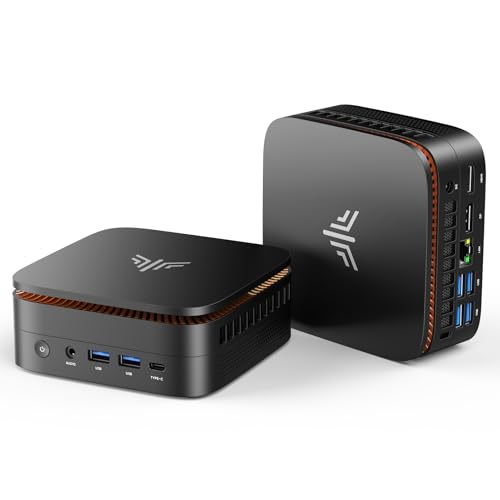
| Ports | 1x Ethernet, 2x USB 3.2 Gen2 Type-A (10Gbps), 4x USB 3.2 Gen1 Type-A (5Gbps), 1x USB 3.2 Gen2 Type-C (DP1.4, 10Gbps, PD), 1x HDMI 2.0, 1x DP 1.4b, 1x 3.5mm audio |
This is the KAMRUI E3B built around an AMD Ryzen 5 7530U, 16GB of LPDDR4X memory, and a 512GB SSD. It is not the same machine as KAMRUI's other mini PC sold under the E3B name, which uses a Ryzen 7 7730U chip, 16GB of DDR4, and a 1TB SSD. KAMRUI reuses the E3B label across two different chip tiers, so buyers need to check the processor line before they click buy.
This review covers only the Ryzen 5 7530U configuration described above, grounded entirely in KAMRUI's own manufacturer listing. It explains what this chip and memory combination handles well, where it falls short, and how it stacks up against the Ryzen 7 E3B and the rest of the mini PC shelf.
What This KAMRUI E3B Is and Who Should Buy It
This KAMRUI E3B is a mini desktop PC built around an AMD Ryzen 5 7530U, not the Ryzen 7 7730U used in KAMRUI's other E3B. It ships with 16GB of LPDDR4X memory and a 512GB SSD in a case small enough to hide behind a monitor. A small business gets near-full desktop function without a tower's footprint.
It suits single workstations, reception desks, and hybrid setups running office software, browser tabs, and video calls. It is a weak fit for teams planning local AI work or heavy multi-core rendering, since both the chip and the fixed memory cap it there.
A receptionist's desk, a shared point-of-sale station, or a satellite-office desk are all reasonable fits for this size and price tier. The small case frees up desk space a full tower would take up. Any team that mostly runs browser-based software and video calls will find the Ryzen 5 chip more than enough.
- Best for: single office workstations, reception desks, and hybrid remote setups
- Also good for: multi-monitor desks that need triple 4K output
- Skip it if: you need to add RAM later, or want Ryzen 7-class multi-core power
Ryzen 5 7530U Performance: What This Chip Handles
The Ryzen 5 7530U is a 6-core, 12-thread processor on AMD's Zen 3 architecture. It runs a 2.0GHz base clock, boosts to 4.5GHz, and carries a 15-watt TDP that can rise to 28 watts under load. KAMRUI states its single-thread performance beats the older Ryzen 5 5500U by 25 percent.
That single-thread gain shows up in everyday tasks like web browsing, document editing, and email, which lean on one fast core more than many cores working in parallel. Six cores and twelve threads still leave room for dozens of open browser tabs alongside a video call. Graphics run through an integrated AMD Radeon RX Vega 7 GPU with 7 compute units at 1800MHz.
The 4.5GHz boost clock helps during short bursts of heavy work, like exporting a large spreadsheet or opening a document full of embedded images. Once that burst ends, the chip settles back toward its 15-watt baseline, which keeps the fan quiet next to a desk phone. That quiet baseline matters in a shared office where several of these units might sit side by side.
Memory and Storage: Fast but Fixed
This E3B ships with 16GB of LPDDR4X memory soldered to the board, and KAMRUI lists it as non-upgradeable. LPDDR4X runs faster and more efficiently than the plain DDR4 found in many rival mini PCs, but that 16GB ceiling is permanent once you buy it.
Storage is more flexible. The 512GB SSD sits alongside two open M.2 2280 slots, one for NVMe or SATA drives and one for SATA only, and both accept drives up to 2TB. A business can grow total storage well past the base 512GB even though memory stays fixed.
For most office software, 16GB is enough to run an operating system, a browser with dozens of tabs, and an office suite at the same time. The fixed ceiling only becomes a real problem for buyers planning bigger jumps later, like running several virtual machines or memory-hungry creative software.
Ports, Wireless, and Triple 4K Displays
This E3B drives three 4K displays at once through DisplayPort 1.4b, HDMI 2.0, and USB-C. That setup covers most multi-monitor office desks without a separate docking station.
WiFi 6 delivers up to 2402 Mbps on the 5GHz band, and KAMRUI states it doubles the range of WiFi 5. Bluetooth 5.2 handles wireless peripherals efficiently. Wired connections include one Ethernet port, two USB 3.2 Gen2 Type-A ports at 10Gbps, four USB 3.2 Gen1 Type-A ports at 5Gbps, and a USB-C port that handles charging, 10Gbps data, and 4K/60Hz video.
The two 10Gbps USB-A ports matter for moving large files to an external drive without routing everything over WiFi. The single Ethernet port gives one machine a stable wired option for video calls in offices where WiFi congestion is common. Between the six USB ports and the Type-C connector, most office peripherals connect without an adapter.
- 1x Ethernet for a stable wired connection during video calls
- 2x USB 3.2 Gen2 Type-A (10Gbps) plus 4x USB 3.2 Gen1 Type-A (5Gbps)
- 1x USB-C handling charging, 10Gbps data, and 4K/60Hz display output
Where This KAMRUI E3B Falls Short
The biggest limitation is memory. 16GB of LPDDR4X is soldered in place, so a business that later needs 32GB has to replace the whole machine instead of upgrading it.
KAMRUI also lacks the decades-long enterprise support history of Lenovo, HP, or Dell. A team ordering five or ten units for a real deployment should weigh that support gap before committing.
The listing does not spell out a specific warranty term or a dedicated support commitment the way some other KAMRUI models do. Buyers planning a multi-unit rollout should confirm current warranty terms directly on the product page before placing a large order.
- 16GB LPDDR4X memory is fixed and cannot be expanded
- Integrated Vega 7 graphics rule out gaming and local AI workloads
- Budget-brand support and resale value trail established enterprise vendors
This Ryzen 5 E3B vs. the Ryzen 7 E3B and Other Alternatives
KAMRUI sells two mini PCs under the E3B name, and they are not the same machine. This configuration runs a Ryzen 5 7530U with 16GB of LPDDR4X and a 512GB SSD, while KAMRUI's other E3B runs a Ryzen 7 7730U with 16GB of DDR4 and a 1TB SSD.
The Ryzen 7 version wins on core count, eight cores against six, and starts with double the storage. This Ryzen 5 version answers with faster LPDDR4X memory and a lower entry point for buyers who don't need the extra cores. In Layer3 Labs' own hardware-recommendation work with clients, model-name reuse like this causes real ordering mistakes: a team assumes "E3B" means one spec sheet, then receives a mixed fleet running two different chips.
Against the rest of the shelf, the KAMRUI AK1PLUS trades performance for an even lower price with its Intel Celeron chip, and the two Pinova P1 models run an older Ryzen R2544 in the same RAM and storage tier. The GMKtec M5 Ultra sits above all of these with a Ryzen 7 7730U and 32GB of RAM, a better fit for heavier multitasking than this E3B is built for.
Where to buy the KAMRUI E3B Mini PC, Ryzen 5 7530U
A capable everyday office mini PC with fast memory and triple-4K output, held back by soldered RAM that can't grow with the business.
Check price on Amazon →Alternatives worth comparing
If the KAMRUI E3B Mini PC, Ryzen 5 7530U is not the right fit, these are the other mini pcs ranking alongside it right now.


Frequently Asked Questions
- The chip, memory type, and storage size. This E3B runs a Ryzen 5 7530U with 16GB of LPDDR4X and a 512GB SSD. KAMRUI's other E3B runs a Ryzen 7 7730U with 16GB of DDR4 and a 1TB SSD. Check the listed processor before you buy, since both sell under the same E3B name.
- Yes, for everyday office work. The Ryzen 5 7530U handles web browsing, document editing, email, and video calls smoothly. It is not built for local AI models or heavy multi-core rendering.
- No. It ships with 16GB of LPDDR4X memory soldered to the board, and KAMRUI lists it as non-upgradeable. Plan for 16GB being the permanent ceiling on this configuration.
- Up to 4.5TB total. It ships with a 512GB SSD and adds two open M.2 2280 slots, one for NVMe or SATA and one for SATA only, each supporting drives up to 2TB.
- Yes. It drives triple 4K displays through DisplayPort 1.4b, HDMI 2.0, and USB-C, which covers most multi-monitor office setups.
- WiFi 6 rated up to 2402 Mbps on the 5GHz band, plus Bluetooth 5.2. KAMRUI states the WiFi 6 range is double that of WiFi 5.
Rolling Out Mini PCs for Your Office?
Layer3 Labs helps small and mid-size businesses choose, standardize, and deploy the right AI-ready hardware, and the workflows that run on it.
Book a free consultation