GMKtec M5S Mini PC Review: A Budget Business Desktop
A budget Ryzen mini desktop with real RAM headroom, and a clear ceiling on graphics and AI. Here is where it fits, and where it does not.

A capable budget office desktop with strong memory and storage upgrade room. Its Ryzen 3 5400U and integrated graphics rule out local AI, and put it clearly behind its own GMKtec M5 Ultra sibling.
Check price on Amazon →| Processor | AMD Ryzen 3 5400U (7nm process, 2.6GHz base, 4.0GHz turbo, 8 threads via SMT) |
|---|---|
| Graphics | AMD Radeon Graphics (6 cores, 1600MHz) |
| Memory | 16GB DDR4 SO-DIMM (1x16GB), expandable to 128GB |
| Storage | 512GB M.2 2280 PCIe 3.0 SSD, dual-slot expansion to 8TB PCIe 4.0 |
| Networking | Dual 2.5G RJ45 LAN, WiFi 6 (2.5G/5G bands), Bluetooth 5.2 |
| Displays | Triple display support: 8K@60Hz via USB4, 4K@60Hz HDMI 2.0, 4K@60Hz DisplayPort |
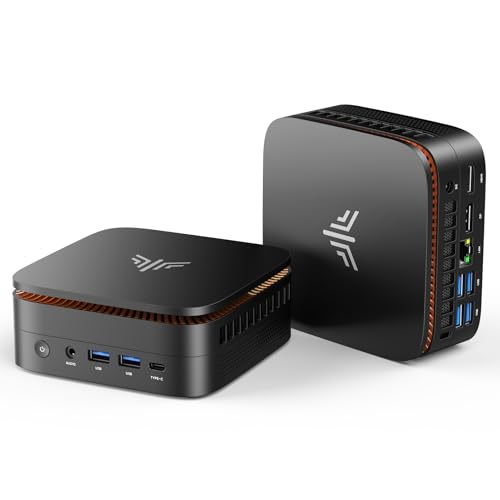
| Ports | 2x USB 3.2 Gen2, 2x USB 2.0, HDMI 2.0, DisplayPort, USB-C (10Gbps, PD 100W, 4K video), 3.5mm audio, DC power |
| Warranty | 1-year limited |
The GMKtec M5S is a budget mini desktop built around the AMD Ryzen 3 5400U processor. It targets the same office tasks as pricier mini PCs: email, spreadsheets, video calls, and multiple browser tabs, at a lower cost of entry.
This review covers what the M5S handles well and where its budget positioning shows. It also compares the M5S to the other mini PCs selling next to it, including GMKtec's own higher-tier M5 Ultra. Every spec below comes from the manufacturer listing, not an estimate.
What the GMKtec M5S Is, and Who Should Buy It
The GMKtec M5S is a small desktop PC that trades the size of a tower for something that hides behind a monitor. It runs on the AMD Ryzen 3 5400U, built on a 7-nanometer process. The chip has a base clock of 2.6GHz, a turbo boost up to 4.0GHz, and 8 threads via SMT/Hyperthreading.
It fits businesses that need a low-cost desktop for everyday office work: email, spreadsheets, browser-based apps, and video calls. It is a poor fit for demanding creative work, serious gaming, or running AI models locally. None of those jobs are what a Ryzen 3 chip with integrated graphics is built for.
GMKtec markets the low-power design as an office-friendly feature. The chip's 7-nanometer process is built to draw less power than older desktop parts. The listing says this keeps the unit running cool and quiet during long workdays, while trimming the electricity bill on machines that stay on all day.
- Best for: reception desks, hot-desking stations, and secondary office computers on a tight budget
- Also good for: light multitasking across several 4K monitors
- Skip it if: you need strong graphics performance, local AI inference, or a chip built for sustained heavy workloads
Performance: What the Ryzen 3 5400U Handles
The Ryzen 3 5400U is an entry-level mobile chip. Its 4.0GHz turbo boost and 8 threads via SMT are enough for everyday business software. Word processors, spreadsheets, and dozens of open browser tabs run without slowdown.
GMKtec's own listing pitches the M5S for spreadsheets, presentations, video conferencing, and multitasking across dozens of open tabs. That lines up with what an entry-level Ryzen chip is actually good at. It suits people who spend their day in office apps and browser windows, not compiling code, editing 4K video, or crunching large spreadsheets with heavy formulas.
The listing also markets this machine for gaming, pointing to its integrated Radeon graphics with 6 cores at 1600MHz. In practice, that graphics hardware suits retro console emulation through tools like Batocera, indie titles, and older Steam favorites. It is not built for modern AAA games or any GPU-heavy production work.
Memory and Storage: The Real Selling Point
Where the M5S earns its keep is upgrade room. It ships with 16GB of DDR4 memory in a single SO-DIMM slot. GMKtec rates the board for up to 128GB, well beyond what most budget mini PCs allow.
Storage tells the same story. The included 512GB M.2 2280 PCIe 3.0 SSD sits alongside a second M.2 slot. GMKtec says the pair supports up to 8TB of PCIe 4.0 storage combined. For a business that expects to add a database or a growing set of applications, that headroom means the machine does not need replacing the moment it fills up.
Two details are worth knowing before buying. The factory 16GB stick is installed alone, so the M5S runs in single-channel mode until a second module is added. The boot drive itself is PCIe 3.0, not the faster PCIe 4.0 the expansion slot supports. Neither is a dealbreaker for office work, but both matter to a buyer chasing the fastest drive speeds.
Displays, Ports, and Networking
The M5S supports three displays at once: 8K at 60Hz over USB4, plus 4K at 60Hz through both HDMI 2.0 and DisplayPort. That is enough for a multi-monitor command desk without an add-in graphics card.
Networking includes dual 2.5G RJ45 LAN ports, useful for a small office router or firewall box as well as a desktop. It also has WiFi 6 across 2.5G and 5G bands and Bluetooth 5.2. Port selection covers two USB 3.2 Gen2 ports, two USB 2.0 ports, and a USB-C port with 100W power delivery and 4K video. Round it out with HDMI 2.0, DisplayPort, a 3.5mm audio jack, and the DC power input.
GMKtec calls out the dual LAN ports as a fit for pfSense or Untangle, two open-source firewall platforms IT teams run on small-business networks. That is a genuine secondary use case for this hardware, apart from sitting on a desk as an office computer. An IT admin standardizing on inexpensive network appliances could reasonably put a few M5S units to work this way instead of buying dedicated firewall hardware.
GMKtec M5S vs the GMKtec M5 Ultra
GMKtec sells more than one machine in this family, and the naming causes confusion. The M5S reviewed here uses the Ryzen 3 5400U, an entry-level chip built for light office work at a lower price.
The GMKtec M5 Ultra, a separate listing in the same product line, steps up to an 8-core, 16-thread Ryzen 7 7730U with an 8-core integrated GPU, against the M5S's 4-core, 8-thread Ryzen 3 5400U with a 6-core GPU. Buyers who need more sustained CPU performance for heavier multitasking should look at the M5 Ultra instead. The M5S is the right pick when a lighter, less demanding office workload is the whole job.
Shared branding across a lineup like this makes comparison shopping harder, not easier. Before buying, check the exact processor listed on the product page rather than the model name alone. The M5S and the M5 Ultra can appear side by side in search results with very different chips inside a similar-looking chassis.
Where the GMKtec M5S Falls Short
The M5S carries the normal tradeoffs of a budget mini PC. Its Ryzen 3 5400U is an older, entry-level chip, not the newer Ryzen AI silicon showing up in pricier machines.
None of these limits make the M5S a bad computer. They make it a computer built for a specific, narrow job: light office work at a low price. Buyers who ask more of it than that will hit its ceiling quickly.
For a business standardizing hardware across many desks, the M5S is best treated as the cheapest tier in a lineup, not the default choice. Pairing it with a planned memory upgrade closes some of the gap with pricier machines, but that adds cost and setup time most offices would rather avoid at scale.
- No NPU, so on-device AI inference is not realistic on this machine
- DDR4 memory and PCIe 3.0 primary storage, both a step behind the DDR5 and PCIe 4.0 specs on newer mini PCs
- Only a single memory slot populated from the factory, so reaching the 128GB ceiling means buying and installing your own module
- GMKtec is a budget brand backed by a 1-year warranty, shorter than the multi-year coverage some competitors offer
GMKtec M5S vs the Alternatives
Against the other best-selling mini PCs on the shelf, the M5S lands in a similar spot to the KAMRUI and Getorli Ryzen models nearby. All of them pair entry-level AMD chips with office budgets, not performance.
Its main edge over those rivals is the stated 128GB memory ceiling and dual-slot 8TB storage headroom, which several competing budget mini PCs do not offer. If total upgrade room matters more than raw clock speed, the M5S has an advantage on paper.
On raw clock speed, the KAMRUI Pinova P2 and its Ryzen 7330U claim a higher 4.3GHz turbo than the M5S. The Getorli Ryzen 5 3500U and 3501U models list a 3.7GHz maximum with a 4-core, 8-thread layout. None of these differences change what tier of work any of these machines can handle: all of them are entry-level chips for office duty, not performance parts.
Where to buy the GMKtec M5S Mini Desktop PC
A capable budget office desktop with strong memory and storage upgrade room. Its Ryzen 3 5400U and integrated graphics rule out local AI, and put it clearly behind its own GMKtec M5 Ultra sibling.
Check price on Amazon →Alternatives worth comparing
If the GMKtec M5S Mini Desktop PC is not the right fit, these are the other mini pcs ranking alongside it right now.


Frequently Asked Questions
- Yes, for basic office tasks. It handles email, spreadsheets, browser apps, and video calls on its Ryzen 3 5400U processor. Its dual 2.5G LAN ports also make it usable as a small office router or server box, not just a desktop. Its low-power design means it can run all day without generating much heat or noise.
- Not realistically. The Ryzen 3 5400U has no NPU, and its integrated Radeon graphics are not built for AI inference. Businesses that need on-device AI should look at a Ryzen AI chip or a mini PC with a dedicated GPU instead. Forcing a local model onto this hardware will be slow at best and unusable at worst.
- The M5S uses the entry-level Ryzen 3 5400U (4-core, 8-thread), while the GMKtec M5 Ultra steps up to a Ryzen 7 7730U (8-core, 16-thread) for heavier multitasking. The M5S suits basic office use, while the M5 Ultra suits buyers who need more performance headroom. Check the exact processor listed on each product page before buying. The shared M5 name does not guarantee shared performance, and the two machines can sit right next to each other in search results.
- Up to 128GB, according to GMKtec, though it ships with just 16GB installed in a single SO-DIMM slot. Businesses planning to run more demanding software, or several virtual machines at once, should budget for a memory upgrade. The stock configuration is not built to cover that on its own.
- GMKtec offers a 1-year limited warranty covering defects in design and workmanship, shorter than the multi-year coverage some competing brands provide. GMKtec also backs the unit with an after-sales support team, according to the listing, for buyers who run into setup or hardware issues. Businesses that need longer coverage should factor that into the total cost of ownership before choosing this over a pricier, longer-warrantied model.
Choosing mini PCs for your business?
Layer3 Labs helps small and mid-size businesses select, standardize, and deploy the right desktop hardware, and the AI workflows that run on top of it.
Book a free consultation