KAMRUI Pinova P2 Mini PC Review (8GB RAM, Ryzen 4300U)
A compact AMD Ryzen 4300U desktop with 8GB of RAM, a 512GB SSD, and triple 4K display support, built for everyday home and business use.

A solid budget mini PC for light office work and multi-monitor desks, but the 8GB RAM tier is thin for anyone running more than a handful of apps at once.
Check price on Amazon →| CPU | AMD Ryzen 4300U (4-core / 8-thread, up to 3.7GHz, 7nm Zen2, 28W) |
|---|---|
| Graphics | AMD Radeon Vega 5 (28W) |
| RAM | 8GB LPDDR4 |
| Storage | 512GB M.2 SSD; 2 total M.2 2280 slots (NVMe/SATA PCIe 3.0 + SATA), expandable to 4TB combined |
| Display outputs | Triple 4K@60Hz via HDMI 2.0, DisplayPort 1.4, USB-C |
| Ports | 2x USB 3.2 Gen2 Type-A (10Gbps), USB 3.2 Gen2 Type-C (10Gbps, DisplayPort 1.4) |
| Networking | Gigabit Ethernet, WiFi, Bluetooth |
| Dimensions | 5.05 x 5.05 x 1.73 in |
| Warranty | 12-month warranty with lifetime technical support |
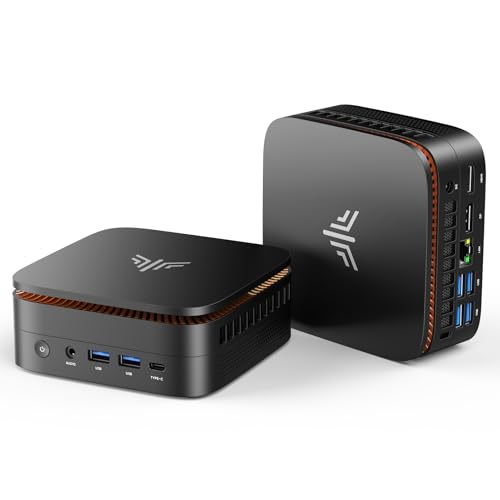
The KAMRUI Pinova P2 Mini PC 8GB RAM 512GB SSD pairs AMD's Ryzen 4300U, a 4-core, 8-thread processor built on 7nm Zen2, with 8GB of LPDDR4 memory and a 512GB M.2 SSD. KAMRUI markets it for home and business desktops that need triple 4K display support without a discrete graphics card.
This review covers what this Pinova P2 configuration does well, where the 8GB RAM tier limits it, and how it compares to the other mini PCs and Pinova variants selling on the same shelf. Every claim below comes from the manufacturer's own product listing.
What This KAMRUI Pinova P2 Build Is, and Who Should Buy It
This Pinova P2 configuration runs a Ryzen 4300U processor with 8GB of RAM and a 512GB SSD in KAMRUI's compact, 5.05 x 5.05 x 1.73-inch case. The listing positions it as a home or business desktop for browsing, streaming, and everyday productivity, not a machine built for heavy multitasking or professional creative work. The silver case and VESA mount also make it easy to fit into a small office setup, whether that's on a desk or mounted behind a monitor.
It suits a single-user desk running office software, a browser, and a couple of background apps, especially where triple-monitor output matters more than raw memory headroom. Businesses that need more RAM should look at KAMRUI's own 16GB version of this same Pinova P2 line instead. The listing also backs the hardware with a 12-month warranty and lifetime technical support from KAMRUI.
- Best for: a single-user home or small-office desktop running everyday productivity software
- Also good for: a compact triple-monitor setup in a conference room or reception desk
- Skip it if: you routinely run virtual machines, many browser tabs, or memory-hungry apps at once
The Ryzen 4300U Processor and Radeon Vega 5 Graphics
The Ryzen 4300U is a true 4-core, 8-thread processor built on AMD's 7nm Zen2 architecture, running up to 3.7GHz at 28 watts, according to the listing. KAMRUI's own testing claims it runs 40% faster than the Intel i3-10110U and 25% faster than the Intel N95 in multi-core tasks, positioning it against the entry-level Intel chips common in this price bracket.
Integrated AMD Radeon Vega 5 graphics, also running at 28 watts, handles the triple 4K@60Hz display output the listing highlights. KAMRUI describes it as 2.5 times stronger than the Intel UHD graphics in the N95 and i3-10110U, which is the comparison point KAMRUI leans on throughout this listing.
AMD's Zen2 architecture, the foundation for the 4300U, is a newer core design than the Zen+ chips found in some competing mini PCs on this shelf, though the actual generational gap matters less for office work than for anything compute-intensive. The listing also notes a quiet cooling system, with the fan described as nearly silent at light load and fairly quiet even under sustained use.
8GB LPDDR4 and a 512GB SSD, with a Real Expansion Path
This configuration ships with 8GB of LPDDR4 memory and a 512GB M.2 SSD preinstalled. 8GB is the entry point for this Pinova P2 line: KAMRUI sells the same chassis with 16GB of RAM under a separate listing, so buyers who need more memory headroom for multitasking should check the RAM figure carefully before choosing between the two.
Storage has more room to grow than the RAM does. The listing specifies two M.2 2280 slots, one supporting SATA or NVMe over PCIe 3.0 and one SATA-only, that combine for up to 4TB of total storage. Drives aren't included, so that upgrade is a buyer-supplied addition. That upgrade path covers a scenario common in small offices: a box bought light on storage now, expanded later once budget allows.
Triple 4K Output and a Fast USB-C Port
KAMRUI's Pinova P2 drives three 4K@60Hz displays through HDMI 2.0, DisplayPort 1.4, and a USB-C port, per the listing, which also carries DisplayPort 1.4 over the same connector. That's enough video output for a reception desk or small conference room running several screens off one compact box.
Two additional USB 3.2 Gen2 Type-A ports run at up to 10Gbps for external drives or fast peripherals, and the USB-C port doubles as a display output and a 10Gbps data connection. For a case this small, that's a dense port layout, and it leaves room for an external drive or dock without giving up a display connection.
Gigabit Wired Networking and Unspecified Wireless
Wired networking is Gigabit Ethernet rather than the 2.5GbE some competing mini PCs on this shelf offer. For a desk running triple monitors and typical office traffic, Gigabit is enough; it just isn't the fastest option on the shelf.
The listing pairs the Ethernet port with WiFi and Bluetooth but doesn't specify which generation of either standard, unlike some competing listings that name WiFi 5 or Bluetooth 5.2 outright. Buyers who need a guaranteed WiFi generation should confirm it before ordering. For an office desk that's wired to the network most of the day anyway, the Gigabit port is the connection that carries the actual workload.
Where This Configuration Falls Short
The clearest limit here is memory. 8GB of RAM is workable for single-user browsing and office work, but it leaves little headroom once several browser tabs, a video call, and background apps run at the same time. The listing doesn't describe a RAM upgrade path for this configuration the way it does for storage.
The networking and wireless specs are also less detailed than on some competing listings. Where a rival might name WiFi 6 or Bluetooth 5.2 outright, this listing states only Gigabit Ethernet, WiFi, and Bluetooth without a generation attached to either.
- 8GB RAM is thin for multitasking; KAMRUI's own 16GB Pinova P2 listing is the upgrade path if that matters
- Gigabit Ethernet rather than 2.5GbE, which some competing mini PCs on this shelf include
- No dedicated GPU: integrated Radeon Vega 5 covers office visuals and triple 4K output, not GPU-accelerated workloads
- WiFi and Bluetooth generations aren't specified in the listing, so buyers can't confirm WiFi 6 support
KAMRUI Pinova P2 (8GB) vs the Alternatives
The most direct comparison on this shelf is to KAMRUI's own lineup. Our gear-radar routine flags this pattern constantly on the Mini PCs shelf: the same Pinova P2 name covers at least two separate listings, this 8GB Ryzen 4300U build and a 16GB version on the newer Ryzen 7330U chip, so the RAM figure in the title matters more than the model name when comparing them.
Against the GMKtec Ryzen 5 3500U mini PC, this Pinova P2 trades RAM headroom, 8GB versus 16GB, for a smaller footprint and a lower starting memory tier. Against the Apple Mac mini M4, the comparison again comes down to platform: the Mac mini ships with 16GB of unified memory as its base configuration, double what this Pinova P2 build includes. For a business weighing this Pinova P2 against KAMRUI's own Pinova P1 line, the P1 configurations reviewed here both ship with 16GB of RAM as standard, another case of the RAM figure mattering more than the model name.
Where to buy the KAMRUI Pinova P2 Mini PC 8GB RAM 512GB SSD, AMD Ryzen 4300U(Beats 10110U/3500U/N95,Up to 3.7GHz,4C/8T) Mini Computers,Triple 4K Display/HDMI+DP+Type-C/WiFi/BT for Home/Business Mini Desktop Computers
A solid budget mini PC for light office work and multi-monitor desks, but the 8GB RAM tier is thin for anyone running more than a handful of apps at once.
Check price on Amazon →Alternatives worth comparing
If the KAMRUI Pinova P2 Mini PC 8GB RAM 512GB SSD, AMD Ryzen 4300U(Beats 10110U/3500U/N95,Up to 3.7GHz,4C/8T) Mini Computers,Triple 4K Display/HDMI+DP+Type-C/WiFi/BT for Home/Business Mini Desktop Computers is not the right fit, these are the other mini pcs ranking alongside it right now.


Frequently Asked Questions
- It's enough for single-user browsing, office software, and streaming, but it leaves little room once several apps and browser tabs run at once. KAMRUI also sells this same Pinova P2 chassis with 16GB of RAM for buyers who need more.
- Three. It outputs triple 4K@60Hz displays through HDMI 2.0, DisplayPort 1.4, and USB-C, according to the listing.
- Yes. The listing specifies two M.2 2280 slots, one NVMe/SATA over PCIe 3.0 and one SATA-only, that combine for up to 4TB of total storage. Drives are not included.
- This configuration uses AMD's Ryzen 4300U, a 4-core, 8-thread processor on 7nm Zen2 architecture running up to 3.7GHz, according to the listing.
- No. The listing specifies Gigabit Ethernet rather than 2.5GbE, along with WiFi and Bluetooth for wireless connections.
- RAM and CPU. This build ships with 8GB of RAM on a Ryzen 4300U chip, while KAMRUI's other Pinova P2 listing includes 16GB of RAM on the newer Ryzen 7330U processor.
Sizing mini PCs for local AI or thin-client rollouts?
Layer3 Labs helps small and mid-size businesses pick the right mini PC configuration, RAM tier included, and wire it into a real local AI or edge-compute workflow.
Book a free consultation