GMKtec G10 Mini PC Review: Triple Displays, Older Silicon
A flexible little Ryzen 5 desktop that runs off USB-C power and drives three screens, listed here under a second ASIN for the same hardware.

A genuinely flexible mini PC for multi-monitor and mobile setups, built around an older Ryzen 5 3500U chip, and, ASIN aside, the same G10 hardware GMKtec already sells elsewhere on this shelf.
Check price on Amazon →| Processor | AMD Ryzen 5 3500U (4-core, Zen+, up to 3.7GHz, 12nm) |
|---|---|
| Graphics | AMD Radeon Vega 8 (1200MHz, integrated) |
| Memory | 16GB dual-channel DDR4 (2x 8GB), upgradable to 64GB |
| Storage | 512GB SSD, dual M.2 2280 PCIe 3.0 slots, expandable to 16TB |
| Displays | Triple display at 4K/60Hz (HDMI 2.1, DisplayPort 1.4, USB-C) |
| Power | USB-C PD charging (65-70W); runs off a charger or power bank |
| Networking | 2.5GbE Ethernet, Wi-Fi 5, Bluetooth 5.0 |
| Ports | 2x USB 3.2, USB 2.0, HDMI 2.1, full-function USB-C (PD/DP/data), DisplayPort, 3.5mm audio |
The GMKtec G10 Mini PC Computer is a compact AMD Ryzen 5 3500U desktop that GMKtec already sells on this same shelf under a separate Amazon listing. This entry, ranked #10 in Mini PCs, carries the identical spec sheet: the same Ryzen 5 3500U, the same 16GB of dual-channel DDR4, the same 512GB SSD, and the same triple-display and USB-C power features, listed under a new ASIN. That pattern shows up on Amazon when a listing loses its Buy Box and the seller relists the same product to reset its selling history.
This review covers what the hardware actually offers, where it falls short, and how it compares to the other mini PCs on the same shelf, including GMKtec's other G10 listing. Every spec below comes from the manufacturer's own listing. Compare current stock and availability between the two G10 listings before you order, since neither page here tracks live pricing.
What the GMKtec G10 Is, and Who It Fits
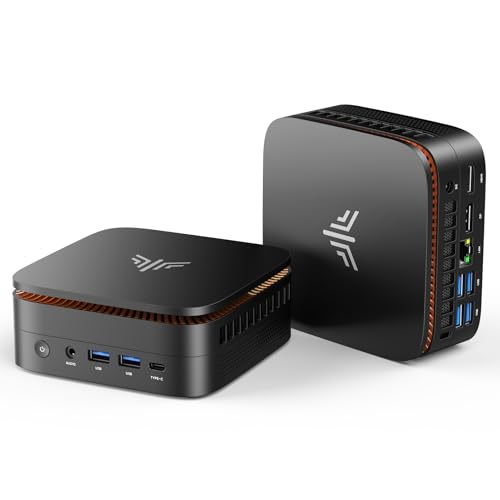
The GMKtec G10 is a compact AMD Ryzen 5 3500U desktop built around flexible placement rather than top-end speed. It pairs 16GB of dual-channel DDR4 with a 512GB SSD, drives three monitors at once, and can run from a USB-C charger instead of a dedicated power brick.
It fits a small business or home office that wants a tidy, portable desktop for everyday tasks: multi-monitor productivity work, a hot-desk that moves between rooms, or a light home-theater setup. It is a weak fit for anyone who needs a current six-core processor, a discrete GPU, or real local AI inference.
GMKtec markets this build as an HTPC as well as an office machine, and the hardware supports that dual role. The Vega 8 graphics handle 4K video playback without strain, and the triple-display output can cover a living-room screen alongside two work monitors, all from a box small enough to tuck behind either one.
- Best for: multi-monitor desks, mobile or hot-desk setups, and light home-theater use
- Also good for: standardizing several seats on small, USB-C-powered desktops
- Skip it if: you need a modern six-core chip, discrete-GPU power, or serious local AI
Performance: What the Ryzen 5 3500U Handles
The Ryzen 5 3500U runs everyday office software well but is not a current-generation processor.
It is a four-core chip on AMD's older Zen+ architecture, built on a 12nm process, with a base clock of 2.1GHz and a boost to 3.7GHz at a 15W TDP. GMKtec's own listing compares it to the Ryzen 3 4300U, claiming a 20% multi-core gain, and to Intel's N95/N97/N150 entry chips, claiming a 35% gain, rather than to a current-generation Ryzen 5, which is the more telling comparison for anyone shopping today.
A BIOS performance mode raises the power ceiling to 25W for heavier multitasking, and the listing states a configurable TDP range from 12W up to 35W. That headroom helps under sustained load, though it does not change the chip's underlying four-core Zen+ design.
The Real Strength: Triple Displays, USB-C Power, and Storage Room
The G10's biggest advantage is flexibility, not speed.
It drives three 4K displays at 60Hz through HDMI 2.1, DisplayPort 1.4, and USB-C, which covers more simultaneous screens than several rivals on this shelf. It also charges over USB-C at 65 to 70 watts, so a laptop charger or a high-output power bank can run it instead of a dedicated brick, which suits a desk that moves or a mobile setup.
Storage room is generous too. Dual M.2 2280 PCIe 3.0 slots take the G10 to a combined 16TB, and the 16GB of dual-channel DDR4 it ships with can be upgraded to 64GB, so the machine has real room to grow instead of hitting a hard ceiling on day one.
- Triple 4K/60Hz display output via HDMI 2.1, DisplayPort 1.4, and USB-C
- USB-C PD charging at 65-70W, works from a charger or portable power bank
- Dual PCIe 3.0 M.2 slots expandable to 16TB, plus RAM upgradeable to 64GB
Everyday Use: Networking and Port Selection
The G10 covers the connections a small office or home desk actually needs.
A 2.5GbE Ethernet port gives it wired networking well ahead of the Gigabit ports built into most rivals, which matters for large file transfers, network-attached storage, or running the box as a lightweight home-lab or firewall appliance. Wireless covers Wi-Fi 5 and Bluetooth 5.0, a step behind newer standards but adequate for browsing, calls, and general connectivity.
Physical ports include two USB 3.2 connections, a USB 2.0 port, HDMI 2.1, a full-function USB-C port that carries power, display, and data, a dedicated DisplayPort output, and a 3.5mm audio jack. That is enough I/O to run a wired keyboard and mouse, external storage, and audio gear from one small box, without adding a hub.
Where the GMKtec G10 Falls Short
The G10's real limitation is processor generation, not missing features.
Its wireless connectivity is Wi-Fi 5 and Bluetooth 5.0, a step behind the Wi-Fi 6 found on newer competing mini PCs. The integrated Vega 8 graphics work fine for displays and light gaming but include no NPU, so they cannot handle serious AI workloads. GMKtec also remains a value brand, without the support network or resale value of Lenovo, Dell, or HP.
None of that rules the G10 out. It rules out treating it as a fast, modern workstation. Buy it for what it actually is: a flexible, well-connected small desktop for office and light home-theater duty, not a machine to run heavy local AI models or demanding creative software on.
- A four-core Zen+ design from 2019, so it will lose a straight speed test to any current six-core mobile chip
- Wireless tops out at Wi-Fi 5 and Bluetooth 5.0, generations behind the Wi-Fi 6 rivals on this shelf now ship
- The Vega 8 graphics core has no NPU, so it is not a fit for running language models on-device
- GMKtec is a value brand; expect thinner support and lower resale value than Lenovo, Dell, or HP
Two ASINs, One Machine: Which G10 Listing to Buy
Two Amazon listings for this exact GMKtec G10 build are live on the mini PC shelf right now, and the practical question is which one to click, not which one is better hardware.
This product page (ASIN B0FR8S6CBW) and our earlier G10 review (ASIN B0FBWST8TH) describe the identical Ryzen 5 3500U build: same processor, same 16GB of RAM, same 512GB SSD, same triple-display and USB-C power features. Sellers commonly relist an existing product under a fresh ASIN after losing the Buy Box on the original listing, and that pattern is what this looks like. Because it is the same physical product, none of the buying advice below changes depending on which ASIN you land on.
What does change is stock and shipping timing, which move independently between the two ASINs even for identical hardware. Check both listings before you order: whichever one currently shows in-stock, faster shipping, or a live seller offer is the one to buy, and there is no hardware reason to prefer one ASIN over the other beyond that.
In our own gear-radar routine, which tracks the daily top-20 sales-rank shelf across mini PC listings, this same-hardware-under-two-ASINs pattern shows up often enough that it is worth checking before assuming two ranked products on the same shelf are actually different machines. It is a quirk of how Amazon's Buy Box and relisting mechanics work, not a signal about the product itself.
GMKtec G10 vs the Rest of the Shelf
Set the duplicate-listing question aside and the G10's real competition is the rest of the mini PC shelf, where the tradeoffs are more conventional.
The KAMRUI Pinova P2 and Pinova P1 models offer other AMD chips at a similar tier, with their own mix of cores and clock speeds, and are worth a look if triple-display output or USB-C charging are not requirements. Apple's Mac mini with the M4 chip runs on Apple Silicon rather than x86 and suits a very different workflow, particularly for a team already standardized on Apple hardware. The KAMRUI AK1PLUS sits below the G10 with an entry Intel Celeron processor built for the most basic tasks, at a lower price than either G10 listing is likely to carry.
The deciding factor for most buyers is simple: pick the G10 for its display count, portable power option, and storage headroom; pick a newer-chip rival if raw processing speed on a modern architecture matters more than any of those three things.
Where to buy the GMKtec G10 Mini PC (AMD Ryzen 5 3500U)
A genuinely flexible mini PC for multi-monitor and mobile setups, built around an older Ryzen 5 3500U chip, and, ASIN aside, the same G10 hardware GMKtec already sells elsewhere on this shelf.
Check price on Amazon →Alternatives worth comparing
If the GMKtec G10 Mini PC (AMD Ryzen 5 3500U) is not the right fit, these are the other mini pcs ranking alongside it right now.


Frequently Asked Questions
- Yes, for flexible desk setups rather than raw speed. It drives three 4K displays, runs off USB-C power, and handles everyday office work well, though its Ryzen 5 3500U is an older chip that trails current six-core processors.
- Yes. This listing (ASIN B0FR8S6CBW) and our earlier G10 review (ASIN B0FBWST8TH) describe the identical Ryzen 5 3500U hardware: same processor, memory, storage, and display features. Compare stock and availability across both listings before ordering, since neither page here tracks live pricing.
- No. It is a four-core chip on AMD's older Zen+ architecture from 2019, not a current-generation Ryzen 5. It handles everyday office work fine and beats entry Intel N-series chips, but it is not comparable to a modern six-core mobile processor.
- Not beyond the smallest ones, and even those run slowly. The integrated Radeon Vega 8 graphics core has no dedicated NPU, so on-device inference has nowhere fast to run. A mini PC built around a dedicated GPU or a newer Ryzen AI chip is the better pick if local AI is the actual goal.
- Yes, because it charges over a standard USB-C PD connection rated at 65 to 70 watts. Any laptop charger or high-output portable power bank capable of that wattage can run the machine, which is what makes it viable for a desk that moves or a genuinely mobile office setup.
- It drives three separate displays at once, each at 4K resolution and 60Hz, split across an HDMI 2.1 port, a DisplayPort 1.4 output, and the full-function USB-C port. Several rivals on this same shelf top out at two simultaneous displays, so three is a genuine differentiator here.
Standardizing on mini PCs for your team?
Layer3 Labs helps small and mid-size businesses choose, standardize, and deploy the right AI-ready hardware, and the workflows that run on it.
Book a free consultation