GMKtec Nucbox G3 Pro Review: An Entry-Level Business Desktop
A budget mini PC built around a 2019-era dual-core chip — here's where its 2.5GbE networking and Linux support still earn a place, and where the dated processor holds it back.

An affordable desktop for single-purpose office tasks and small Linux servers, but its aging dual-core i3-10110U and unexpandable 8GB of RAM make it a poor fit for real multitasking.
Check price on Amazon →| Processor | Intel Core i3-10110U (2-core/4-thread, 10th Gen 'Comet Lake', released 2019) |
|---|---|
| Memory | 8GB DDR4 SO-DIMM, dual channel |
| Storage | 256GB M.2 2242 SATA SSD, plus a free M.2 2280 NVMe PCIe expansion slot |
| Graphics | Intel integrated graphics (up to 1000MHz), 4K video playback with AV1 decoding |
| Display Outputs | Dual HDMI 2.0, 4K@60Hz on each port |
| Networking | 2.5GbE Ethernet (Intel i226), WiFi 6, Bluetooth 5.2 |
| Ports | USB 3.2 x4 (up to 5Gbps), 3.5mm audio jack |
| Remote Management | Wake On LAN, PXE Boot, RTC Wake, Auto Power On |
| Warranty | 1-year limited |
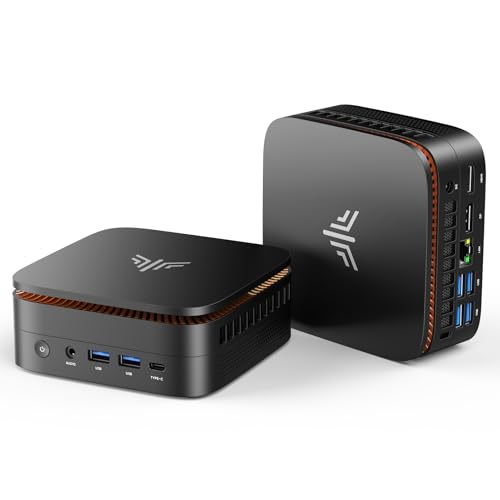
The GMKtec Nucbox G3 Pro is a compact desktop built around Intel's Core i3-10110U, a dual-core mobile processor first released in 2019. It pairs that older chip with 8GB of DDR4 memory and a 256GB SSD, aimed at businesses that need a cheap, small desktop for one simple job rather than a do-everything workstation.
This review covers what the G3 Pro does well, where its dated processor limits it, and how it stacks up against the other mini PCs selling alongside it. Every spec below comes from the manufacturer listing, and the processor's age and core count are the widely documented facts about that specific Intel chip.
What the GMKtec Nucbox G3 Pro Is — and Who Should Buy It
The GMKtec Nucbox G3 Pro is a small desktop computer built for basic, single-purpose tasks. It runs on Intel's dual-core Core i3-10110U instead of a modern chip, which keeps the price down but limits what it can do at once.
It fits businesses that need a cheap, dedicated box for one job: a point-of-sale terminal, a digital sign, a lightweight firewall, or a thin client for remote desktop sessions. It is a poor fit for anyone who keeps a dozen browser tabs and several apps open at the same time.
- Best for: single-purpose desktops, point-of-sale terminals, digital signage, and small Linux servers
- Also good for: a low-cost firewall or router build using its 2.5GbE port
- Skip it if: your team multitasks across many apps, tabs, or heavier software at once
Performance: What the Aging I3-10110U Can and Can't Handle
The Intel Core i3-10110U is a dual-core, four-thread processor from Intel's 10th-generation mobile lineup, first released in 2019. That makes it seven years old as of this review, and its two cores set the ceiling for anything the G3 Pro runs at once.
For a single task, like one office app or a browser with a handful of tabs, it holds up fine. Ask it to run several programs at the same time, and the lack of cores shows quickly, because there is no extra silicon to absorb the load.
8GB of DDR4 RAM adds to the limit. Modern browsers and office suites can use several gigabytes on their own, so running multiple heavy apps alongside a browser will push this machine into swapping memory to disk, which slows everything down.
For comparison, GMKtec's own Nucbox G3S and M5 Ultra, both covered elsewhere on this site, ship with newer chips built for exactly the multitasking this processor struggles with. The G3 Pro is priced and specced for a narrower job, not a general office replacement.
2.5GbE Networking and Linux Support Are the Real Selling Points
The GMKtec Nucbox G3 Pro's 2.5-gigabit Ethernet, run through an Intel i226 controller, is the strongest line on its spec sheet. That port moves data up to 2.5 times faster than the Gigabit Ethernet found on most budget mini PCs.
The listing states compatibility with Linux, Proxmox, Ubuntu, and ESXi/VMware, alongside Wake On LAN, PXE Boot, RTC Wake, and Auto Power On. Together, those features fit a small, always-on Linux box better than a general Windows desktop, such as a firewall appliance or a lightweight virtualization host.
That remote-management list also matters for IT teams managing several identical desktops. PXE Boot lets a technician image a machine over the network without touching a USB drive, and Wake On LAN lets them power it on remotely for updates, both useful for a fleet of kiosks or signage boxes deployed across multiple sites.
WiFi 6 and Bluetooth 5.2 round out the connectivity, and the dual HDMI 2.0 ports each drive a 4K@60Hz display. That makes the G3 Pro workable as a two-monitor thin client when wired networking isn't the priority.
Storage and Expansion: Modest, but There's a Path to Grow
The G3 Pro ships with a 256GB SSD in the compact M.2 2242 form factor, smaller than the standard 2280 drives most desktops use. That built-in drive covers an operating system and a handful of applications, not much more.
A separate M.2 2280 NVMe PCIe slot lets you add a second, larger drive later, which is a real advantage over mini PCs with no expansion path at all. A business planning to add storage down the road can do so without buying a whole new machine.
GMKtec also markets the G3 Pro's fast boot times, since a small SATA SSD, even in the 2242 size, still starts up far quicker than a spinning hard drive. For a single-purpose desktop that mostly stays powered on anyway, boot speed matters less than it would for a laptop, but it still helps after updates or reboots.
Where the GMKtec Nucbox G3 Pro Falls Short
The G3 Pro's biggest limit is its processor. A dual-core chip from 2019 was modest even at launch, and seven years of software growth since then has only widened the gap between it and current mini PCs.
8GB of RAM with no listed upgrade path adds to that limit, and the 256GB M.2 2242 SSD is small by current standards. GMKtec backs the machine with only a one-year warranty, shorter than the three-year coverage some competitors offer.
In Layer3 Labs' own hardware-recommendation work, dual-core chips like this one consistently handle one dedicated job well, such as a firewall or a signage player, but stumble once a second demanding task runs alongside it. That pattern matches what the G3 Pro's spec sheet suggests here.
- Dual-core, four-thread i3-10110U — a 2019-era chip, thin for anything beyond one task at a time
- 8GB of RAM with no listed upgrade path — likely a permanent ceiling
- 256GB SSD in the smaller M.2 2242 format, plus only a one-year warranty
GMKtec Nucbox G3 Pro vs the Alternatives
Against GMKtec's own lineup, the G3 Pro sits well below the Nucbox G3S and far below the M5 Ultra. The G3S uses a newer Intel N95 chip, and the M5 Ultra's eight-core Ryzen 7 7730U with 32GB of RAM is built for real multitasking, not single-task duty.
Compared to the KAMRUI Pinova P2, which pairs a similar 256GB SSD with a newer quad-core Ryzen chip and double the RAM, the G3 Pro's main edge is its 2.5GbE port and Linux compatibility list. For a dedicated firewall or Linux box, that edge can matter more than raw speed.
The KAMRUI AK1PLUS lands closest to the G3 Pro on price and ambition, since both use older, budget-tier chips. The AK1PLUS still wins on RAM, shipping with 16GB against the G3 Pro's 8GB, which makes it the safer pick if any part of the job needs more than one lightweight process running at a time.
Where to buy the GMKtec Nucbox G3 Pro Mini PC (Intel Core i3-10110U)
An affordable desktop for single-purpose office tasks and small Linux servers, but its aging dual-core i3-10110U and unexpandable 8GB of RAM make it a poor fit for real multitasking.
Check price on Amazon →Alternatives worth comparing
If the GMKtec Nucbox G3 Pro Mini PC (Intel Core i3-10110U) is not the right fit, these are the other mini pcs ranking alongside it right now.


Frequently Asked Questions
- It works well for single-purpose tasks like point-of-sale terminals, signage, or a small Linux server, but its dual-core i3-10110U and 8GB of RAM struggle with real multitasking. Choose it only for a dedicated, one-job desktop.
- It comes from Intel's 10th-generation mobile lineup, first released in 2019. That makes it a dual-core, four-thread chip several generations behind current mini PC processors.
- Yes. The listing states compatibility with Linux, Ubuntu, Proxmox, and ESXi/VMware, plus Wake On LAN and PXE Boot support for remote management, which suits a small server or firewall build.
- Storage, yes — it has a free M.2 2280 NVMe PCIe slot for a second drive. The listing does not mention upgradeable memory, so 8GB of DDR4 is likely the practical ceiling.
- It has 2.5-gigabit Ethernet through an Intel i226 controller, plus WiFi 6 and Bluetooth 5.2. The 2.5GbE port moves data up to 2.5 times faster than standard Gigabit Ethernet.
- Skip it if you need to run several demanding apps at once or plan any local AI work. Teams with heavier multitasking needs should look at GMKtec's own M5 Ultra or a newer Ryzen-based mini PC instead.
Rolling out mini PCs for your business?
Layer3 Labs helps small and mid-size businesses choose, standardize, and deploy the right AI-ready hardware, and the workflows that run on it.
Book a free consultation