KAMRUI E3B Mini PC Review: An AMD Ryzen 7 Desktop for Business
A compact Ryzen 7 desktop with real storage expansion room, built for office desks that need more CPU power than an entry-level mini PC provides.

A capable Ryzen 7 mini PC for office desktops and heavy multitasking, held back by soldered memory and graphics that cannot live up to its gaming-branded name.
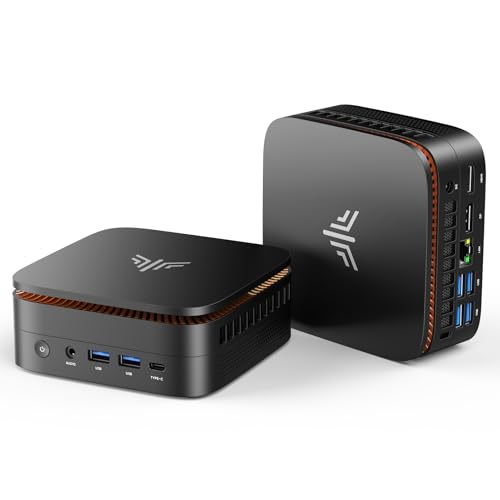
Check price on Amazon →| Processor | AMD Ryzen 7 7730U (8-core / 16-thread, base 2.0GHz, up to 4.50GHz turbo) |
|---|---|
| Graphics | AMD Radeon Graphics, 8 cores, integrated |
| Memory | 16GB LPDDR4X |
| Storage | 1TB M.2 2280 SSD (second M.2 slot supports up to ~4TB total) |
| Display outputs | HDMI, DisplayPort, USB 3.2 Gen2 Type-C; triple 4K@60Hz |
| Networking | 10/100/1000Mbps RJ45 Ethernet, Wi-Fi 6 (tri-band), Bluetooth 5.2 |
| Warranty | 1-year limited warranty |
The KAMRUI E3B is a mini PC built around AMD's Ryzen 7 7730U processor, aimed at buyers who want office-desktop performance and occasional light gaming from one small box. It ships with 16GB of RAM and a 1TB SSD already installed, so a new unit is ready to run Windows without an immediate storage upgrade.
This review covers what the E3B does well, where its limits show up, and how it compares to the other mini PCs selling in the same category right now. Every spec below comes from KAMRUI's own product listing.
What the KAMRUI E3B Is, and Who Should Buy It
The KAMRUI E3B is a small-form-factor desktop that runs full Windows on an 8-core AMD Ryzen 7 7730U rather than a locked-down thin client. Its case is small enough to sit behind a monitor or on a shelf, which suits businesses that want to reclaim desk space without giving up a real desktop-class processor.
It fits companies that need dependable desktops for office software, browser-based tools, video calls, and multitasking across several apps at once. It is a weaker match for sustained 3D rendering, competitive gaming, or local AI inference, since none of those tasks run well on integrated graphics alone.
The small footprint matters more for a growing office than it looks on paper. A unit this size mounts behind a monitor with a VESA bracket or sits flat on a shelf, so a business fitting out a new desk or a shared workstation does not need to plan around a full tower's cable runs and case fans. For companies rotating staff through hot-desking or standardizing several front-desk machines at once, that consistency in size and setup saves real time over sourcing a mix of used towers.
In our engagement with HOA and condo boards across the USA, back-office teams typically run two or three shared desktops that need to handle browser-based management software and video calls without demanding dedicated IT support. That workload profile lines up closely with what a mini PC in this class is built to handle.
- Best for: office desktops, reception and front-desk stations, and hot-desking setups that need more CPU headroom than a Celeron-class mini PC provides
- Also good for: spreadsheet-heavy work, light photo editing, and multitasking across a dozen or more browser tabs
- Skip it if: you need a dedicated GPU for serious gaming, 3D work, or running large AI models locally
Performance: What the Ryzen 7 7730U Handles
The Ryzen 7 7730U is an 8-core, 16-thread mobile processor built on AMD's Zen 3+ architecture, with a 2.0GHz base clock in its power-saving mode and a turbo boost to 4.50GHz once BIOS is switched to performance mode. That core and thread count is unusual at this price point, since many budget mini PCs top out at 4 or 6 cores.
KAMRUI markets the 7730U as roughly 35% faster than the Ryzen 5 7640HS, the Ryzen 5 7430U, and several older Ryzen 7 chips including the 5825U, 5700U, 5600U, 5560U, and 5500U. That figure comes from KAMRUI's own comparison, not an independent benchmark, so treat it as a directional claim rather than a verified number.
Graphics come from the integrated AMD Radeon Graphics engine, listed at 8 cores running at 2000MHz, which drives triple-display output over HDMI, DisplayPort, and USB 3.2 Gen2 Type-C at up to 4K at 60Hz. That covers office multitasking and video playback well, but it remains integrated graphics, so it will not match a discrete GPU on 3D workloads.
Zen 3+ is AMD's refinement of the Zen 3 core design, tuned mainly for lower power draw at the same clock speeds, which is part of why a chip like the 7730U can pack 8 cores into a mobile-class power envelope small enough for a fanless-feeling mini PC case. In day-to-day use, that means the E3B can keep a dozen browser tabs, a video call, and a spreadsheet open at once without the fan spinning up constantly, since the extra cores spread the load instead of pushing two or four cores to their limit.
Storage and Memory: What Grows and What Doesn't
The KAMRUI E3B ships with 16GB of LPDDR4X memory and a 1TB M.2 2280 SSD already installed, and its second M.2 slot pushes total storage headroom to roughly 4TB. The primary slot accepts both SATA and PCIe NVMe drives, while the second slot supports M.2 2280 SATA drives, so a buyer who fills the first 1TB can add a second drive instead of replacing the machine.
The memory side is more limited. LPDDR4X is typically soldered directly to the board rather than installed in a socket, unlike the swappable DDR4 modules some rival mini PCs use, so 16GB should be treated as the effective ceiling on this model rather than a starting point. KAMRUI's listing does not describe a user-accessible RAM slot, so buyers who expect to outgrow 16GB within a year or two should confirm memory options before ordering.
For most office roles, 16GB is still enough headroom. Windows 11 itself uses roughly 3 to 4GB at idle, and a typical workday of a browser, an email client, a video-call app, and an office suite running together comfortably fits inside 16GB without heavy swapping. The ceiling starts to matter for heavier roles: bookkeeping or design staff who keep large spreadsheets, multiple virtual machines, or dense creative files open at once will feel 16GB sooner than a general office user will.
Ports, Networking, and Display Support
The E3B connects to a wired network through 10/100/1000Mbps RJ45 Gigabit Ethernet ports, and KAMRUI's listing separately advertises data transmission speeds up to 2500Mbps, a figure that does not line up with the stated Gigabit port spec. That mismatch is worth confirming with KAMRUI or a retailer before assuming 2.5G throughput, since the port designation and the headline transfer-speed claim disagree in the manufacturer's own description.
Wireless connectivity covers Wi-Fi 6 with tri-band support and Bluetooth 5.2, which should comfortably pair a wireless mouse, keyboard, and headset while keeping latency low on video calls. Combined with triple 4K@60Hz display output, the E3B is built to sit at the center of a multi-monitor desk setup without extra dongles.
Wi-Fi 6 also matters for offices running several of these units on the same network at once. It handles more simultaneous device connections with less slowdown than older Wi-Fi standards, which is the difference between a single mini PC on a home router and a dozen of them running video calls on the same office access point without the connection degrading for everyone.
Where the KAMRUI E3B Falls Short
The E3B's biggest limit is graphics. Its integrated Radeon engine handles office work and video playback fine but is not built for the kind of gaming its own product name implies, and calling this an office gaming mini PC oversells what integrated graphics can do.
- Integrated graphics only, with no discrete GPU for serious gaming, 3D work, or local AI inference
- Fixed LPDDR4X memory that most buyers will not be able to upgrade past 16GB
- A 1-year limited warranty, shorter than the multi-year coverage some competing brands offer
- A budget-focused brand, so resale value and long-term support history trail established PC makers
- A Gigabit Ethernet spec that conflicts with the listing's own 2500Mbps transfer-speed claim
KAMRUI E3B vs the Other Mini PCs in Its Class
Within KAMRUI's own lineup, the E3B's Ryzen 7 7730U is the most powerful chip on offer. The Pinova P1 models run a Ryzen R2544, and the Pinova P2 models run a Ryzen 7330U or 4300U, both of which sit below the 7730U in core count or clock speed, making the E3B the pick within the brand when raw CPU power matters most.
Against the Apple Mac mini with the M4 chip, the comparison is less about raw specs and more about platform. The Mac mini runs Apple's ARM-based macOS ecosystem, while the E3B runs Windows on x86 hardware, so the better pick depends on which software and peripherals a business already standardizes on. For a company already running Windows-only line-of-business software, the E3B keeps that compatibility without the platform switch a Mac mini would require, and it does so at a lower entry cost than Apple's smallest desktop.
Where to buy the KAMRUI E3B Mini PC
A capable Ryzen 7 mini PC for office desktops and heavy multitasking, held back by soldered memory and graphics that cannot live up to its gaming-branded name.
Check price on Amazon →Alternatives worth comparing
If the KAMRUI E3B Mini PC is not the right fit, these are the other mini pcs ranking alongside it right now.


Frequently Asked Questions
- The KAMRUI E3B handles light and older games reasonably well but is not built for demanding modern titles. It relies on integrated AMD Radeon graphics rather than a discrete GPU, so esports titles and older games run better than current AAA releases.
- It uses AMD's Ryzen 7 7730U, an 8-core, 16-thread mobile processor built on the Zen 3+ architecture. It runs at a 2.0GHz base clock in power-saving mode and boosts up to 4.50GHz in performance mode.
- The E3B ships with a 1TB M.2 SSD and can hold roughly 4TB total across its two M.2 slots. The primary slot supports SATA and PCIe NVMe drives, while the second slot supports M.2 2280 SATA drives.
- Probably not. The E3B uses 16GB of LPDDR4X memory, which is typically soldered to the board rather than installed in a swappable slot, so 16GB should be treated as a ceiling rather than a starting point.
- Yes, it supports triple-display output through HDMI, DisplayPort, and USB 3.2 Gen2 Type-C, at up to 4K resolution at 60Hz. That covers most multi-monitor office setups without needing a separate docking station.
- KAMRUI backs the E3B with a 1-year limited warranty starting from the purchase date, plus what the company describes as lifelong technical support. That is shorter than the multi-year warranties some competing mini PC brands offer.
Rolling out mini PCs for your business?
Layer3 Labs helps small and mid-size businesses choose, standardize, and deploy the right AI-ready hardware, and the workflows that run on it.
Book a free consultation