Rocketbook Core Review: Handwriting That Syncs to the Cloud
A reusable spiral notebook that scans your handwriting to the cloud — here's how the Core works day to day, and who it fits.
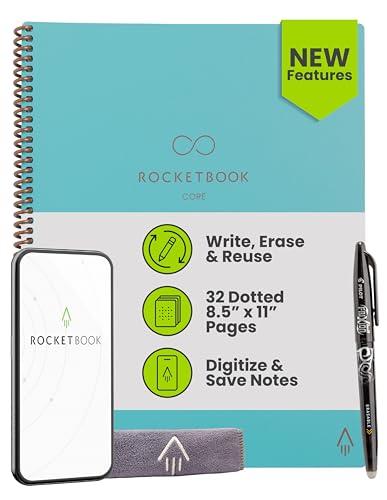
A solid reusable notebook for people who want paper's feel with cloud backup, though the erase-and-rewrite cycle asks for more manual upkeep than a true digital notebook.
Check price on Amazon →| Page size | Letter, 8.5 x 11 inches |
|---|---|
| Color | Teal |
| Paper type | Reusable paper, wipes clean with a damp cloth |
| Included pen | Pilot FriXion pen |
| Page layout | Grid pages with Smart Titles and Smart Tags |
| Cloud destinations | Google Drive, Dropbox, OneNote, and other cloud services via the Rocketbook app |
| Binding and cover | Spiral-bound with a scratch-resistant cover |
The Rocketbook Core Letter Size in Teal is a reusable spiral notebook built for handwriting that ends up in the cloud instead of a drawer. It uses reusable paper you write on with the included Pilot FriXion pen, then scans and files pages with the free Rocketbook app before wiping the page clean and starting over.
This review covers what the Core does well, where its write-scan-erase workflow asks more of you than a true digital notebook, and how it compares to the other notebooks selling alongside it on the Smart Notebooks shelf right now. Every spec below comes from the manufacturer listing.
What the Rocketbook Core Is — and Who It Fits
The Rocketbook Core is a reusable spiral notebook built for people who want to write by hand and still end up with a searchable digital copy of their notes. It pairs premium reusable paper with a companion app, so a page filled in during a meeting can sit in a cloud folder by the time that meeting ends.
This listing is the Letter Size edition, 8.5 x 11 inches, in Teal, with a spiral binding and a scratch-resistant cover. Letter size matches the footprint of a standard notepad, which makes it a straightforward swap for anyone replacing paper notebooks on a desk.
It suits people who take a lot of handwritten notes across meetings, planning sessions, and brainstorms and want those notes backed up without typing them out later. It is a weaker fit for anyone who wants to edit notes digitally after writing them, since editing happens on paper, not on a screen.
- Best for: professionals who prefer writing by hand but need notes searchable and backed up in the cloud
- Also good for: teams standardizing on one notebook format across meetings and 1:1s
- Skip it if: you need real-time digital editing, not a scan-after-the-fact workflow
How the Write, Scan, Erase Cycle Works
The Rocketbook Core runs on a four-step cycle: write, digitize, erase, and rewrite. You write with the included Pilot FriXion pen, whose ink is designed to erase with heat and friction rather than an ink remover, which is what lets a page go blank again later.
Once a page is full, the Rocketbook app scans it and uploads the image to a cloud service you connect, including Google Drive, Dropbox, or OneNote. Scanning captures the page as digitized content, so a note stays available even after the physical page is erased.
After a page has been safely digitized, wiping it with a damp cloth clears it for the next round of notes. That erase step is what turns a single notebook into something closer to an unlimited supply of pages, provided each page is scanned first.
Smart Titles and Smart Tags Keep Scanned Pages Organized
Smart Titles and Smart Tags are how the Rocketbook Core keeps scanned notes from turning into one long, unsorted photo roll. Marking a tag before you scan a page tells the app which cloud folder or destination that page belongs in, so meeting notes and project notes don't end up mixed together.
At Layer3Labs, our own gear-radar routine tracks the Smart Notebooks shelf on Amazon every week, and one pattern shows up again and again: most listings that rank alongside true reusable notebooks are plain paper spiral notebooks with no scan-and-erase feature at all. Smart Titles and Smart Tags are part of what actually separates a notebook built around a digitize-and-reuse workflow from one that only shares the word "notebook" in its listing.
That gap matters for anyone comparing listings by title alone. A notebook labeled reusable without an app or a way to organize scans is only half the product, while the Smart Titles and Smart Tags system is what makes a scanned page findable again months later.
Build, Size, and Portability
The Rocketbook Core's spiral binding and scratch-resistant cover are built to handle being carried around, not just left on a desk. This Letter Size edition measures 8.5 x 11 inches and ships in Teal, alongside a smaller 6 x 8.8-inch Executive size Rocketbook also sells.
Its size is meant to fit into backpacks, purses, or briefcases for people who move between desks, meeting rooms, or job sites. That portability is part of what makes a reusable notebook practical day to day, rather than something left behind on a shelf.
Reusability is also part of the pitch. Writing on the same pages repeatedly, rather than filling and discarding notebook after notebook, is the sustainability angle Rocketbook markets across its lineup.
Rocketbook Core vs the Other Notebooks on the Shelf
Most of the other notebooks selling alongside the Rocketbook Core in Smart Notebooks are plain paper notebooks, not reusable ones. The Oxford six-pack is a set of pastel, college-ruled notebooks; the Dilitego and Gdgdsy notebooks are hardcover, five-subject journals with removable tabs; and the Uebzfocs and Forvencer notebooks are plastic-hardcover or numbered-page journals built for long-form writing.
None of those five give you a way to erase and reuse a page, so once they are full, they are full for good. The one true match on the shelf is another Rocketbook Core listing, sold under a separate Amazon SKU but with the same reusable pages, pen, and app workflow.
Anyone comparing on paper-notebook features alone, such as page count, ruling, or subject dividers, should look at the alternatives below. Anyone who wants the digitize-and-reuse cycle instead of a one-time-use notebook should stay with a Rocketbook.
Where the Rocketbook Core Falls Short
The Rocketbook Core's biggest limitation is that its erase step is permanent once you wipe the page. Skip the scanning step, wipe the page clean, and whatever was written is gone for good, with no undo the way there is in a digital notebook app.
The workflow also assumes a phone or tablet is on hand at the moment a page fills up. Anyone who writes pages faster than they scan them risks building a backlog of pages waiting to be digitized before it is safe to erase them.
Getting real use out of the notebook also means connecting cloud destinations before the first scan. The app needs an account linked to Google Drive, Dropbox, or OneNote to file pages automatically, so that setup happens before the write-erase cycle starts saving any time.
- Erasing is physical, not digital — a page must be scanned before it's wiped, or the notes are lost
- Reusability depends on the FriXion pen family, so replacement pens need to erase the same way to keep the cycle working
- It's a paper notebook with a scanning app, not a touchscreen device — there's no on-page digital editing
Where to buy the Rocketbook Core Reusable Smart Notebook, Letter Size, Teal
A solid reusable notebook for people who want paper's feel with cloud backup, though the erase-and-rewrite cycle asks for more manual upkeep than a true digital notebook.
Check price on Amazon →Alternatives worth comparing
If the Rocketbook Core Reusable Smart Notebook, Letter Size, Teal is not the right fit, these are the other smart notebooks ranking alongside it right now.


Frequently Asked Questions
- Yes, the Rocketbook Core is designed to be written on and erased repeatedly. Its reusable paper wipes clean with a damp cloth once a page has been scanned, so the same notebook can be used again instead of being replaced.
- The Rocketbook Core comes with a Pilot FriXion pen included. FriXion ink is designed to erase with heat and friction, which is what makes the notebook's wipe-clean pages possible.
- You scan each page with the Rocketbook app, which uploads it to a connected cloud service. The app supports destinations like Google Drive, Dropbox, and OneNote, so notes end up backed up and searchable without retyping them.
- Smart Titles and Smart Tags name and file each scanned page automatically. Tagging a page before you scan it tells the app which cloud folder or destination that page should go to, keeping different notes sorted instead of mixed into one long file.
- Wipe the page with a damp cloth after it has been scanned. The Rocketbook Core's paper is built to go blank again this way, ready for a fresh round of notes.
- This listing is the Letter Size edition, 8.5 x 11 inches, in Teal. Rocketbook also sells a smaller Executive size, 6 x 8.8 inches, for a more pocket-friendly notebook.
- Not entirely. The Rocketbook Core replaces the notebook itself with something reusable, but editing still happens on paper, while a digital notebook app lets you revise typed text after the fact.
Turning meeting notes into a real knowledge base?
Layer3 Labs helps small and mid-size businesses design note-capture and knowledge workflows — from handwritten pages to searchable, AI-ready archives.
Book a free consultation